• Wenn Ihr hier einen Thread erstellt, dann erwartet Euch im Beitragformular eine Vorlage mit notwendigen Grundinformationen, durch die Euch die Community schneller helfen kann. Mehr Informationen dazu findet ihr in diesem Thread.

Leise mit Lüfter? und Übertaktungspotential. Was haltet ihr von dem Setup?

AW: Leise mit Lüfter? und Übertaktungspotential. Was haltet ihr von dem Setup?

Das passt schon so. Der grüne pin ist zum Auslesen der Drehzahl gedacht, und da kann nur einer der beiden Lüfter ausgelesen werden. ;-)
 
AW: Leise mit Lüfter? und Übertaktungspotential. Was haltet ihr von dem Setup?

Pros hier ;). Danke

Was meint ihr soll ich den 150er oder den 140er dranhängen?
 
AW: Leise mit Lüfter? und Übertaktungspotential. Was haltet ihr von dem Setup?

Jaja das ist klar. aber ich meine bei welchem der lüfter das drehzahlsignal ausgelesen werden soll
 
AW: Leise mit Lüfter? und Übertaktungspotential. Was haltet ihr von dem Setup?

Achso :D Das ist eigentlich egal. Ich würde vom dem kleineren die Drehzahl auslesen lassen, weil der wahrscheinlich schneller dreht, und somit lauter ist.

Bzw. steht dazu nix in der Bedienungsanleitung des Kühlers?
 
AW: Leise mit Lüfter? und Übertaktungspotential. Was haltet ihr von dem Setup?

Danke
Stimmt der kleinere ist sicher schneller und lauter. In der Installationsanleitung steht nichts.

Eine Frage hätt ich noch. Das Asrock hat ja das xFastUSB/LAN/RAM.
Die sehen ja sehr vielversprechend aus. zb extend ssd/ hdd lifespan - reduce the frequency of accessing your ssds or hdds lifespan und ein paar weitere.

Was haltet ihr davon?
 
AW: Leise mit Lüfter? und Übertaktungspotential. Was haltet ihr von dem Setup?

Diese ganzen Utilities würde ich weglassen. Das ist nur Marketing-Blödsinn, jeder Mainboard Hersteller wirbt mit anderen "unique" Features, die nix bringen. Außer dass der Rechner ggf. weniger stabil läuft :ugly:
 
AW: Leise mit Lüfter? und Übertaktungspotential. Was haltet ihr von dem Setup?

Eine Frage hätt ich noch. Das Asrock hat ja das xFastUSB/LAN/RAM.
Die sehen ja sehr vielversprechend aus. zb extend ssd/ hdd lifespan - reduce the frequency of accessing your ssds or hdds lifespan und ein paar weitere.

Was haltet ihr davon?

Klingt ganz toll. Muss ich unbedingt haben. Ich laufe sofort los. :D :ugly:
 
AW: Leise mit Lüfter? und Übertaktungspotential. Was haltet ihr von dem Setup?

naja das ram utility soll ja wirklich was bringen sowie das usb ding. das lan utility, da steckt die software cfos dahinter.
eigentlich das selbe wie das: http://memory.dataram.com/products-and-services/software/ramdisk
ist aber sicher kein schlechter plan wenn man die zugriffe auf die ssd minimiert :daumen:

From what I know, Xfast RAM is a RAM disk on steroid. So it's aimed at anyone who needs a RAM disk, 32bit or 64bit OS. The extra features of this utility (as per version 2.09) are:

1- Can indeed map and make available RAM beyond the 4GB limitation of a 32bit OS, but confined to the RAM disk only. So if you have a 32bit OS with 8GB of RAM, the OS will only "see" 4GB, but Xfast RAM can create a 4GB RAM disk with the unused RAM left.

2- Can emulate a "ready boost" partition mapped to the RAM disk to accelerate your magnetic hard disk drive, just like an SSD would do. If you already have an SSD boot drive or a small SSD acting as a ready boost drive, this option is useless to you.

3- Option to automatically move your memory pagefile to the RAM disk. 1 click in the Xfast RAM interface, reboot and you are done. No messing around with windows config.

4- Option to move temp and cache of Internet explorer and Firefox to the RAM disk. Again, 1 click in Xfast RAM interface, reboot and you are done. No messing with windows config.

5- Option to move both (and independently if you like) the system temporary files and/or the user temporary files to the RAM disk. 1 click in the ... you know the drill.

You can assign any free drive letter you want to the RAM disk. You can choose the size of the RAM disk. Apparently, it csn support RAM disk size of 8GB for 64bit OS and 32GB for 32bit OS. I benchmarked the RAM disk with Diskmark and got 9800MB/s sequential read with a i5-2500K OC to 4.7Ghz and 8Gb of RAM @ 1866 10-9-9-28 1T (ASRock Extrem4 GEN3). Got very similar result from another Ram disk utility. Xfast RAM is the most versatile RAM disk utility I've ever tried.

NOTE: Beside the obvious gain in speed, this utility is highly recommend to SSD users to limit / reduce write operations that will degrade your SSD.

NOTE2: With 8GB of RAM in my PC, I've created a 1GB RAM disk and it's more than enough for the vast majority of scenarios. I've only encountered limitation with archiving utilities such as Winrar and 7zip. Both app have the option to specify the temp folder of your choice if you need to create archives larger than the maximum capacity of your RAM disk.
 
Zuletzt bearbeitet:
AW: Leise mit Lüfter? und Übertaktungspotential. Was haltet ihr von dem Setup?

So alles funktioniert Prima. Fotos folgen bald mal.

ICh wollte einen internet flash durchführen - internetverbindung wird initialisiert dann wird mir gesagt das ein 1.2 update vorhanden ist und dann wenn ich auf yes drücke dann steht internet connection error :(.
Weil ich ja momentan mit der igpu spiele wie kann ich da die igpu memory erhöhen? so wie in diesem video
Danke
 
Zuletzt bearbeitet:
AW: Leise mit Lüfter? und Übertaktungspotential. Was haltet ihr von dem Setup?

Ja, Du kannst die IGP übertakten, aber ob das viel bringt: :ka:

Die Garantie ist dann jedenfalls futsch :ugly:
 
AW: Leise mit Lüfter? und Übertaktungspotential. Was haltet ihr von dem Setup?

Nein ich will sie nicht übertakten die option hab ich eh gesehen das das arock mb da bis zu 1600mhz anbietet. Ich will nur den ram umstellen wie in dem viedeo ganz am anfang zu sehen.

Woran kann es liegen das ich den internet flash nicht durchführen kann?
 
AW: Leise mit Lüfter? und Übertaktungspotential. Was haltet ihr von dem Setup?

Was willst Du flashen? Das BIOS? Dann musst Du es von der Herstellerhomepage runterladen.

Welchen RAM hast Du genau? Und welches Board, das Asrock Z77 Pro3?
 
AW: Leise mit Lüfter? und Übertaktungspotential. Was haltet ihr von dem Setup?

Ja ich denke mal das es bei diesem flash um das bios geht. Und dies soll ja übers internet gehen. Zeigt mir auch an das ich die version 1.2 installieren kann. Aber werds wohl vom stick aus machen müssen.

hab corsair vengeance 1600 lp cl9. wenn ich auf auto lasse dann erkennt das mainboard diese als 1333. wenn ich dann auf 1666 schalte dann steht sie w1666er sind. ?
Die igpu hat standard 256mb ram zugewiesen. da kann man wie in dem video bis zu 1gb zuweisen. nur finde ich die option in dem uefi von asrock nicht.

thx
 
Zuletzt bearbeitet:
AW: Leise mit Lüfter? und Übertaktungspotential. Was haltet ihr von dem Setup?

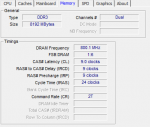
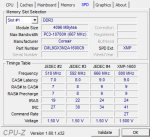
Wenn Du den RAM auf 1600MHz umstellst, kannst Du hier mal CPU-Z Screenshots (Reiter Memory und SPD) posten. Dann können wir mal schauen, ob der RAM richtig eingestellt ist.
 
AW: Leise mit Lüfter? und Übertaktungspotential. Was haltet ihr von dem Setup?

Hier mal die Screenshots.
 

Anhänge

  • Unbenannt.PNG
    Unbenannt.PNG
    15,2 KB · Aufrufe: 41
  • Unbenannt2.PNG
    Unbenannt2.PNG
    20,4 KB · Aufrufe: 48
AW: Leise mit Lüfter? und Übertaktungspotential. Was haltet ihr von dem Setup?

Passt :daumen: Frequenz und Latenzen sind korrekt eingestellt.
 
AW: Leise mit Lüfter? und Übertaktungspotential. Was haltet ihr von dem Setup?

supi :). hast du vielleicht eine idee wo ich das 1.2er update herbekommen kann weil ich finde es auf der asrock seite nicht.
 
AW: Leise mit Lüfter? und Übertaktungspotential. Was haltet ihr von dem Setup?

Hier gibt es das BIOS zum downloaden: ASRock > Products > Motherboard Series Dann auf Dein Board klicken, dann Download und dan BIOS.

Ein BIOS Update ist normalerweise aber nur erforderlich, wenn Probleme auftreten.
 
Zurück