Evga Geforce GTX 980 Ti Classified: 850-Euro-Grafikkarte im Testlabor

MeinE 2 Lösungswege unter Windows 7 Pro:
《BITTE INFORMIERT EUCH OB ES AUCH MIT EURER WINDOWS VERSION FUNKTIONIERT! 》
Unter Win-DOS müßte es auch mit anderen Windows Versionen funktionieren, kann ich allerdings noch nicht bestätigen. Vielleicht könnt ihr das dann posten ☺

GPU-Z muß ich nicht erklären, Bios.rom erstellen

1. MBT-Nvflash Version 5.218 herunterladen,
mbt.nvflash

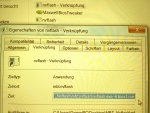
2.Für diese Nvflash eine Verknüpfung im gleichen Verzeichnis in dem alle Dateien sind, erstellen .

3.In der Verknüpfung flashen " C:\Pfad Nvflash.....\
und anhängen \ nvflash -6 Bios.rom
"Übernehmen u OK."
(Siehe Bild
Verknüpfung mit Eintrag nvflash - 6 Bios.rom. Ok und dann anklicken um zu flashen.
20150826_101354.jpg

oder

Funktionert immer:

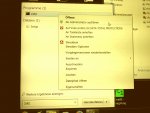
4.Unten links Win Start-Button anklicken und in das leere Feld CMD eingeben jetzt etwas höher auf das schwarze Dos- Icon 1x klicken, rechte Maustaste und als Administrator öffnen.
Dos-Fenster öffnet sich und hier, 1x cd.. , Taste Enter, nochmal cd.. (die 2 Punkte sind auch wichtig ),Enter eingeben um den Pfad zu löschen.
Nun müsste da C:\ stehen,
jetzt die Eingabe: CD u Leerzeichen
( Siehe auch unter Punkt 6 das Bild,obere 2 Zeilen )
20150826_101158.jpg


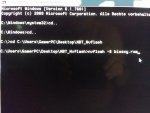
5.Den oberen Link, Blau unterlegt,makieren, anklicken und kopieren. Diesen kopierten Link in das Dos-Fenster hinter C:\cd
⬇" einfügen und Enter drücken ".
20150826_101300.jpg


6.Ihr müsst jetzt nur noch an den Pfad eingeben
nvflash -6 Bios.rom
20150826_063529.jpg
(Bios.Rom steht natürlich für eure Bios Datei !)

Taste " Y " als Bestätigung drücken und das bios wird geschrieben.
Tipp☺
Ihr braucht übrigens nicht den Treiber/Grafikkarte im Geräte-Manger deaktivieren, das geschieht von selbst.
(Schwarzer Bildschirm für ein paar Sekunden )

PC neu starten und das war alles.
"Lets Bench" :daumen:

Für die Fotos, deren Qualität muß ich mich entschuldigen, heute Morgen auf dem Weg zur Arbeit mit dem Smartphone gemacht.

@Sorry an PCGH das ich euren Thread hier mißbraucht habe ;) aber hatte hier schon begonnen da ich vermutete es liegt an der Classified.
@Vieleicht könnt ihr die 3 Posts in einen anderen Thread kopieren wenn ihr wollt und es jemanden interessiert ?

Edit 29.08.15
SCHON GEWUßT ?

https://xdevs.com/guide/maxwell_big_oc/


MfG.wolflux
 
Zuletzt bearbeitet:

Ich lese da nur Kingpin. Bis hin zum Bios.

Jep, etwas Geduld musste haben, alles eine Frage der Zeit, die Classified ist ja noch nagelneu ;)
Die Möglichkeiten werden, wenn es hoffentlich bald kommt,( das Modbios/offene Spannung )? über ein Modbios kommen.
Aber 100% weiß das keiner, da im Prinzip die Karten identisch sind bis auf einen 6 Pin Powerstecker.
MfG.wolflux smiley7103.gif
 
Zuletzt bearbeitet:
Das meinte ich. Sorry für Doppel Posting

Ich verstehe deine Frage nicht ☺
Soll ich dir das alles übersetzen?

MfG.wolflux

Ich habe übrigens ein Bios umgeschrieben mit dem ich direckt auf 1506 MHZ booste. Da es mittlerweile überall Hinweise gibt wie das funktioniert, fange ich mit den Experimentieren an. Leider sind noch nicht alle Schalter dokumentiert.
Ich habe ein Bios mit 100%Pt. bei 250 Watt, also entspricht dem einer Referenz-980 Ti . Interessant ist hierbei, dass die Karte, zuerst unter Full Hd und Ultra Qualität immer um 1500MHz bleibt, je höher die Auflösungen mit der Qualitätstufe umso mehr Watt möchte die Karte, logisch!
Kurz gesagt, bei 4 K 4096x 2200 (1400MHz=250 Watt ) verlangt die Karte gute 100- 140Watt mehr um bei 1500MHz Boost zu bleiben. Und selbst da toggelt sie noch unter 1506 MHz. je nach Scene.
Erstaunlich genügsam für 4k u Ultra ( FarCry4 ) bei 1400MHz.
klasse Karte, muss ich bemerken.
Die PCGH hat jetzt auch unter dem Spiel festgestellt, daß es höchste Anforderungen an die Hardware stellt. Ausgabe 10/2015.
Gruss
 
Zuletzt bearbeitet:
Ne nur den Kern der Sache

Nö, die halbe Stunde musst du schon selber investieren. So faul kann Mann nicht sein, oder?
Es sind aber auch Bilder dabei ☺

Maxwell overclocking guidelines
Overclocking VGA’s today is made easy through a design like EVGA 980 Ti KINGPIN or other similar custom card. The voltage regulation components on the card and overall design/layout are much more capable than reference designs. There are also many different software tools available for adjusting voltages, fan limits, and clock speeds. Anyone can do it with a little basic knowledge of some key terms and practice. First, let’s talk about some of the major components of NVIDIA VGA overclocking software controls. Then some basic terminology/behavior of what’s going on with the GPU when you use those tools to overclock and overvolt the graphics card.

Power target and OC settings
This is main item limiting performance usually, as every NVIDIA card since the Kepler era has a power limit and circuitry on the PCB to measure input power. This control does not give you any amps or Watts value, but instead provides a percentage over design specification (which varies depending on card SKU/vendor!).

980 Ti KP has three different BIOS modes, which all have different maximum power targets keeping nominal power spec the same. If you want maximum OC headroom on air/water, you can just max this setting out and it will be enough.

Next up are the usual controls we use in EVGA Precision X for adjusting everything on the card in windows:

GPU Clock offset – This is GPU core clock adjustment setting.
MEM Clock offset – This is memory clock adjustment setting.
Voltage – for increasing the power to the core (1.212V limit in Precision X) or use classified voltage controller/EVBot for higher.
Fan speed – Always max these when pushing the card on air
KBoost – This is critical for getting the best scores when pushing the limits. It forces the driver to P0 state on a SW level and can prevent the card from sticking low at 2D clocks in between game tests while running benches. This can hurt the overall FPS in a benchmark a lot, and usually results in slightly lower score. On LN2, its most necessary.
Always use K-boost when doing any kind of benching!

Also if you benching with VGA cable (some cards might have no display issue on digital interfaces, such as DVI, HDMI, DP when running very low temperatures), you will need use secret menu in EVGA Precision X to make KBoost working. To access secret menu open Precision X, press Ctrl+Shift+Middle wheel on mouse and extra window with experimental features will pop up.


Disable voltage control – this feature prevent Precision X to control any voltage settings.
Turn off KBOOST limitation – this feature allow you to still enable KBoost even if using VGA output (normally it’s disabled, due rare compatibility issues)
Enabling real voltage monitor
There is one more trick, regarding voltage readout in Precision X and K|NGP|N Edition cards (both 980 and 980Ti flavours). As you all already know, software is unable to show real voltage supplied to GPU, it shows what GPU VID setting currently is, not actual voltage. Most of users are not aware of this detail, and expect to see real voltage. That’s why we often get confused people in forums, who see LN2 records with 2000MHz clocks and asking how is that possible with only 1.212V?

Well, KPE cards have a solution for this, as Precision X can actually read real voltage. KPE PCB have special circuitry to measure real voltage delivered to GPU chip and Precision X can get that reading. This is not default enabled feature, so to enable real GPU voltage monitoring, follow few simple steps before you start your session:
⬇⬇⬇⬇⬇⬇⬇⬇⬇⬇⬇⬇⬇⬇⬇⬇⬇
Download latest Precision X, at moment of writing it was 5.3.6
Set both OVERVOLTAGE and OVERBOOST mode in Voltage section top right. No need change voltages.
Now VOLTAGE in center section will read actual voltage delivered by hardware.
You can disable voltage control via secret menu after, reading still will work.
Screenshot below shows example usage with 1.400V set. GPU Voltage is reported correctly in hardware monitor graph, log and OSD as well, which can be handy to monitor voltage droop/change during benchmark sessions. And after you found sweet spot for voltage, disable OSD and run for records (OSD have little performance hit when running, so you want it OFF when benching for records).

Alles eine Frage der Zeit,ob es dann such mit der Classified funktioniert, wie schon oben geschrieben!Im Moment klappt das nur angeblich mit der Kingpin .
. ⬇⬇⬇⬇⬇
KBoost nicht vergessen zu aktivieren.

There is no limit on reading, so even 1.8V will be reported correctly. Again, this works only for EVGA GeForce GTX 980 KPE and EVGA GeForce GTX 980Ti KPE cards.

Du kannst es ja dennoch testen, Möglichkeit das es funktioniert besteht immer.
Aber unabhängig davon kannst du Stock3 Volt unter Wasserkühlung geben und 1.4 Volt ist mein Ziel zum Benchen nartürlich nur.

Mein Wunsch ist ein mod. Bios das die Spannung eingetragen hat. Traum......
Den obengannten EVBOT um noch höhere Spannungen drauf zu geben ist eigentlich nicht notwendig, ausserdem braucht der EVBOT zuerst ein Update und die richtige Software aufgesetzt.
Aber 90.00 Euro sind kein Vermögen. Hm

Gruss
wolflux


Hat jemand für die Classified 980 Ti ein custom Bios mit Voltmod gefunden?

Gruss
 
Zuletzt bearbeitet:
90€ für den EVbot ist nicht viel aber den erst einmal zu bekommen das ist hier die Herausforderung.Update ist beim EVbot schnell,unter win 7 , gemacht geht fast von alleine.aber es geht mit dem EVbot alles einfach besser und leichter.

[Uncork] EVGA GeForce GTX 980 Ti K|NGP|N : Full OC Guide - kingpincooling.com
EVBOT way

For lucky people who still have EVBOT controller, there is I57 EVBOT Firmware for EVGA GeForce GTX 980 Ti KPE.
You can update your BOT with EVBOT Flash tool supporting Kepler & Maxwell GPU.


die Anleitung ist gut hast du auch was wo mann auch das power target umstellt/anhebt?
 
Zuletzt bearbeitet:
90€ für den EVbot ist nicht viel aber den erst einmal zu bekommen das ist hier die Herausforderung.Update ist beim EVbot schnell,unter win 7 , gemacht geht fast von alleine.aber es geht mit dem EVbot alles einfach besser und leichter.

[Uncork] EVGA GeForce GTX 980 Ti K|NGP|N : Full OC Guide - kingpincooling.com
EVBOT way

For lucky people who still have EVBOT controller, there is I57 EVBOT Firmware for EVGA GeForce GTX 980 Ti KPE.
You can update your BOT with EVBOT Flash tool supporting Kepler & Maxwell GPU.


die Anleitung ist gut hast du auch was wo mann auch das power target umstellt/anhebt?

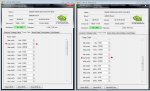
Das kannst du einfach von Hand eintragen
PT1_PT2.JPG

Das ist jetzt mein Classified Bios in dem 260 Watt Pt. genügend sind für 1506 MHz.
Habe gerade mein neues Bios fertiggestellt ☺

Auf Bild 2 sind die 425 Watt das Powertarget das du unter Windows hochziehst.

Ich persönlich gehe allerdings anders vor beim erstellen des mod Bios wie PCGH oder andere Modder.
Ich glaube es müßte mal jemand einen Thread eröffnen, indem alles erklärt wird, gerade für Anfänger die noch nichts damit zu tun hatten, aber auch für Kenner.
;)
Gruss
------------------------------------------
Edit: Habe ich jetzt gemacht unter Overclocking Grafikkarten

Gruss
 
Zuletzt bearbeitet:
Zurück