
Du verwendest einen veralteten Browser. Es ist möglich, dass diese oder andere Websites nicht korrekt angezeigt werden.
Du solltest ein Upgrade durchführen oder einen alternativen Browser verwenden.
Du solltest ein Upgrade durchführen oder einen alternativen Browser verwenden.
GTX 1080/1070/1060/1050/1050Ti Laberthread (Pascal)
- Ersteller chischko
- Erstellt am

Chinaquads
F@H-Team-Member (m/w)
AW: GTX 1080/1070 Laberthread (Pascal)
Hier für euch Founders Edition Besitzer das SC Bios und die erforderliche NVFLASH Version der EVGA GTX 1070 mit 170 Watt PT
NV Flash Version ist auch enthalten.
Erstellt bitte ein Backup von eurem Bios!!
* Für Fehler bei der Durchführung und Richtigkeit des gestellten Bios wird nicht gehaftet !! Bei meiner GTX 1070 ACX 3.0 hat es funktioniert*
der Befehl fürs flashen im CMD ( ausgeführt als Admin ) lautet:
"nvflash -6 1070sc.rom"
Cool thx Mache ich nachher mal
Gesendet von meinem LG-D855 mit Tapatalk
Hier für euch Founders Edition Besitzer das SC Bios und die erforderliche NVFLASH Version der EVGA GTX 1070 mit 170 Watt PT
NV Flash Version ist auch enthalten.
Erstellt bitte ein Backup von eurem Bios!!
* Für Fehler bei der Durchführung und Richtigkeit des gestellten Bios wird nicht gehaftet !! Bei meiner GTX 1070 ACX 3.0 hat es funktioniert*
der Befehl fürs flashen im CMD ( ausgeführt als Admin ) lautet:
"nvflash -6 1070sc.rom"
Anhänge
Zuletzt bearbeitet:

Chinaquads
F@H-Team-Member (m/w)
AW: GTX 1080/1070 Laberthread (Pascal)
Aktuell kein sc bios drin. Ich musste es mir auch über umwege besorgen
Aktuell kein sc bios drin. Ich musste es mir auch über umwege besorgen
.gif "sm_=) =)")
Chinaquads
F@H-Team-Member (m/w)
AW: GTX 1080/1070 Laberthread (Pascal)
Gefixxt, hab mich vertan. Anleitungen gibts genug im netz
Gefixxt, hab mich vertan. Anleitungen gibts genug im netz

Shooot3r
Software-Overclocker(in)
AW: GTX 1080/1070 Laberthread (Pascal)
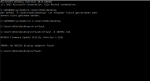
beim flashen findet der keine nvidia karte. habe mal ein bild angehängt, vielleicht kann da ja jemand einen fehler entdecken.
ok es hat geklappt, allerdings geht das pt trotzdem nur bis 112 prozent. so wie vorher auch.
edit: also ich habe mal getestet. ich glaube der basis takt ist nun etwas höher, da ich nur noch +160 eigeben kann, vorher waren es ++250. dafür taktet sie nun höher, muss ich aber mal testen wie es läuft
sollte ich lieber mit evga precision x oder mit dem ab takten?
beim flashen findet der keine nvidia karte. habe mal ein bild angehängt, vielleicht kann da ja jemand einen fehler entdecken.
ok es hat geklappt, allerdings geht das pt trotzdem nur bis 112 prozent. so wie vorher auch.
edit: also ich habe mal getestet. ich glaube der basis takt ist nun etwas höher, da ich nur noch +160 eigeben kann, vorher waren es ++250. dafür taktet sie nun höher, muss ich aber mal testen wie es läuft
sollte ich lieber mit evga precision x oder mit dem ab takten?
Anhänge
Zuletzt bearbeitet:
Chinaquads
F@H-Team-Member (m/w)
AW: GTX 1080/1070 Laberthread (Pascal)
Weißt du überhaupt was du machst ?
Das PT liegt jetzt bei 170 Watt / 100%
Per GPU-Z solltest du auch sehen, das du einen höheren Grundtakt / Boost hast
Dann ist es doch logisch, das du nicht mehr so hoch übertakten kannst.
Hast du dir nen Backup von deinem Bios angelegt ?
Wichtig bei ner RMA, das Original Bios wieder aufspielen, sonst kann es passieren, das sie dir die Garantie verweigern.
Weißt du überhaupt was du machst ?
Das PT liegt jetzt bei 170 Watt / 100%
Per GPU-Z solltest du auch sehen, das du einen höheren Grundtakt / Boost hast
Dann ist es doch logisch, das du nicht mehr so hoch übertakten kannst.
Hast du dir nen Backup von deinem Bios angelegt ?
Wichtig bei ner RMA, das Original Bios wieder aufspielen, sonst kann es passieren, das sie dir die Garantie verweigern.
Shooot3r
Software-Overclocker(in)
AW: GTX 1080/1070 Laberthread (Pascal)
Dann kann die Karte bei 112%ja an die 190 Watt ziehen
die karte wird unter last direkt mal 6 grad wärmer, taktet aber auch fast durchgehne mit 2100 mhz. bei +60mv. wird zeit das die eiwolf mal auf den markt kommt. 75 grad bei 80-95% kann man dann doch aus dem gehäuse hören.
Gesendet von meinem LG-D855 mit Tapatalk
Dann kann die Karte bei 112%ja an die 190 Watt ziehen
die karte wird unter last direkt mal 6 grad wärmer, taktet aber auch fast durchgehne mit 2100 mhz. bei +60mv. wird zeit das die eiwolf mal auf den markt kommt. 75 grad bei 80-95% kann man dann doch aus dem gehäuse hören.
Gesendet von meinem LG-D855 mit Tapatalk
Zuletzt bearbeitet:

RawMangoJuli
Lötkolbengott/-göttin
AW: GTX 1080/1070 Laberthread (Pascal)
sooo ich hab jetzt mal n bisschen mit Undervolt rumgespielt
und meine 1070 verbraucht mit 1700MHz@0,8V nur ca. 100W (Stock 170W) max 47°C @ 35% LüfterPWM xD
bei Witcher 3 1080p (fast) Ultra fallen die FpS gerade einmal um 10% im Vergleich zum Stock Takt
was allerdings komisch ist, wenn ich 1800 MHz@0,8V laufen lasse, dann habe ich weniger FpS als mit 1700MHz
kann mir jemand sagen, woran das liegt?
sooo ich hab jetzt mal n bisschen mit Undervolt rumgespielt
und meine 1070 verbraucht mit 1700MHz@0,8V nur ca. 100W
(Stock 170W) max 47°C @ 35% LüfterPWM xDbei Witcher 3 1080p (fast) Ultra fallen die FpS gerade einmal um 10% im Vergleich zum Stock Takt
was allerdings komisch ist, wenn ich 1800 MHz@0,8V laufen lasse, dann habe ich weniger FpS als mit 1700MHz
kann mir jemand sagen, woran das liegt?

RawMangoJuli
Lötkolbengott/-göttin
AW: GTX 1080/1070 Laberthread (Pascal)
PT is weiterhin auf 100%
was is wv?
PT is weiterhin auf 100%
was is wv?

majinvegeta20
Lötkolbengott/-göttin
AW: GTX 1080/1070 Laberthread (Pascal)
Zum Glück hab ich weniger das Problem mit einem Power Limit. Davon hab ich mehr als genug zur Verfügung.
Aber wunderbar das es für alle anderen eine Notlösung gibt.
Wieviel dürft ihr denn nu max ziehen?
Ca. 200 Watt inkl. PT OC?
Kann man die Spannung auch ohne Mod Bios nach unten setzen? Krieg sie nur hoch im Tool.
Zum Glück hab ich weniger das Problem mit einem Power Limit. Davon hab ich mehr als genug zur Verfügung.
Aber wunderbar das es für alle anderen eine Notlösung gibt.
Wieviel dürft ihr denn nu max ziehen?
Ca. 200 Watt inkl. PT OC?
Kann man die Spannung auch ohne Mod Bios nach unten setzen? Krieg sie nur hoch im Tool.
RawMangoJuli
Lötkolbengott/-göttin
AW: GTX 1080/1070 Laberthread (Pascal)
das geht mit dem tollem neuen Feature vom Afterburner
"Added voltage/frequency curve customization support. You may use traditional core clock slider on NVIDIA GeForce GTX 1070 and 1080 graphics cards to apply fixed offset to all voltage/frequency curve points as well as use brand new flexible voltage/frequency curve editor window for more precise per-point curve adjustment. The editor window can be activated with <Ctrl> + <F> keyboard shortcut and it provides you the following features:
You may independently adjust clock frequency offset for each point with mouse cursor or <Up> / <Down> keys
You may hold <Ctrl> key to set anchor and fix clock frequency offset in minimum/maximum voltage point and adjust the offset of any other point with mouse to linearly interpolate the offsets between the anchor and adjustment points
You may hold <Shift> key while adjusting the offset of any point with mouse to apply the same fixed offset to all points. That’s equal to adjusting the offset with the slider in main application window
You may press <Ctrl> + <D> to reset offsets for all points
You may switch between traditional core clock control slider in the main window and voltage/frequency curve editor window to see how they affect each other in realtime
You may press <L> after selecting any point on the curve with mouse cursor to disable GPU dynamic voltage/frequency adjustment and lock the voltage and core clock frequency to a state defined by the target point. This feature allows you to test graphics card stability independently for each voltage/frequency point of the curve using real 3D applications or any stress test of your choice. In addition to stability testing usage scenario, MSI Afterburner allows you to save a curve with locked point setting to a profile, so you may easily switch between dynamic voltage/frequency management and fixed voltage/frequency settings in realtime (e.g. to achieve the maximum performance during benchmarking). Please take a note that fixed voltage and frequency settings do not allow you to disable power and thermal throttling"
MSI Afterburner 4.3.0 Beta 4 Download
vor allem das Letztere mit dem press L is super
da kann man zu einer ausgewählten Spannung eine Frequenz bestimmen
gerade mal OC getestet
stabile 2100MHz @ 1,0V in Witcher 3 UHD
und dabei wird das 170W PT nur zu 99% ausgefahren (114% wären möglich gewesen)
sehr geil (GPU lief auf ca. 55°C)
Edit: das Problem mit dem 1800MHz@0,8V trat jetzt nicht mehr auf ... ka woran das lag
Kann man die Spannung auch ohne Mod Bios nach unten setzen? Krieg sie nur hoch im Tool.
das geht mit dem tollem neuen Feature vom Afterburner
"Added voltage/frequency curve customization support. You may use traditional core clock slider on NVIDIA GeForce GTX 1070 and 1080 graphics cards to apply fixed offset to all voltage/frequency curve points as well as use brand new flexible voltage/frequency curve editor window for more precise per-point curve adjustment. The editor window can be activated with <Ctrl> + <F> keyboard shortcut and it provides you the following features:
You may independently adjust clock frequency offset for each point with mouse cursor or <Up> / <Down> keys
You may hold <Ctrl> key to set anchor and fix clock frequency offset in minimum/maximum voltage point and adjust the offset of any other point with mouse to linearly interpolate the offsets between the anchor and adjustment points
You may hold <Shift> key while adjusting the offset of any point with mouse to apply the same fixed offset to all points. That’s equal to adjusting the offset with the slider in main application window
You may press <Ctrl> + <D> to reset offsets for all points
You may switch between traditional core clock control slider in the main window and voltage/frequency curve editor window to see how they affect each other in realtime
You may press <L> after selecting any point on the curve with mouse cursor to disable GPU dynamic voltage/frequency adjustment and lock the voltage and core clock frequency to a state defined by the target point. This feature allows you to test graphics card stability independently for each voltage/frequency point of the curve using real 3D applications or any stress test of your choice. In addition to stability testing usage scenario, MSI Afterburner allows you to save a curve with locked point setting to a profile, so you may easily switch between dynamic voltage/frequency management and fixed voltage/frequency settings in realtime (e.g. to achieve the maximum performance during benchmarking). Please take a note that fixed voltage and frequency settings do not allow you to disable power and thermal throttling"
MSI Afterburner 4.3.0 Beta 4 Download
vor allem das Letztere mit dem press L is super
da kann man zu einer ausgewählten Spannung eine Frequenz bestimmen
gerade mal OC getestet
stabile 2100MHz @ 1,0V in Witcher 3 UHD
und dabei wird das 170W PT nur zu 99% ausgefahren (114% wären möglich gewesen)
sehr geil
(GPU lief auf ca. 55°C)Edit: das Problem mit dem 1800MHz@0,8V trat jetzt nicht mehr auf ... ka woran das lag
AW: GTX 1080/1070 Laberthread (Pascal)
Hallo zusammen,
ist das normal, dass ich bei Witcher 3 in WQHD mit meiner 1070 teilweise bis in den 40er Framebereich runterrutsche (Stichwort Novigrad) ? Oder liegt da was im Argen ? AA und Hairworks sind aus! CPU ist i5-4690 und 8 Gb Ram sind drin!
LG
Hallo zusammen,
ist das normal, dass ich bei Witcher 3 in WQHD mit meiner 1070 teilweise bis in den 40er Framebereich runterrutsche (Stichwort Novigrad) ? Oder liegt da was im Argen ? AA und Hairworks sind aus! CPU ist i5-4690 und 8 Gb Ram sind drin!
LG
Zuletzt bearbeitet:
Ähnliche Themen

- Antworten
- 31
- Aufrufe
- 1K


- Antworten
- 88
- Aufrufe
- 3K

- Antworten
- 60
- Aufrufe
- 5K


- Antworten
- 1
- Aufrufe
- 1K