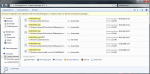
Wieeee, ich will nicht mehr mitmachen?!?


Ich hatte ja schon erwähnt, dass man der GPU per Registry die eine oder andere Sekunde mehr Zeit verschaffen kann. Meistens genügt es die vordefinierten 2 Sekunden von MS auf 3 bzw 4 zu erhöhen.
Hier mal mein HowTo:
Timeout Detection and Recovery
Windows Vista attempts to detect these problematic hang situations and recover a responsive desktop dynamically. In this process, the Windows Display Driver Model (WDDM) driver is reinitialized and the GPU is reset. No reboot is necessary, which greatly enhances the user experience. The only visible artifact from the hang detection to the recovery is a screen flicker, which results from resetting some portions of the graphics stack, causing a screen redraw. Some older Microsoft DirectX applications may render to a black screen at the end of this recovery. The end user would have to restart these applications.
The following is a brief overview of the TDR process:
1.
Timeout detection: The Video Scheduler component of the Windows Vista graphics stack detects that the GPU is taking more than the permitted quantum time to execute the particular task and tries to preempt this particular task. The preempt operation has a "wait" timeout—the actual "TDR timeout." This step is thus the "timeout detection" phase of the process.
The default timeout period in Windows Vista is 2 seconds. If the GPU cannot complete or preempt the current task within the TDR timeout, then the GPU is diagnosed as hung.
2.
Preparation for recovery: The operating system informs the WDDM driver that a timeout has been detected and it must reset the GPU. The driver is told to stop accessing memory and should not access hardware after this time. The operating system and the WDDM driver collect hardware and other state information that could be useful for post-mortem diagnosis.
3.
Desktop recovery: The operating system resets the appropriate state of the graphics stack. The Video Memory Manager component of the graphics stack purges all allocations from video memory. The WDDM driver resets the GPU hardware state. The graphics stack takes the final actions and restores the desktop to the responsive state. As mentioned earlier, some older DirectX applications may now render just black, and the user may be required to restart these applications. Well-written DirectX 9Ex and DirectX 10 applications that handle "Device Remove" continue to work correctly. The application must release and then recreate its Microsoft Direct3D device and all of its objects. DirectX application programmers can find more information in the Windows SDK.
Microsoft wollte mit diesem tollen Feature die Grafikhardware besonders schützen und hat eben dies ominöse Windows Display Driver Modell inkl. TDR mit dem SP1 für Vista und alle folgenden Betriebssysteme eingeführt. Nur scheint dabei die festgelegte Zeit bis zum Reset der GPU mit 2 Sekunden mitunter zu kurz zu sein.
Was kann man gegen einen Bluescreen oder voreiligen GPU-Reset tun? Dazu bietet MS eine kleine Hilfestellung in Form von Registeryeinträgen die nachfolgend behandelt werden.
The following registry keys are documented for testing purposes only.
These registry keys should not be manipulated by any applications outside targeted testing or debugging.
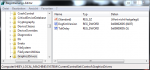
Alle Werte bis auf dem Fett hervorgehobenen TdrDelay können ignoriert werden.
The TDR-related registry keys are located under HKLM\System\CurrentControlSet\Control\GraphicsDriv ers (anm.: Bis hierhin sind die Eintäge in der Registry vorhanden) Gilt ab Vista SP1.
• TdrLevel: REG_DWORD. The initial level of recovery. The possible values are:
• TdrLevelOff (0). – Detection disabled.
(anm.: nicht empfohlen, da der PC bei einem Fehler nur per Reset neu gestartet werden kann)
• TdrLevelBugcheck (1) – Bug check on detected timeout, for example, no recovery.
• TdrLevelRecoverVGA (2) – Recover to VGA (not implemented).
• TdrLevelRecover(3) – Recover on timeout. This is the default value.
•
TdrDelay: REG_DWORD.
The number of seconds that the GPU is allowed to delay the preempt request from the scheduler. This is effectively the timeout threshold. The default value is 2.
(anm.: diesen Wert erhöhen, um der GPU mehr Zeit zu verschaffen) Dieser Wert muss manuell nachgetragen werden. Dadurch werden Bluescreens weitesgehends verhindert. Sollten widererwartens Bluescreens auftreten, diesen Wert schrittweise erhöhen.
• TdrDdiDelay: REG_DWORD.
The number of seconds that the operating system allows threads to leave the driver. After a specified time, the operating system bug checks the system with the code VIDEO_TDR_FAILURE (0x116). The default value is 5.
• TdrTestMode: REG_DWORD:
Internal test usage.
• TdrDebugMode: REG_DWORD:
the debugging-related behavior of the TDR process.
• TDR_DEBUG_MODE_OFF (0)
breaks to kernel debugger before the recovery to allow investigation of the timeout.
• TDR_DEBUG_MODE_IGNORE_TIMEOUT (1)
ignores any timeout.
• TDR_DEBUG_MODE_RECOVER_NO_PROMPT (2)
recovers without break into the debugger. This is the default value.
• TDR_DEBUG_MODE_RECOVER_UNCONDITIONAL (3)
recovers even if some recovery conditions are not met (for example, recovers on consecutive timeouts).
• TdrLimitTime: REG_DWORD (Windows Vista SP1 and later versions only):
The default time within which a "TdrLimitCount" number of TDRs are allowed without crashing the system.
• TdrLimitCount: REG_DWORD (Windows Vista SP1 and later versions only):
The default number of TDRs (0x117) that are allowed in "TdrLimitTime" without crashing the system.
mfg
ThoR65








 Ich brauch den ganzen Plunder ja nur per Copy&Paste in einen eigenen Thread zu packen und "aus die Maus". Dann warten wir auf einen "freundlichen" Mitarbeiter der PCGH der dieses Machwerk mit 100er Nägeln ganz oben im UF annagelt.