Du verwendest einen veralteten Browser. Es ist möglich, dass diese oder andere Websites nicht korrekt angezeigt werden. Du solltest ein Upgrade durchführen oder einen alternativen Browser verwenden.
ich habe seit dem Wechsel auf Win10 ab und zu abstürze mit dieser Fehlermeldung gehabt. Heute waren es schon 7 in 20min...
Über Google finde ich nur das so ziemlich alles an diesem Fehler schuld sein kann, toll.... Ich vermute das es meine Grafikkarte ist. Sie hat mal etwas viel Takt bekommen und seit dem war es unter Win7 so das sie nicht mehr die volle Leistung bringt.
Es reichte noch für 10-15 FPS in WoT, Diablo 3, WoW, LoL und Fallout 4. Hat man den PC neu gestartet lief ales wieder ruckelfrei, für Benchmarks wie 3Dmark hat es aber nie mehr zu top Punkten über 10000 gereicht. Waren nur noch um die 7000.
Seit ich das Update auf Win10 64 PRO gemacht habe, und dann nochmal komplett neu installiert habe kommen die BlueScreens dazu. Mit der Zeit sind es jetzt so viele geworden das man kein Spiel mehr starten braucht, es stürzt eh ab.
Kann es sein das Win10 einfach empfindlicher ist was Fehler an der Graka betrifft? Und gibt es ne möglichkein die Grafikkarte zu retten? Oder ist es was anderes?
Hast du nur ein Upgrade durchgeführt oder das System danach komplett neu aufgesetzt?
Falls nur geupgraded wurde, würde ich eine komplette Neuinstallation von Win 10 empfehlen, denn das hat bei allen Rechnern hier im Haushalt bisher sämtliche Probleme gelöst
GPU weiß ich gerade noch das selbst nach 10min FurMark nicht mehr als 57 grad waren, CPU habe ich nicht im Kopf.
Ich mach die Daten heute Abend wenn ich wieder Zuhause bin mal fertig.
Also durch reine Takterhöhung geht so schnell keine GPU kaputt.
Was heißt etwas viel Takt bekommen? Core oder der VRam?
VRam ist tendenziell empfindlicher.
Oder hast du sie aufs maximal einstellbare gesetzt? (also die höchste Taktrate die dir dein OC-Tool angeboten hat)
@Old-Knitterhemd
Zu viel Takt heißt das ich, als der PC neu war (März 2014) mich mehr mit dem Thema Übertakten beschäftigt habe. Als ich die WaKü hatte (Juli 2014) wollte ich dann mehr aus der Grafikkarte raus holen.
Ich habe mit MSI Afterburner gearbeitet. Den Speichertakt habe ich nicht angehoben, beim Core war ich bei 1150MHz +50mV. Ja und wie es dann so ist... 3DMark lief, das Telefon klingelt und man ist kurz abgelenkt.
Als ich wiederkam lief der 3DMark noch aber das Bild war vollter Artefakte. Ich habe dann abgebrochen und den Takt wieder runter gestellt. Seit dem habe ich die Probleme das ich die Leistung nicht mehr voll abrufen konnte.
Seit dem läuft aber auch alles auf Standart Takt.
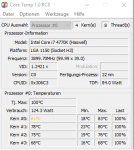
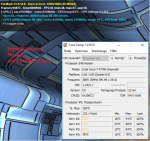
Hier mal die Ergebnisse der Tests die ich gerade gemacht habe.
Als erstes habe ich Prime95 Small FFTs 10min laufen lassen.
Dann habe ich nochmal Prime95-Blends 8 Threads zusammen mit FurMark laufen lassen, ca. 9min
Die CPU wird schon echt warm, da hab ich nie so drauf geachtet.
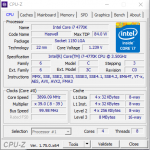
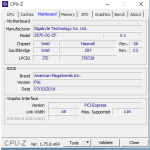
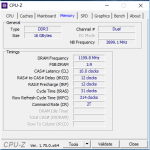
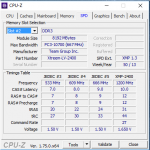
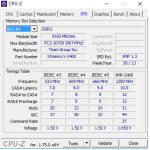
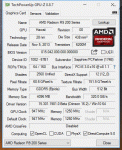
Hier die Screenshots von CPU-Z / GPU-Z
Was mir noch einfällt ist das er seit dem problem mit der Grafikkarte den Treiber bei 3DMark auch nicht mehr verifiziert und die Ergebnisse ungültig sind.
Gestern nachdem ich den Thread aufgemacht habe habe ich nochmal 3DMark durchlaufen lassen und kam auf 9300 Punkte, was fast das ist was früher möglich war. Zumindest mehr als die 6500-7000 Punkte die es sonst waren.
Als ich die Dumps hochladen wollte bin ich auch das Tool WhoCrashed gestoßen. Es Kommt zu folgenden Ergebnissen:
On Sun 28.02.2016 13:50:35 GMT your computer crashed
crash dump file: C:\Windows\Minidump\022816-3859-01.dmp
This was probably caused by the following module: atikmdag.sys (atikmdag+0x44843)
Bugcheck code: 0x100000EA (0xFFFFE000951DA080, 0x0, 0x0, 0x0)
Error: THREAD_STUCK_IN_DEVICE_DRIVER_M
file path: C:\Windows\system32\drivers\atikmdag.sys
product: ATI Radeon Family
company: Advanced Micro Devices, Inc.
description: ATI Radeon Kernel Mode Driver
Bug check description: This indicates that a thread in a device driver is endlessly spinning.
This appears to be a typical software driver bug and is not likely to be caused by a hardware problem.
A third party driver was identified as the probable root cause of this system error. It is suggested you look for an update for the following driver: atikmdag.sys (ATI Radeon Kernel Mode Driver, Advanced Micro Devices, Inc.).
Google query: Advanced Micro Devices, Inc. THREAD_STUCK_IN_DEVICE_DRIVER_M
On Sun 28.02.2016 13:50:35 GMT your computer crashed
crash dump file: C:\Windows\memory.dmp
This was probably caused by the following module: atikmdag.sys (atikmdag+0x44843)
Bugcheck code: 0xEA (0xFFFFE000951DA080, 0x0, 0x0, 0x0)
Error: THREAD_STUCK_IN_DEVICE_DRIVER
file path: C:\Windows\system32\drivers\atikmdag.sys
product: ATI Radeon Family
company: Advanced Micro Devices, Inc.
description: ATI Radeon Kernel Mode Driver
Bug check description: This indicates that a thread in a device driver is endlessly spinning.
This appears to be a typical software driver bug and is not likely to be caused by a hardware problem.
A third party driver was identified as the probable root cause of this system error. It is suggested you look for an update for the following driver: atikmdag.sys (ATI Radeon Kernel Mode Driver, Advanced Micro Devices, Inc.).
Google query: Advanced Micro Devices, Inc. THREAD_STUCK_IN_DEVICE_DRIVER
On Sun 28.02.2016 10:53:59 GMT your computer crashed
crash dump file: C:\Windows\Minidump\022816-4093-01.dmp
This was probably caused by the following module: atikmdag.sys (atikmdag+0x44843)
Bugcheck code: 0x100000EA (0xFFFFE00069C19080, 0x0, 0x0, 0x0)
Error: THREAD_STUCK_IN_DEVICE_DRIVER_M
file path: C:\Windows\system32\drivers\atikmdag.sys
product: ATI Radeon Family
company: Advanced Micro Devices, Inc.
description: ATI Radeon Kernel Mode Driver
Bug check description: This indicates that a thread in a device driver is endlessly spinning.
This appears to be a typical software driver bug and is not likely to be caused by a hardware problem.
A third party driver was identified as the probable root cause of this system error. It is suggested you look for an update for the following driver: atikmdag.sys (ATI Radeon Kernel Mode Driver, Advanced Micro Devices, Inc.).
Google query: Advanced Micro Devices, Inc. THREAD_STUCK_IN_DEVICE_DRIVER_M
On Sun 28.02.2016 10:30:51 GMT your computer crashed
crash dump file: C:\Windows\Minidump\022816-4109-01.dmp
This was probably caused by the following module: atikmdag.sys (atikmdag+0x44843)
Bugcheck code: 0x100000EA (0xFFFFE00174636080, 0x0, 0x0, 0x0)
Error: THREAD_STUCK_IN_DEVICE_DRIVER_M
file path: C:\Windows\system32\drivers\atikmdag.sys
product: ATI Radeon Family
company: Advanced Micro Devices, Inc.
description: ATI Radeon Kernel Mode Driver
Bug check description: This indicates that a thread in a device driver is endlessly spinning.
This appears to be a typical software driver bug and is not likely to be caused by a hardware problem.
A third party driver was identified as the probable root cause of this system error. It is suggested you look for an update for the following driver: atikmdag.sys (ATI Radeon Kernel Mode Driver, Advanced Micro Devices, Inc.).
Google query: Advanced Micro Devices, Inc. THREAD_STUCK_IN_DEVICE_DRIVER_M
On Sun 28.02.2016 10:25:07 GMT your computer crashed
crash dump file: C:\Windows\Minidump\022816-3953-01.dmp
This was probably caused by the following module: atikmdag.sys (atikmdag+0x44843)
Bugcheck code: 0x100000EA (0xFFFFE000BB023740, 0x0, 0x0, 0x0)
Error: THREAD_STUCK_IN_DEVICE_DRIVER_M
file path: C:\Windows\system32\drivers\atikmdag.sys
product: ATI Radeon Family
company: Advanced Micro Devices, Inc.
description: ATI Radeon Kernel Mode Driver
Bug check description: This indicates that a thread in a device driver is endlessly spinning.
This appears to be a typical software driver bug and is not likely to be caused by a hardware problem.
A third party driver was identified as the probable root cause of this system error. It is suggested you look for an update for the following driver: atikmdag.sys (ATI Radeon Kernel Mode Driver, Advanced Micro Devices, Inc.).
Google query: Advanced Micro Devices, Inc. THREAD_STUCK_IN_DEVICE_DRIVER_M
On Sun 28.02.2016 10:24:02 GMT your computer crashed
crash dump file: C:\Windows\Minidump\022816-4234-01.dmp
This was probably caused by the following module: atikmdag.sys (atikmdag+0x44843)
Bugcheck code: 0x100000EA (0xFFFFE00114B03840, 0x0, 0x0, 0x0)
Error: THREAD_STUCK_IN_DEVICE_DRIVER_M
file path: C:\Windows\system32\drivers\atikmdag.sys
product: ATI Radeon Family
company: Advanced Micro Devices, Inc.
description: ATI Radeon Kernel Mode Driver
Bug check description: This indicates that a thread in a device driver is endlessly spinning.
This appears to be a typical software driver bug and is not likely to be caused by a hardware problem.
A third party driver was identified as the probable root cause of this system error. It is suggested you look for an update for the following driver: atikmdag.sys (ATI Radeon Kernel Mode Driver, Advanced Micro Devices, Inc.).
Google query: Advanced Micro Devices, Inc. THREAD_STUCK_IN_DEVICE_DRIVER_M
On Sun 28.02.2016 10:18:17 GMT your computer crashed
crash dump file: C:\Windows\Minidump\022816-4031-01.dmp
This was probably caused by the following module: atikmdag.sys (atikmdag+0x44843)
Bugcheck code: 0x100000EA (0xFFFFE0001B54A080, 0x0, 0x0, 0x0)
Error: THREAD_STUCK_IN_DEVICE_DRIVER_M
file path: C:\Windows\system32\drivers\atikmdag.sys
product: ATI Radeon Family
company: Advanced Micro Devices, Inc.
description: ATI Radeon Kernel Mode Driver
Bug check description: This indicates that a thread in a device driver is endlessly spinning.
This appears to be a typical software driver bug and is not likely to be caused by a hardware problem.
A third party driver was identified as the probable root cause of this system error. It is suggested you look for an update for the following driver: atikmdag.sys (ATI Radeon Kernel Mode Driver, Advanced Micro Devices, Inc.).
Google query: Advanced Micro Devices, Inc. THREAD_STUCK_IN_DEVICE_DRIVER_M
On Sun 28.02.2016 10:10:16 GMT your computer crashed
crash dump file: C:\Windows\Minidump\022816-5687-01.dmp
This was probably caused by the following module: atikmdag.sys (atikmdag+0x44843)
Bugcheck code: 0x100000EA (0xFFFFE00063E15080, 0x0, 0x0, 0x0)
Error: THREAD_STUCK_IN_DEVICE_DRIVER_M
file path: C:\Windows\system32\drivers\atikmdag.sys
product: ATI Radeon Family
company: Advanced Micro Devices, Inc.
description: ATI Radeon Kernel Mode Driver
Bug check description: This indicates that a thread in a device driver is endlessly spinning.
This appears to be a typical software driver bug and is not likely to be caused by a hardware problem.
A third party driver was identified as the probable root cause of this system error. It is suggested you look for an update for the following driver: atikmdag.sys (ATI Radeon Kernel Mode Driver, Advanced Micro Devices, Inc.).
Google query: Advanced Micro Devices, Inc. THREAD_STUCK_IN_DEVICE_DRIVER_M
On Sun 28.02.2016 09:25:18 GMT your computer crashed
crash dump file: C:\Windows\Minidump\022816-4468-01.dmp
This was probably caused by the following module: atikmdag.sys (atikmdag+0x44843)
Bugcheck code: 0x100000EA (0xFFFFE000DDB22340, 0x0, 0x0, 0x0)
Error: THREAD_STUCK_IN_DEVICE_DRIVER_M
file path: C:\Windows\system32\drivers\atikmdag.sys
product: ATI Radeon Family
company: Advanced Micro Devices, Inc.
description: ATI Radeon Kernel Mode Driver
Bug check description: This indicates that a thread in a device driver is endlessly spinning.
This appears to be a typical software driver bug and is not likely to be caused by a hardware problem.
A third party driver was identified as the probable root cause of this system error. It is suggested you look for an update for the following driver: atikmdag.sys (ATI Radeon Kernel Mode Driver, Advanced Micro Devices, Inc.).
Google query: Advanced Micro Devices, Inc. THREAD_STUCK_IN_DEVICE_DRIVER_M
On Fri 26.02.2016 13:38:06 GMT your computer crashed
crash dump file: C:\Windows\Minidump\022716-5796-01.dmp
This was probably caused by the following module: atikmdag.sys (atikmdag+0x44843)
Bugcheck code: 0x100000EA (0xFFFFE001F624F080, 0x0, 0x0, 0x0)
Error: THREAD_STUCK_IN_DEVICE_DRIVER_M
file path: C:\Windows\system32\drivers\atikmdag.sys
product: ATI Radeon Family
company: Advanced Micro Devices, Inc.
description: ATI Radeon Kernel Mode Driver
Bug check description: This indicates that a thread in a device driver is endlessly spinning.
This appears to be a typical software driver bug and is not likely to be caused by a hardware problem.
A third party driver was identified as the probable root cause of this system error. It is suggested you look for an update for the following driver: atikmdag.sys (ATI Radeon Kernel Mode Driver, Advanced Micro Devices, Inc.).
Google query: Advanced Micro Devices, Inc. THREAD_STUCK_IN_DEVICE_DRIVER_M
Conclusion 10 crash dumps have been found and analyzed. A third party driver has been identified to be causing system crashes on your computer. It is strongly suggested that you check for updates for these drivers on their company websites. Click on the links below to search with Google for updates for these drivers:
If no updates for these drivers are available, try searching with Google on the names of these drivers in combination with the errors that have been reported for these drivers. Include the brand and model name of your computer as well in the query. This often yields interesting results from discussions on the web by users who have been experiencing similar problems.
Note that it's not always possible to state with certainty whether a reported driver is responsible for crashing your system or that the root cause is in another module. Nonetheless it's suggested you look for updates for the products that these drivers belong to and regularly visit Windows update or enable automatic updates for Windows. In case a piece of malfunctioning hardware is causing trouble, a search with Google on the bug check errors together with the model name and brand of your computer may help you investigate this further.
Update:
gerade nochmal 3DMark laufen lassen. Es wird besser, aber der Treiber scheint immernoch das Problem zu sein.
Es ist der Aktuelle Crimson 16.2 beta
Stelle testweise im Bios die Anbindung der Grafikkarte (PCI-E) auf Gen2 bzw. Gen3 (also nicht auf AUTO lassen).
Teste, ob es mit einem der beiden Einstellungen besser wird.
Die Einstellung findest du im "M.I.T" Menü -> "Miscellaneous Settings" -> "PEG Gen3 Slot Configuration".
Laut den Dumps liegt das Problem ja an den Grafikkartentreibern (oder der Grafikkarte selbst). Hast du unter Win10 die Grafikkartentreiber manuell installiert, oder diese über die Win Updates gezogen?
Der Grafikkartentreiber wurde auch schon sauber deinstalliert, und frisch installiert?
Die Einstellung ist und war immer auf Gen3. Ich teste jetzt mal auf Gen2.
Der PC lief Sonntag und Montag auch super ohne Probleme, jetzt gerade wollte ich nur ein Video auf der PCGH Seite starten und wieder selber Fehler.
Die Treiber habe ich manuell installiert, hier über PCGH runtergeladen. Der erste war der 16.1 und dann der 16.2, eine Neuinstallation habe ich dabei nicht ausgewählt.
Kann ich den 16.2 einfach nochmal installieren und Neuinstallation wählen? Oder muss ich den erst deinstallieren oder sogar auf nen neuen Treiber warten?
Wenn es mit Gen2 nicht besser, oder sogar schlimmer wird, würde ich die Treiber ganz frisch installieren.
Für eine saubere Deinstallation der Grafikkartentreiber bietet sich das DDU Tool (Display Driver Uninstaller) an: Official Display Driver Uninstaller DDU Download
Welcher Treiber war denn vor Windows 10 im Einsatz?!?!
Schon der aktuellste Crimson, oder wurde der GPU Treiber erst mit dem neu aufsetzen mal aktualisiert?
Im Crimson hast du unter:
"Spiele "-> "Globale Einstellungen"-> und oben rechts "zurücksetzen"; die Möglichkeit mal Grafikeinstellungen und Shader Cache zu reseten - half mir auch mal.
Versuch sonst mal nen alten Catalyst Treiber.
Die Karte kann aber auch einfach langsam ans Ende kommen, wenn sie eh nen Schaden hat...
Dann wieder die 16.2 Betatreiber oder lieber die 15.12?
Deinstalliert das Tool wirklich nur die Grafiktreiber? Ich hatte das schonmal mit einem angeblichen Grafiktreiber-Uninstaller, der mir aber den kompletten USB Treiber mit gelöscht hat.
Es war ne scheiß Arbeit ohne Maus und Tastatur da irgendwas wieder zum laufen zu bekommen, darum bin ich da etwas vorsichtig
So bisher sieht es sehr gut aus, keine Abstürze und auch das Neustarten weil nur 10FPS hat sich erledigt.
Den neuen AMD Treiber, der seit kurzen draußen ist, habe ich noch nicht drauf gemacht. ich wollte erstmal testen ob es an der Einstellung im Bios liegt.
Sollte es weiter so laufen mache ich demnächst nochmal ein Treiberupdate mit sauberer Neuinstallation. Danach teste ich evtl. nochmal gen3 um zu sehen ob der Fehler wieder auftritt.
Vielen Dank für die Hilfe und Tipps, bin sehr happy das die Karte wieder mit voller Leistung läuft. War schon kurz davor mir einfach ne neue zu kaufen -.-