Neuer Gaming Rechner | Microlags vermutlich CPU?

BinDerKleineMann

Komplett-PC-Aufrüster(in)
Hallo zusammen,

ich habe inzwischen endlich eine GPU zu dem bereits im Januar gekauften anderen Komponenten zu "normalen" Preisen bekommen. Nun stelle ich jedoch fest das ich Microlags habe.

Im folgenden Einmal die verbaute Hardware, das Problembild und die bisher versuchten Debugging Ansätze. Ich bin offen für Tips.

Folgende Hardware ist verbaut.

CPU: AMD 9800x3D
Mainboard: ASRock X870 Riptide (Bios Aktuell 3.20)
RAM: Kingston KF560C30-32 (6000 MT/s)
GPU: Zotac RTX 5090 Extreme Infinity
SSD: Samsung SSD 990 Pro 2TB (Systemplatte)
Corsair T705 4TB (PCIe5 - Gaming Platte)
Monitor: Samsung Odysey G9 (Dual WQHD Auflösung)
1745783828281.png
1745784613198.png


Fehlerbild:

Ich habe verständlicherweise Absolut Stabile FPS. Mir ist in Overwatch 2 dann jedoch kleine bis starke Microlags aufgefallen, weswegen ich etwas tiefer nach der Ursache gesucht habe.

Mit PresentMon habe ich mir die Frametimes und die Auslastung der CPU/GPU angeschaut.
Für Overwatch 2 verständlich langweilt sich die GPU. Da ich keine 600 FPS brauche habe ich die Frames bei 120 gecappt, da der Monitor nicht mehr kann.
Die Frametimes sind absolut stabil bis zu diesem Microlag und steigen dann von ca 8ms (so hoch weil Framecap) auf 8,5ms - 10ms
Die Werte für die GPU (GPU Busy und GPU Present) bleiben stabil. Jedoch spiked in exakt dem gleichen Moment der CPU Busy wert.
Das ganze Resultiert dann in deutlich spürbaren Microlags.

Das Problem lässt sich auch in anderen Spielen, selbst irgendwelche 8bit Pixel Indie Games nachvollziehen. Lag im Spiel, durch Spike der Frametimes bei gleichzeitig konstanten Werten für die GPU und einem Spike bei CPU Wait
(Das Bild ist aus V Rising) Verhalten ist aber in allen anderen Spielen Quasi das Gleiche)
1745785574374.jpeg


Bisherige Versuche das Problem Einzugrenzen.

- Bios aktualisiert auf die aktuellste Version (3.20)
- AMD Chipsatztreiber aktualisiert.
- Zwei Updates der GPU Treiber
- Diverse Spiele gestestet. (Natürlich am einfachsten Nachvollziehbar bei einem FPS, aber konnte kein Spiel finden, was das Problem nicht auch hat.)
- Verschiedene Grafikoptionen Einstellungen (Low - Ultra, Mit NVIDIA Reflex und ohne, mit DLSS und Ohne, Native Auflösung und Geringe Auflösung, Gsync On/Off)

-----------

Bin aktuell überfragt wie ich hier am saubersten Debuggen könnte um das Problem oder die Ursache weiter einzugrenzen und bedanke mich schon vorab für jeglichen Idee.
Sollten Infos fehlen bitte einfach Bescheid geben.


Edit 27.04.2025 <Output LatencyMon>

1745789358415.png

NOTE: some processes were hit by hard pagefaults. If these were programs producing audio, they are likely to interrupt the audio stream resulting in dropouts, clicks and pops. Check the Processes tab to see which programs were hit.

Process with highest pagefault count: msmpeng.exe

Total number of hard pagefaults 928
Hard pagefault count of hardest hit process: 716
Number of processes hit: 20

1745789408790.png


Der CPU Relevante Teil
CPU SPEED
_________________________________________________________________________________________________________
Reported CPU speed (WMI): 470 MHz
Reported CPU speed (registry): 4691 MHz

Note: reported execution times may be calculated based on a fixed reported CPU speed. Disable variable speed settings like Intel Speed Step and AMD Cool N Quiet in the BIOS setup for more accurate results.

-----

Muss mal prüfen was ich im BIOS dazu finde. Der Windows Energiesparplan war zwar auf Hochleistung eingestellt.
Die minimale CPU Energie auf 0%
Werde es zum Test mal auf 100% setzen. Aber eigentlich sollte der CPU ja nicht heruntertakten, wenn der Thread genutzt wird.

1745789571996.png
 
Zuletzt bearbeitet:
Hast du Software wie iCUE, ASRock Polychrome RGB, ASRock Motherboard Utility o. Ähnliches installiert?
Hast du auch an die Firmware der SSDs gedacht?
Schau mal mit LatencyMon nach, ob eine Software dir die Suppe versalzt.
 
Die von dir genannte Software oder dergleichen habe ich nicht installiert.
Ich nutze lediglich ArgusMonitor zur Lüftersteuerung, aber das hatte ich auch bereits deaktivert.

Ich werde LatencyMon mal installieren. Ich vermute einfach das Tracing laufen Lassen und wenn der Fehler aufkommt stoppen. Welche Infos sind dann dort Relevant?
 
Zuletzt bearbeitet:
Ich hatte mit dem alten Rechner mit Gsync keine Probleme. An oder Aus scheint kein Einfluss auf das Verhalten zu haben. Aber das habe ich auch testweise ausgeschalten. Ergänze die Info noch in der Übersicht oben.

Bin gerade über ein paar Beiträge gestolpert in denen Empfohlen wird quasi alle Boosts und Energiesparmechanismen ausschalten.

CPB, PBO, C-State Control, CPPC, SVM Mode, Cool'n'Quiet

Fühlt sich irgendwie falsch an all diese Dinge auszuschalten. Auf der anderen Seite gibts auch etliche Beiträge die sagen anlassen :-D
 
Zuletzt bearbeitet:
Was für ein Proses wird in LatencyMon unter Processes mit der höhsten Hard pagefaults gelistet?
Hast du ja oben mit beigepackt...

msmpeng gehört zu den Defender und schaut aus das er grade dein System checkt.
VRising ist ein Spiel. Warum läuft das im Hintergrund?
Wieviele Tabs hast du im Chrom offen?

Im LatencyMon unter Stats kannst du genauer sehen was noch so bremst.
 
Schonmal danke für den Input.

Ich werde vermutlich erst Morgen Abend dazu kommen wieder ausgiebig etwas zu testen.
Hier nur schnell zur Klarstellung.

Alle vermeintlich Relevanten Teil aus den Stats habe ich oben im Post hinzugefügt. Gab die Info mit den Pagefaults, aber das war überwiegend die Malwareengine von MS.
V Rising lief nicht im Hintergrund sondern war in dem Moment das "Spiel" Overwatch als Multiplayer Titel ist für die Kollegen nicht ganz so toll wenn ich damit beschäftigt bin Debugging Informationen zu sammeln. Dort fält der Lag zwar am intensivsten auf, aber das Verhalten auf die Metriken ist zumindest laut Perfmon identisch und auch in nicht so schnellen spielen kann man die Lags leider beobachten.

Ja der Pfad mit dem Ausschalten aller Energieoptionen oder auch des Boosts klingen nicht so als sollten die zu dem Verhalten führen.

Ich persönlich kann LatencyMon so absolut nicht einschätzen. Was da Normal ist und was nicht. Bis auf die Infos, die explizit in den Stats stehen.
Gibts hier irgendein Sinnvollen Zeitraum wie lange das Tool mitlaufen sollte? Einfach anmachen und ein Spiel spielen und später stoppen?
Der Output einfach mal hier platziert oder auf spezielle Werte achten?

Wie gesagt sollte ich heute Abend dazu kommen. (Oder Morgen, wie man das defniert :-D)

Und nochmal danke für die Ratschläge.
 
Ich persönlich kann LatencyMon so absolut nicht einschätzen. Was da Normal ist und was nicht. Bis auf die Infos, die explizit in den Stats stehen.
Gibts hier irgendein Sinnvollen Zeitraum wie lange das Tool mitlaufen sollte? Einfach anmachen und ein Spiel spielen und später stoppen?

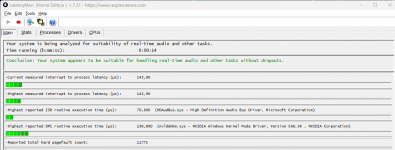
Bei dir ist bei Highest measured der Wert bei ~2000µs und das ist schlecht. Da bremst was die Reaktionszeit des PC.
Unter Stats und Processes sollte der Übeltäter zu finden sein.
Bei mir schaut es so aus:
Screenshot 2025-04-29 073900.png

Es scheind bei den 870(E) MB Probleme mit dem LAN zu geben. Hier ein Tipp der bei machen geholfen hat:

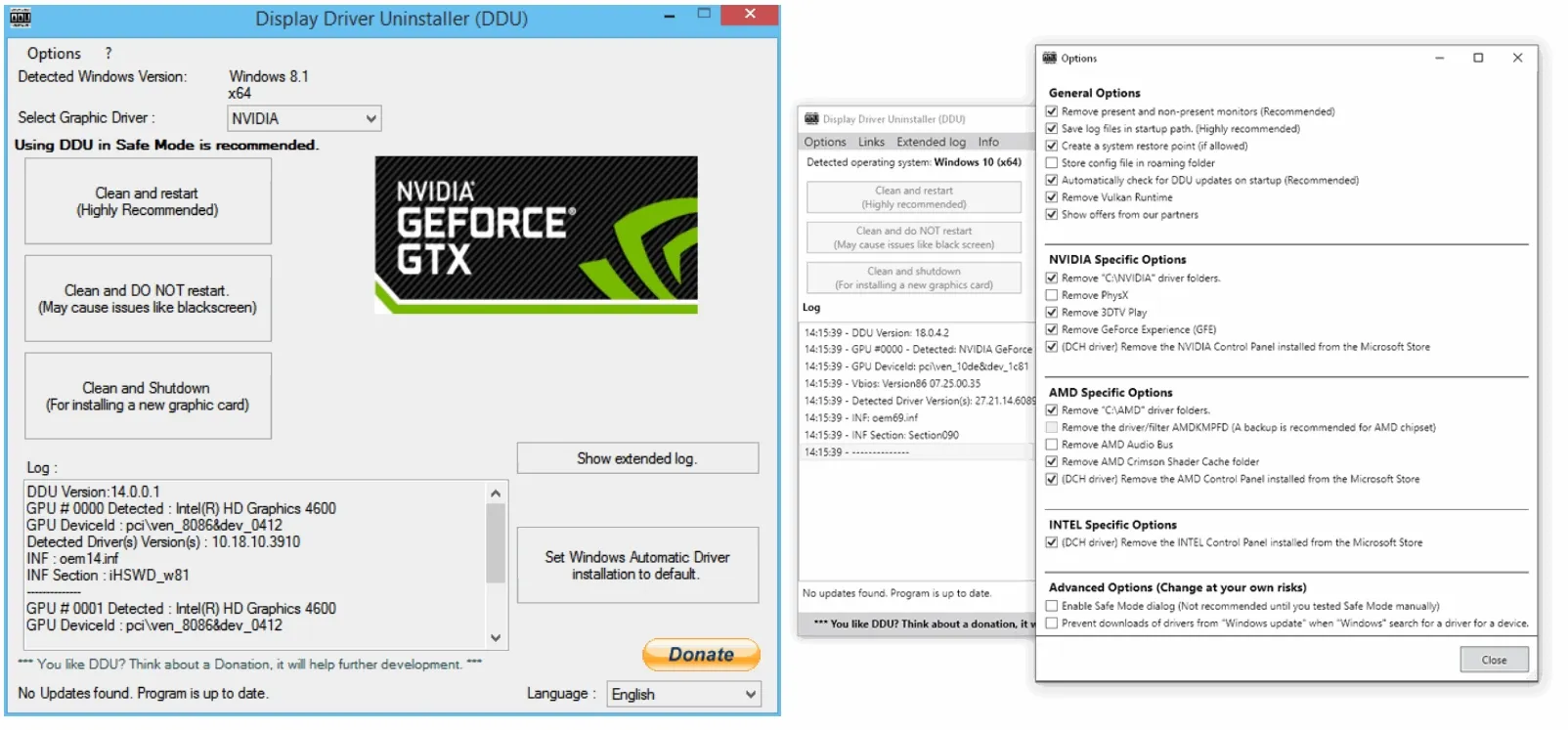
Lösche mit DDU den Grafiktreiber und nach ein Neustart die aktuelle Version 576.26.

Der Treiber für LAN ist auf der Intel-Seite aktueller Ver. 36.24.12162:
 
Zuletzt bearbeitet:
Hi ich werde mich mal dran machen die Treiber und auch die Grafikkartentreiber neu zu installieren

In den Stats von LatencyMon sehe ich leider nur das was ein Problem ist aber ich erkenne nicht welcher Prozess nun hier das Größte Problem ist. Aber jka erstmal Treiber komplett neu installieren

_________________________________________________________________________________________________________
CONCLUSION
_________________________________________________________________________________________________________
Your system appears to be having trouble handling real-time audio and other tasks. You are likely to experience buffer underruns appearing as drop outs, clicks or pops. One problem may be related to power management, disable CPU throttling settings in Control Panel and BIOS setup. Check for BIOS updates.
LatencyMon has been analyzing your system for 0:27:05 (h:mm:ss) on all processors.


_________________________________________________________________________________________________________
SYSTEM INFORMATION
_________________________________________________________________________________________________________
Computer name: PC-BDKM
OS version: Windows 11, 10.0, version 2009, build: 26100 (x64)
Hardware: X870 Riptide WiFi, ASRock
BIOS: 3.20
CPU: AuthenticAMD AMD Ryzen 7 9800X3D 8-Core Processor
Logical processors: 8
Processor groups: 1
Processor group size: 8
RAM: 63063 MB total


_________________________________________________________________________________________________________
CPU SPEED
_________________________________________________________________________________________________________
Reported CPU speed (WMI): 470 MHz
Reported CPU speed (registry): 4691 MHz

Note: reported execution times may be calculated based on a fixed reported CPU speed. Disable variable speed settings like Intel Speed Step and AMD Cool N Quiet in the BIOS setup for more accurate results.


_________________________________________________________________________________________________________
MEASURED INTERRUPT TO USER PROCESS LATENCIES
_________________________________________________________________________________________________________
The interrupt to process latency reflects the measured interval that a usermode process needed to respond to a hardware request from the moment the interrupt service routine started execution. This includes the scheduling and execution of a DPC routine, the signaling of an event and the waking up of a usermode thread from an idle wait state in response to that event.

Highest measured interrupt to process latency (µs): 2631,30
Average measured interrupt to process latency (µs): 19,233084

Highest measured interrupt to DPC latency (µs): 2627,20
Average measured interrupt to DPC latency (µs): 14,361596


_________________________________________________________________________________________________________
REPORTED ISRs
_________________________________________________________________________________________________________
Interrupt service routines are routines installed by the OS and device drivers that execute in response to a hardware interrupt signal.

Highest ISR routine execution time (µs): 156,449371
Driver with highest ISR routine execution time: Wdf01000.sys - Kernelmodustreiber-Frameworklaufzeit, Microsoft Corporation

Highest reported total ISR routine time (%): 0,008068
Driver with highest ISR total time: Wdf01000.sys - Kernelmodustreiber-Frameworklaufzeit, Microsoft Corporation

Total time spent in ISRs (%) 0,008068

ISR count (execution time <250 µs): 793848
ISR count (execution time 250-500 µs): 0
ISR count (execution time 500-1000 µs): 0
ISR count (execution time 1000-2000 µs): 0
ISR count (execution time 2000-4000 µs): 0
ISR count (execution time >=4000 µs): 0


_________________________________________________________________________________________________________
REPORTED DPCs
_________________________________________________________________________________________________________
DPC routines are part of the interrupt servicing dispatch mechanism and disable the possibility for a process to utilize the CPU while it is interrupted until the DPC has finished execution.

Highest DPC routine execution time (µs): 617,833085
Driver with highest DPC routine execution time: ACPI.sys - ACPI-Treiber für NT, Microsoft Corporation

Highest reported total DPC routine time (%): 0,292413
Driver with highest DPC total execution time: ACPI.sys - ACPI-Treiber für NT, Microsoft Corporation

Total time spent in DPCs (%) 1,007762

DPC count (execution time <250 µs): 8868324
DPC count (execution time 250-500 µs): 0
DPC count (execution time 500-10000 µs): 12550
DPC count (execution time 1000-2000 µs): 0
DPC count (execution time 2000-4000 µs): 0
DPC count (execution time >=4000 µs): 0


_________________________________________________________________________________________________________
REPORTED HARD PAGEFAULTS
_________________________________________________________________________________________________________
Hard pagefaults are events that get triggered by making use of virtual memory that is not resident in RAM but backed by a memory mapped file on disk. The process of resolving the hard pagefault requires reading in the memory from disk while the process is interrupted and blocked from execution.

NOTE: some processes were hit by hard pagefaults. If these were programs producing audio, they are likely to interrupt the audio stream resulting in dropouts, clicks and pops. Check the Processes tab to see which programs were hit.

Process with highest pagefault count: msmpeng.exe

Total number of hard pagefaults 89611
Hard pagefault count of hardest hit process: 53108
Number of processes hit: 87


_________________________________________________________________________________________________________
PER CPU DATA
_________________________________________________________________________________________________________
CPU 0 Interrupt cycle time (s): 184,348234
CPU 0 ISR highest execution time (µs): 149,275634
CPU 0 ISR total execution time (s): 0,006815
CPU 0 ISR count: 5319
CPU 0 DPC highest execution time (µs): 538,621403
CPU 0 DPC total execution time (s): 75,110533
CPU 0 DPC count: 4935597
_________________________________________________________________________________________________________
CPU 1 Interrupt cycle time (s): 48,260121
CPU 1 ISR highest execution time (µs): 156,449371
CPU 1 ISR total execution time (s): 1,041886
CPU 1 ISR count: 788211
CPU 1 DPC highest execution time (µs): 485,910467
CPU 1 DPC total execution time (s): 22,826155
CPU 1 DPC count: 1622577
_________________________________________________________________________________________________________
CPU 2 Interrupt cycle time (s): 19,714130
CPU 2 ISR highest execution time (µs): 1,472820
CPU 2 ISR total execution time (s): 0,000224
CPU 2 ISR count: 318
CPU 2 DPC highest execution time (µs): 547,889149
CPU 2 DPC total execution time (s): 3,839289
CPU 2 DPC count: 277991
_________________________________________________________________________________________________________
CPU 3 Interrupt cycle time (s): 31,499370
CPU 3 ISR highest execution time (µs): 0,0
CPU 3 ISR total execution time (s): 0,0
CPU 3 ISR count: 0
CPU 3 DPC highest execution time (µs): 470,921765
CPU 3 DPC total execution time (s): 10,575322
CPU 3 DPC count: 675412
_________________________________________________________________________________________________________
CPU 4 Interrupt cycle time (s): 22,098059
CPU 4 ISR highest execution time (µs): 0,0
CPU 4 ISR total execution time (s): 0,0
CPU 4 ISR count: 0
CPU 4 DPC highest execution time (µs): 420,344916
CPU 4 DPC total execution time (s): 4,589141
CPU 4 DPC count: 340635
_________________________________________________________________________________________________________
CPU 5 Interrupt cycle time (s): 32,675363
CPU 5 ISR highest execution time (µs): 0,0
CPU 5 ISR total execution time (s): 0,0
CPU 5 ISR count: 0
CPU 5 DPC highest execution time (µs): 617,833085
CPU 5 DPC total execution time (s): 11,124389
CPU 5 DPC count: 773145
_________________________________________________________________________________________________________
CPU 6 Interrupt cycle time (s): 11,882134
CPU 6 ISR highest execution time (µs): 0,0
CPU 6 ISR total execution time (s): 0,0
CPU 6 ISR count: 0
CPU 6 DPC highest execution time (µs): 420,625453
CPU 6 DPC total execution time (s): 1,168777
CPU 6 DPC count: 101264
_________________________________________________________________________________________________________
CPU 7 Interrupt cycle time (s): 14,591615
CPU 7 ISR highest execution time (µs): 0,0
CPU 7 ISR total execution time (s): 0,0
CPU 7 ISR count: 0
CPU 7 DPC highest execution time (µs): 436,495843
CPU 7 DPC total execution time (s): 1,781681
CPU 7 DPC count: 154253
_________________________________________________________________________________________________________
 
Hi ich werde mich mal dran machen die Treiber und auch die Grafikkartentreiber neu zu installieren

In den Stats von LatencyMon sehe ich leider nur das was ein Problem ist aber ich erkenne nicht welcher Prozess nun hier das Größte Problem ist. Aber jka erstmal Treiber komplett neu installieren
Tauchen die Stutter bei dir sehr oft auf, oder nur mal zwischendurch? Weil ich habe das auch schon festgestellt, dass ich zwischendurch mal einen Frametimespike habe. Ich kann mir aber auch nicht erklären, woran das liegt. Ich habe einen 7800x3D als CPU. Mit meinem damaligen Intel System hatte ich das nie.
Im LatencyMon unter Stats kannst du genauer sehen was noch so bremst.
Worauf sollte man unter Stats besonders achten? Check dieses Tool auch noch nicht so richtig.
 
Versuch auch den Tipp von @QIX mit dem deaktivieren der LAN! Oder wenn du über ihn ins Netz gehst, zumindest dein Treiber von Intel installieren.
  • Wdf01000.sys ist ein auf dem Windows Driver Framework (WDF) basierender Treiber, der die Kommunikation zwischen Systemhardware und angeschlossenen Geräten ermöglicht.
  • Acpi.sys umfassen Unterstützung für die Energieverwaltung und Plug & Play (PnP)-Geräteaufzählung
Was hast du alles an dein MB angeschlossen (Intern u. Extern)?
Ich vermute das es zu ein Konflikt zwischen Windows und ein Eingerät (Sound.-Grafikkarte, Headset, Drucker, Scanner,...) kommt.

P.S.
Mach auch eine Windows Reparatur, starte den Terminal (Adminrechte):
  1. Dism /Online /Cleanup-Image /RestoreHealth
  2. sfc /scannow
 
Zuletzt bearbeitet:
Hmm

ich hab ein USB Switch Hub in verwendung, damit ich Notebook und PC damit ohne umstecken bedienen kann, aber ich werde das auch gleich mal umstecken und ausschließen.

Ansonsten ist nicht die Welt angeschlossen. Maus, Tastatur und Webcam :-D Aber das hängt alles am USB Switch. War zumindest im alten Rechner kein Problem.
Treiber entfernt und die aktuellsten Hotfix Treiber installiert. Aktuelle Lan Treiber installiert.
Windows Reparatur auch durch.
Maus & Tastatur direkt ans Mainboard angeschlossen.

Geholfen hat es nichts. Die Latenz schießt schon im Desktop Betrieb in die Höhe....

1745957617578.png

_________________________________________________________________________________________________________
CONCLUSION
_________________________________________________________________________________________________________
Your system seems to be having difficulty handling real-time audio and other tasks. You may experience drop outs, clicks or pops due to buffer underruns. One or more DPC routines that belong to a driver running in your system appear to be executing for too long. One problem may be related to power management, disable CPU throttling settings in Control Panel and BIOS setup. Check for BIOS updates.
LatencyMon has been analyzing your system for 0:02:30 (h:mm:ss) on all processors.


_________________________________________________________________________________________________________
SYSTEM INFORMATION
_________________________________________________________________________________________________________
Computer name: PC-BDKM
OS version: Windows 11, 10.0, version 2009, build: 26100 (x64)
Hardware: X870 Riptide WiFi, ASRock
BIOS: 3.20
CPU: AuthenticAMD AMD Ryzen 7 9800X3D 8-Core Processor
Logical processors: 8
Processor groups: 1
Processor group size: 8
RAM: 63063 MB total


_________________________________________________________________________________________________________
CPU SPEED
_________________________________________________________________________________________________________
Reported CPU speed (WMI): 470 MHz
Reported CPU speed (registry): 4691 MHz

Note: reported execution times may be calculated based on a fixed reported CPU speed. Disable variable speed settings like Intel Speed Step and AMD Cool N Quiet in the BIOS setup for more accurate results.


_________________________________________________________________________________________________________
MEASURED INTERRUPT TO USER PROCESS LATENCIES
_________________________________________________________________________________________________________
The interrupt to process latency reflects the measured interval that a usermode process needed to respond to a hardware request from the moment the interrupt service routine started execution. This includes the scheduling and execution of a DPC routine, the signaling of an event and the waking up of a usermode thread from an idle wait state in response to that event.

Highest measured interrupt to process latency (µs): 839,40
Average measured interrupt to process latency (µs): 18,216968

Highest measured interrupt to DPC latency (µs): 696,90
Average measured interrupt to DPC latency (µs): 13,613830


_________________________________________________________________________________________________________
REPORTED ISRs
_________________________________________________________________________________________________________
Interrupt service routines are routines installed by the OS and device drivers that execute in response to a hardware interrupt signal.

Highest ISR routine execution time (µs): 151,169473
Driver with highest ISR routine execution time: Wdf01000.sys - Kernelmodustreiber-Frameworklaufzeit, Microsoft Corporation

Highest reported total ISR routine time (%): 0,001877
Driver with highest ISR total time: Wdf01000.sys - Kernelmodustreiber-Frameworklaufzeit, Microsoft Corporation

Total time spent in ISRs (%) 0,001877

ISR count (execution time <250 µs): 18405
ISR count (execution time 250-500 µs): 0
ISR count (execution time 500-1000 µs): 0
ISR count (execution time 1000-2000 µs): 0
ISR count (execution time 2000-4000 µs): 0
ISR count (execution time >=4000 µs): 0


_________________________________________________________________________________________________________
REPORTED DPCs
_________________________________________________________________________________________________________
DPC routines are part of the interrupt servicing dispatch mechanism and disable the possibility for a process to utilize the CPU while it is interrupted until the DPC has finished execution.

Highest DPC routine execution time (µs): 1464,594543
Driver with highest DPC routine execution time: nvlddmkm.sys - NVIDIA Windows Kernel Mode Driver, Version 576.26 , NVIDIA Corporation

Highest reported total DPC routine time (%): 0,321541
Driver with highest DPC total execution time: ACPI.sys - ACPI-Treiber für NT, Microsoft Corporation

Total time spent in DPCs (%) 0,827605

DPC count (execution time <250 µs): 902671
DPC count (execution time 250-500 µs): 0
DPC count (execution time 500-10000 µs): 2090
DPC count (execution time 1000-2000 µs): 3
DPC count (execution time 2000-4000 µs): 0
DPC count (execution time >=4000 µs): 0


_________________________________________________________________________________________________________
REPORTED HARD PAGEFAULTS
_________________________________________________________________________________________________________
Hard pagefaults are events that get triggered by making use of virtual memory that is not resident in RAM but backed by a memory mapped file on disk. The process of resolving the hard pagefault requires reading in the memory from disk while the process is interrupted and blocked from execution.

NOTE: some processes were hit by hard pagefaults. If these were programs producing audio, they are likely to interrupt the audio stream resulting in dropouts, clicks and pops. Check the Processes tab to see which programs were hit.

Process with highest pagefault count: systemsettings.exe

Total number of hard pagefaults 16488
Hard pagefault count of hardest hit process: 4597
Number of processes hit: 44


_________________________________________________________________________________________________________
PER CPU DATA
_________________________________________________________________________________________________________
CPU 0 Interrupt cycle time (s): 13,465585
CPU 0 ISR highest execution time (µs): 151,169473
CPU 0 ISR total execution time (s): 0,022514
CPU 0 ISR count: 18393
CPU 0 DPC highest execution time (µs): 1379,782136
CPU 0 DPC total execution time (s): 6,343661
CPU 0 DPC count: 492202
_________________________________________________________________________________________________________
CPU 1 Interrupt cycle time (s): 1,325212
CPU 1 ISR highest execution time (µs): 6,682797
CPU 1 ISR total execution time (s): 0,000032
CPU 1 ISR count: 12
CPU 1 DPC highest execution time (µs): 1464,594543
CPU 1 DPC total execution time (s): 0,265812
CPU 1 DPC count: 39670
_________________________________________________________________________________________________________
CPU 2 Interrupt cycle time (s): 0,357466
CPU 2 ISR highest execution time (µs): 0,0
CPU 2 ISR total execution time (s): 0,0
CPU 2 ISR count: 0
CPU 2 DPC highest execution time (µs): 369,677894
CPU 2 DPC total execution time (s): 0,037213
CPU 2 DPC count: 7133
_________________________________________________________________________________________________________
CPU 3 Interrupt cycle time (s): 2,718492
CPU 3 ISR highest execution time (µs): 0,0
CPU 3 ISR total execution time (s): 0,0
CPU 3 ISR count: 0
CPU 3 DPC highest execution time (µs): 380,428480
CPU 3 DPC total execution time (s): 0,989112
CPU 3 DPC count: 118615
_________________________________________________________________________________________________________
CPU 4 Interrupt cycle time (s): 0,600127
CPU 4 ISR highest execution time (µs): 0,0
CPU 4 ISR total execution time (s): 0,0
CPU 4 ISR count: 0
CPU 4 DPC highest execution time (µs): 362,193562
CPU 4 DPC total execution time (s): 0,068156
CPU 4 DPC count: 12688
_________________________________________________________________________________________________________
CPU 5 Interrupt cycle time (s): 4,684903
CPU 5 ISR highest execution time (µs): 0,0
CPU 5 ISR total execution time (s): 0,0
CPU 5 ISR count: 0
CPU 5 DPC highest execution time (µs): 391,770198
CPU 5 DPC total execution time (s): 2,213123
CPU 5 DPC count: 228933
_________________________________________________________________________________________________________
CPU 6 Interrupt cycle time (s): 0,165347
CPU 6 ISR highest execution time (µs): 0,0
CPU 6 ISR total execution time (s): 0,0
CPU 6 ISR count: 0
CPU 6 DPC highest execution time (µs): 249,728203
CPU 6 DPC total execution time (s): 0,008592
CPU 6 DPC count: 2097
_________________________________________________________________________________________________________
CPU 7 Interrupt cycle time (s): 0,228991
CPU 7 ISR highest execution time (µs): 0,0
CPU 7 ISR total execution time (s): 0,0
CPU 7 ISR count: 0
CPU 7 DPC highest execution time (µs): 185,455127
CPU 7 DPC total execution time (s): 0,013866
CPU 7 DPC count: 3426
_________________________________________________________________________________________________________
 
Zuletzt bearbeitet:
Kannst du auf den LAN verzichten? Wenn deaktiviere in im UEFI.
Hohl die Grafikkarte mal raus und blass mit Druckluft den PCI-E Slot mal durch.

Toll das macht ja mit den neuen Nvidia Treiber den Eindruck das es schlechter geworden ist... *heul*

Hast du dein USB Switch abgezogen?

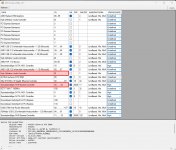
Mach mal von Msi-Utility-v3 ein Screenshot und poste es bitte.
Msi-Utiliy V3 braucht auch Adminrechte.

Die Firmware von der Samsung SSD kontrolliert und auf den aktuellen Stand gebracht?

Ist die iGPU aktiv und hat den AMD Treiber? Deaktiviere die iGPU oder wenn du sie gebrauchst, installiere den AMD Grafiktreiber zusätzlich (Minimal Version reicht).
 
Zuletzt bearbeitet:
Anbei der Screenshot vom MSI Utility

1745966682571.png


Lan werde ich gleich mal deaktivieren. Habe bisher nur die Treiber getestet.
Ansonsten habe ich in der Zwischenzeit mal die Studio Treiber Version versucht oder auch hier nur die Treiber ohne Zusätze wie Geforce Experience, Audio Treiber, Shadow Play und Co zu installieren.

Bleibt aber gleich schlecht das Ganze

1745966772970.png


_________________________________________________________________________________________________________
CONCLUSION
_________________________________________________________________________________________________________
Your system seems to be having difficulty handling real-time audio and other tasks. You may experience drop outs, clicks or pops due to buffer underruns. One or more DPC routines that belong to a driver running in your system appear to be executing for too long. One problem may be related to power management, disable CPU throttling settings in Control Panel and BIOS setup. Check for BIOS updates.
LatencyMon has been analyzing your system for 0:02:35 (h:mm:ss) on all processors.


_________________________________________________________________________________________________________
SYSTEM INFORMATION
_________________________________________________________________________________________________________
Computer name: PC-BDKM
OS version: Windows 11, 10.0, version 2009, build: 26100 (x64)
Hardware: X870 Riptide WiFi, ASRock
BIOS: 3.20
CPU: AuthenticAMD AMD Ryzen 7 9800X3D 8-Core Processor
Logical processors: 8
Processor groups: 1
Processor group size: 8
RAM: 63063 MB total


_________________________________________________________________________________________________________
CPU SPEED
_________________________________________________________________________________________________________
Reported CPU speed (WMI): 470 MHz
Reported CPU speed (registry): 4691 MHz

Note: reported execution times may be calculated based on a fixed reported CPU speed. Disable variable speed settings like Intel Speed Step and AMD Cool N Quiet in the BIOS setup for more accurate results.


_________________________________________________________________________________________________________
MEASURED INTERRUPT TO USER PROCESS LATENCIES
_________________________________________________________________________________________________________
The interrupt to process latency reflects the measured interval that a usermode process needed to respond to a hardware request from the moment the interrupt service routine started execution. This includes the scheduling and execution of a DPC routine, the signaling of an event and the waking up of a usermode thread from an idle wait state in response to that event.

Highest measured interrupt to process latency (µs): 986,20
Average measured interrupt to process latency (µs): 20,100705

Highest measured interrupt to DPC latency (µs): 981,40
Average measured interrupt to DPC latency (µs): 15,653025


_________________________________________________________________________________________________________
REPORTED ISRs
_________________________________________________________________________________________________________
Interrupt service routines are routines installed by the OS and device drivers that execute in response to a hardware interrupt signal.

Highest ISR routine execution time (µs): 141,931784
Driver with highest ISR routine execution time: Wdf01000.sys - Kernelmodustreiber-Frameworklaufzeit, Microsoft Corporation

Highest reported total ISR routine time (%): 0,001495
Driver with highest ISR total time: Wdf01000.sys - Kernelmodustreiber-Frameworklaufzeit, Microsoft Corporation

Total time spent in ISRs (%) 0,001495

ISR count (execution time <250 µs): 10238
ISR count (execution time 250-500 µs): 0
ISR count (execution time 500-1000 µs): 0
ISR count (execution time 1000-2000 µs): 0
ISR count (execution time 2000-4000 µs): 0
ISR count (execution time >=4000 µs): 0


_________________________________________________________________________________________________________
REPORTED DPCs
_________________________________________________________________________________________________________
DPC routines are part of the interrupt servicing dispatch mechanism and disable the possibility for a process to utilize the CPU while it is interrupted until the DPC has finished execution.

Highest DPC routine execution time (µs): 1302,945001
Driver with highest DPC routine execution time: nvlddmkm.sys - NVIDIA Windows Kernel Mode Driver, Version 576.02 , NVIDIA Corporation

Highest reported total DPC routine time (%): 0,315777
Driver with highest DPC total execution time: ACPI.sys - ACPI-Treiber für NT, Microsoft Corporation

Total time spent in DPCs (%) 0,854554

DPC count (execution time <250 µs): 832044
DPC count (execution time 250-500 µs): 0
DPC count (execution time 500-10000 µs): 2040
DPC count (execution time 1000-2000 µs): 1
DPC count (execution time 2000-4000 µs): 0
DPC count (execution time >=4000 µs): 0


_________________________________________________________________________________________________________
REPORTED HARD PAGEFAULTS
_________________________________________________________________________________________________________
Hard pagefaults are events that get triggered by making use of virtual memory that is not resident in RAM but backed by a memory mapped file on disk. The process of resolving the hard pagefault requires reading in the memory from disk while the process is interrupted and blocked from execution.

NOTE: some processes were hit by hard pagefaults. If these were programs producing audio, they are likely to interrupt the audio stream resulting in dropouts, clicks and pops. Check the Processes tab to see which programs were hit.

Process with highest pagefault count: chrome.exe

Total number of hard pagefaults 5502
Hard pagefault count of hardest hit process: 3438
Number of processes hit: 30


_________________________________________________________________________________________________________
PER CPU DATA
_________________________________________________________________________________________________________
CPU 0 Interrupt cycle time (s): 15,399465
CPU 0 ISR highest execution time (µs): 141,931784
CPU 0 ISR total execution time (s): 0,018558
CPU 0 ISR count: 10238
CPU 0 DPC highest execution time (µs): 1302,945001
CPU 0 DPC total execution time (s): 7,059512
CPU 0 DPC count: 459004
_________________________________________________________________________________________________________
CPU 1 Interrupt cycle time (s): 1,392878
CPU 1 ISR highest execution time (µs): 0,0
CPU 1 ISR total execution time (s): 0,0
CPU 1 ISR count: 0
CPU 1 DPC highest execution time (µs): 415,154978
CPU 1 DPC total execution time (s): 0,333167
CPU 1 DPC count: 46430
_________________________________________________________________________________________________________
CPU 2 Interrupt cycle time (s): 0,415603
CPU 2 ISR highest execution time (µs): 0,0
CPU 2 ISR total execution time (s): 0,0
CPU 2 ISR count: 0
CPU 2 DPC highest execution time (µs): 366,511831
CPU 2 DPC total execution time (s): 0,064365
CPU 2 DPC count: 12885
_________________________________________________________________________________________________________
CPU 3 Interrupt cycle time (s): 2,908267
CPU 3 ISR highest execution time (µs): 0,0
CPU 3 ISR total execution time (s): 0,0
CPU 3 ISR count: 0
CPU 3 DPC highest execution time (µs): 388,413771
CPU 3 DPC total execution time (s): 1,081964
CPU 3 DPC count: 105704
_________________________________________________________________________________________________________
CPU 4 Interrupt cycle time (s): 0,728686
CPU 4 ISR highest execution time (µs): 0,0
CPU 4 ISR total execution time (s): 0,0
CPU 4 ISR count: 0
CPU 4 DPC highest execution time (µs): 361,802814
CPU 4 DPC total execution time (s): 0,098261
CPU 4 DPC count: 16643
_________________________________________________________________________________________________________
CPU 5 Interrupt cycle time (s): 3,998126
CPU 5 ISR highest execution time (µs): 0,0
CPU 5 ISR total execution time (s): 0,0
CPU 5 ISR count: 0
CPU 5 DPC highest execution time (µs): 419,944148
CPU 5 DPC total execution time (s): 1,936335
CPU 5 DPC count: 184497
_________________________________________________________________________________________________________
CPU 6 Interrupt cycle time (s): 0,191444
CPU 6 ISR highest execution time (µs): 0,0
CPU 6 ISR total execution time (s): 0,0
CPU 6 ISR count: 0
CPU 6 DPC highest execution time (µs): 362,814752
CPU 6 DPC total execution time (s): 0,012243
CPU 6 DPC count: 3044
_________________________________________________________________________________________________________
CPU 7 Interrupt cycle time (s): 0,264841
CPU 7 ISR highest execution time (µs): 0,0
CPU 7 ISR total execution time (s): 0,0
CPU 7 ISR count: 0
CPU 7 DPC highest execution time (µs): 362,764656
CPU 7 DPC total execution time (s): 0,023472
CPU 7 DPC count: 5878
_________________________________________________________________________________________________________


-------------------------------

Edit Nach dem deaktivieren des LAN Adapters im BIOS

gefühlt auch nicht besser. Ich dachte erst Oh sieht gut aus. Aber dann zack kam wieder ein Spike in den Werten. Nach dem kopieren nochmal gestartet. Und direkt einen über 1500.

Bin absolut überfragt wo das herkommt. Muss nun erstmal ins Bett. Eventuell baue ich morgen mal die alte GPU ein um hier eine Komponente ausschließen zu können.

_________________________________________________________________________________________________________
CONCLUSION
_________________________________________________________________________________________________________
Your system seems to be having difficulty handling real-time audio and other tasks. You may experience drop outs, clicks or pops due to buffer underruns. One or more DPC routines that belong to a driver running in your system appear to be executing for too long. One problem may be related to power management, disable CPU throttling settings in Control Panel and BIOS setup. Check for BIOS updates.
LatencyMon has been analyzing your system for 0:06:30 (h:mm:ss) on all processors.


_________________________________________________________________________________________________________
SYSTEM INFORMATION
_________________________________________________________________________________________________________
Computer name: PC-BDKM
OS version: Windows 11, 10.0, version 2009, build: 26100 (x64)
Hardware: X870 Riptide WiFi, ASRock
BIOS: 3.20
CPU: AuthenticAMD AMD Ryzen 7 9800X3D 8-Core Processor
Logical processors: 8
Processor groups: 1
Processor group size: 8
RAM: 63063 MB total


_________________________________________________________________________________________________________
CPU SPEED
_________________________________________________________________________________________________________
Reported CPU speed (WMI): 470 MHz
Reported CPU speed (registry): 4691 MHz

Note: reported execution times may be calculated based on a fixed reported CPU speed. Disable variable speed settings like Intel Speed Step and AMD Cool N Quiet in the BIOS setup for more accurate results.


_________________________________________________________________________________________________________
MEASURED INTERRUPT TO USER PROCESS LATENCIES
_________________________________________________________________________________________________________
The interrupt to process latency reflects the measured interval that a usermode process needed to respond to a hardware request from the moment the interrupt service routine started execution. This includes the scheduling and execution of a DPC routine, the signaling of an event and the waking up of a usermode thread from an idle wait state in response to that event.

Highest measured interrupt to process latency (µs): 554,30
Average measured interrupt to process latency (µs): 19,832892

Highest measured interrupt to DPC latency (µs): 545,80
Average measured interrupt to DPC latency (µs): 14,436031


_________________________________________________________________________________________________________
REPORTED ISRs
_________________________________________________________________________________________________________
Interrupt service routines are routines installed by the OS and device drivers that execute in response to a hardware interrupt signal.

Highest ISR routine execution time (µs): 751,158388
Driver with highest ISR routine execution time: Wdf01000.sys - Kernelmodustreiber-Frameworklaufzeit, Microsoft Corporation

Highest reported total ISR routine time (%): 0,000884
Driver with highest ISR total time: Wdf01000.sys - Kernelmodustreiber-Frameworklaufzeit, Microsoft Corporation

Total time spent in ISRs (%) 0,000888

ISR count (execution time <250 µs): 12649
ISR count (execution time 250-500 µs): 0
ISR count (execution time 500-1000 µs): 1
ISR count (execution time 1000-2000 µs): 0
ISR count (execution time 2000-4000 µs): 0
ISR count (execution time >=4000 µs): 0


_________________________________________________________________________________________________________
REPORTED DPCs
_________________________________________________________________________________________________________
DPC routines are part of the interrupt servicing dispatch mechanism and disable the possibility for a process to utilize the CPU while it is interrupted until the DPC has finished execution.

Highest DPC routine execution time (µs): 1239,333191
Driver with highest DPC routine execution time: nvlddmkm.sys - NVIDIA Windows Kernel Mode Driver, Version 576.02 , NVIDIA Corporation

Highest reported total DPC routine time (%): 0,329282
Driver with highest DPC total execution time: ACPI.sys - ACPI-Treiber für NT, Microsoft Corporation

Total time spent in DPCs (%) 0,817887

DPC count (execution time <250 µs): 1298108
DPC count (execution time 250-500 µs): 0
DPC count (execution time 500-10000 µs): 5750
DPC count (execution time 1000-2000 µs): 3
DPC count (execution time 2000-4000 µs): 0
DPC count (execution time >=4000 µs): 0


_________________________________________________________________________________________________________
REPORTED HARD PAGEFAULTS
_________________________________________________________________________________________________________
Hard pagefaults are events that get triggered by making use of virtual memory that is not resident in RAM but backed by a memory mapped file on disk. The process of resolving the hard pagefault requires reading in the memory from disk while the process is interrupted and blocked from execution.

NOTE: some processes were hit by hard pagefaults. If these were programs producing audio, they are likely to interrupt the audio stream resulting in dropouts, clicks and pops. Check the Processes tab to see which programs were hit.

Process with highest pagefault count: googledrivefs.exe

Total number of hard pagefaults 20412
Hard pagefault count of hardest hit process: 4097
Number of processes hit: 119


_________________________________________________________________________________________________________
PER CPU DATA
_________________________________________________________________________________________________________
CPU 0 Interrupt cycle time (s): 35,594978
CPU 0 ISR highest execution time (µs): 751,158388
CPU 0 ISR total execution time (s): 0,027749
CPU 0 ISR count: 12650
CPU 0 DPC highest execution time (µs): 1239,333191
CPU 0 DPC total execution time (s): 16,208871
CPU 0 DPC count: 660588
_________________________________________________________________________________________________________
CPU 1 Interrupt cycle time (s): 3,045118
CPU 1 ISR highest execution time (µs): 0,0
CPU 1 ISR total execution time (s): 0,0
CPU 1 ISR count: 0
CPU 1 DPC highest execution time (µs): 621,590279
CPU 1 DPC total execution time (s): 0,711082
CPU 1 DPC count: 80814
_________________________________________________________________________________________________________
CPU 2 Interrupt cycle time (s): 0,846672
CPU 2 ISR highest execution time (µs): 0,0
CPU 2 ISR total execution time (s): 0,0
CPU 2 ISR count: 0
CPU 2 DPC highest execution time (µs): 362,243658
CPU 2 DPC total execution time (s): 0,166722
CPU 2 DPC count: 27782
_________________________________________________________________________________________________________
CPU 3 Interrupt cycle time (s): 7,176680
CPU 3 ISR highest execution time (µs): 0,0
CPU 3 ISR total execution time (s): 0,0
CPU 3 ISR count: 0
CPU 3 DPC highest execution time (µs): 661,226178
CPU 3 DPC total execution time (s): 2,454986
CPU 3 DPC count: 162874
_________________________________________________________________________________________________________
CPU 4 Interrupt cycle time (s): 1,314208
CPU 4 ISR highest execution time (µs): 0,0
CPU 4 ISR total execution time (s): 0,0
CPU 4 ISR count: 0
CPU 4 DPC highest execution time (µs): 1015,795140
CPU 4 DPC total execution time (s): 0,212138
CPU 4 DPC count: 30475
_________________________________________________________________________________________________________
CPU 5 Interrupt cycle time (s): 11,586281
CPU 5 ISR highest execution time (µs): 0,0
CPU 5 ISR total execution time (s): 0,0
CPU 5 ISR count: 0
CPU 5 DPC highest execution time (µs): 678,098486
CPU 5 DPC total execution time (s): 5,703735
CPU 5 DPC count: 322823
_________________________________________________________________________________________________________
CPU 6 Interrupt cycle time (s): 0,404515
CPU 6 ISR highest execution time (µs): 0,0
CPU 6 ISR total execution time (s): 0,0
CPU 6 ISR count: 0
CPU 6 DPC highest execution time (µs): 359,959284
CPU 6 DPC total execution time (s): 0,035785
CPU 6 DPC count: 7467
_________________________________________________________________________________________________________
CPU 7 Interrupt cycle time (s): 0,488931
CPU 7 ISR highest execution time (µs): 0,0
CPU 7 ISR total execution time (s): 0,0
CPU 7 ISR count: 0
CPU 7 DPC highest execution time (µs): 359,448305
CPU 7 DPC total execution time (s): 0,060533
CPU 7 DPC count: 11038
_________________________________________________________________________________________________________


EDIT 2

Firmware sollte aktuell sein die hatte ich damals nach der Installation bereits geprüft da ich von einem Bug mit alter Firmware gelesen habe und prüfen wollte ob die Firmware bereits aktuell und der Bug gefixt ist. Aber ich werde hier morgen nochmal prüfen. Eventuell ist seit Installation ja nochmal was raus gekommen.
 
Zuletzt bearbeitet:
hat ein anderer nutzer an deinem pc das selbe problem?

stromsparmodi bei usb geräten ausgeschaltet? einfach mal soundtreiber deaktiviert und ohne diesen getestet?
 
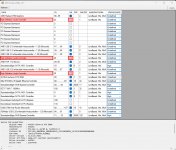
Es teilen sich High Definition Audio-Controller (25) und Standardmäßiger SATA AHCI-Controller (20-28) die IRQ.
Msi.jpg
Aktiviere für alle 3 High Definition Audio-Controller das Msi Protokoll.
Msi aktivieren.jpg

Hast du für die iGPU dem AMD Grafiktreiber installiert? Deaktiviere mal zum testen im UEFI die iGPU.

Lass die "Automatische Erkennung und Installation von Treiber-Updates für AMD" mal durchlaufen, da ist nicht nur der iGPU Treiber mit dabei, auch Treiber für die CPU und Chipset!

Der USB Switch ist noch angeschlossen? Bei der Fehlersuche benutzt ihn bitte nicht.
 
Zuletzt bearbeitet:
Hab die drei auf MSI umgestellt.
Die Interne GPU deaktiviert.
Witzigerweise hab eich nun nur noch zwei High Definition Audio Controller

1746027440295.png


Auch scheinen sich die IRQs nun nicht mehr zu überschneiden. Aber die werden doch bei jedem Boot neu verteilt oder? Zumindest waren die IRQs schon anders als ich deinem Hinweis nachgehen wollte.

USB Switch ist aktuell nicht angeschlossen. Internes LAN ist auch noch deaktviert.
Im Grunde hat der Rechner Maus und Tastatur zu handeln. Die zwei RAM Riegel. Die zwei NVMe SSDs und die Grafikkarte.

LantencyMon wirft nach wie vor nach kurzer Zeit ziemlich Krude werte Raus. Eben vor dem Reboot hatte ich 3000er Werte für DPC verursacht durch die Nvidia Grafikkartentreiber.

Ich werde gleich nochmal einen frischen User Testen. Und danach mal eine alte Grafikkarte einbauen.

Chipsatztreiber von AMD habe ich damals zu beginn installiert und waren auch nochmal von mir in Folge des Debuggings auf die aktuellste Version gebracht worden.

Sogar die Version direkt von AMD getestet und nicht die letzte die ASRock freigeben hat bzw bereitstellt.
 
In den Grafikkarten sind für das HDMI und Displayport Vorgaben ein Sound mit dabei. Beide müssen Sound übertragen können und dabei den Kopierschutz HD+ beherrschen.
Wenn du die iGPU im UEFI deaktiviert fehlt deshalb auch ein Audioausgang.

Wenn jetzt die Idee mit den Benutzerkonto und ein älteren Treiber für die Grafikkarte nicht hilft, weis ich auch nicht weiter.
Denk nur dran, das eine 5090 mindestens den 572.16 braucht, ältere sind NICHT für die 5000 Reihe freigegeben. Sie können Instabil sein und unterstützen nicht alle Funktionen der Serie.

Wenn alles nicht mehr hilft, könnte eine Neuinstallation von Windows die letzte Rettung sein.
Erstelle mit Rufus ein USB-Boot-Stick und nutze ein Bloatware freie Windows Version.
 
Zurück