BlueScreen wie jetzt weiter

Ok, habe zunächst versucht mit dem anderen NB(Win7) die SSD über eSata zu formatieren. Da kam immer die Fehlermeldung "Formatierung konnte nicht abgeschlossen werden".
Habe dann versucht mit GParted zu formatieren.
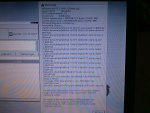
Schon vor dem Formatieren war folgende Warnung zu sehen:
Foto-0011.jpg
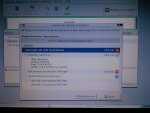
Habe dann versucht zu formatieren (ntfs), was aber nicht möglich war:
Foto-0013.jpg
Habe dann nochmal chkdsk drüberlaufen lassen wobei folgende Fehlermeldung kam:
Der Typ des Dateisystems ist NTFS.
Der erste NTFS-Startsektor ist nicht lesbar oder beschädigt.
Es wird stattdessen der zweite NTFS-Startsektor gelesen.
Alle NTFS-Startsektoren sind nicht lesbar oder beschädigt. Kein Fortsetzen möglich.

SSD einschicken?
 
Hallo ich bin der Micha und wollte gerne wissen ob ihr mir bei meinem Problem helfen könnt ,habe einen neuen Rechner von Otto gekauft und habe jetzt andauernd Bluescreen habe jetzt die minidump ausgelesen und vieleicht könnt ihr mir sagen wo der fehler ist:
Microsoft (R) Windows Debugger Version 6.2.8229.0 AMD64
Copyright (c) Microsoft Corporation. All rights reserved.

Loading Dump File [C:\Windows\Minidump\042212-23805-01.dmp]
Mini Kernel Dump File: Only registers and stack trace are available
Symbol search path is: SRV*C:\symbols*http://msdl.microsoft.com/download/symbols
Executable search path is:
Windows 7 Kernel Version 7601 (Service Pack 1) MP (4 procs) Free x64
Product: WinNt, suite: TerminalServer SingleUserTS Personal
Built by: 7601.17790.amd64fre.win7sp1_gdr.120305-1505
Machine Name:
Kernel base = 0xfffff800`02c5f000 PsLoadedModuleList = 0xfffff800`02ea3650
Debug session time: Sun Apr 22 13:16:50.934 2012 (UTC + 2:00)
System Uptime: 0 days 0:02:20.682
Loading Kernel Symbols
...............................................................
................................................................
.......................
Loading User Symbols
Loading unloaded module list
....
TRIAGER: Could not open triage file : C:\Program Files (x86)\Windows Kits\8.0\Debuggers\x64\triage\oca.ini, error 2
TRIAGER: Could not open triage file : C:\Program Files (x86)\Windows Kits\8.0\Debuggers\x64\winxp\triage.ini, error 2
*******************************************************************************
* *
* Bugcheck Analysis *
* *
*******************************************************************************
Use !analyze -v to get detailed debugging information.
BugCheck 101, {31, 0, fffff88003163180, 2}
Probably caused by : Unknown_Image ( ANALYSIS_INCONCLUSIVE )
Followup: MachineOwner
---------
0: kd> !analyze -v
*******************************************************************************
* *
* Bugcheck Analysis *
* *
*******************************************************************************
CLOCK_WATCHDOG_TIMEOUT (101)
An expected clock interrupt was not received on a secondary processor in an
MP system within the allocated interval. This indicates that the specified
processor is hung and not processing interrupts.
Arguments:
Arg1: 0000000000000031, Clock interrupt time out interval in nominal clock ticks.
Arg2: 0000000000000000, 0.
Arg3: fffff88003163180, The PRCB address of the hung processor.
Arg4: 0000000000000002, 0.
Debugging Details:
------------------

BUGCHECK_STR: CLOCK_WATCHDOG_TIMEOUT_4_PROC
CUSTOMER_CRASH_COUNT: 1
DEFAULT_BUCKET_ID: WIN7_DRIVER_FAULT
PROCESS_NAME: System
CURRENT_IRQL: d
STACK_TEXT:
fffff880`009a9768 fffff800`02d32a3a : 00000000`00000101 00000000`00000031 00000000`00000000 fffff880`03163180 : nt!KeBugCheckEx
fffff880`009a9770 fffff800`02ce57f7 : 00000000`00000000 fffff800`00000002 00000000`00002711 fffff800`02cdef43 : nt! ?? ::FNODOBFM::`string'+0x4e2e
fffff880`009a9800 fffff800`02c20895 : fffff800`02c46460 fffff880`009a99b0 fffff800`02c46460 00000000`00000000 : nt!KeUpdateSystemTime+0x377
fffff880`009a9900 fffff800`02cd81d3 : 00000000`edcdee77 fffff800`02e50e80 fffff800`02e50e80 00000000`00000010 : hal!HalpHpetClockInterrupt+0x8d
fffff880`009a9930 fffff800`02d11677 : fffff800`02e50e80 00000000`00000001 00000000`00000000 00000000`00000000 : nt!KiInterruptDispatchNoLock+0x163
fffff880`009a9ac0 fffff800`02ce0b0c : 00000000`00000000 fffff880`009a9bf8 00000000`00000000 00000000`00000000 : nt!KxFlushEntireTb+0x93
fffff880`009a9b00 fffff800`02ca2819 : 00000000`00000010 00000000`00000000 fffffa80`0169c4d0 00000000`00000010 : nt!KeFlushMultipleRangeTb+0x28c
fffff880`009a9bd0 fffff800`02ca3067 : 00000000`00078900 00000000`0000000f 00000000`00000000 00000000`00000000 : nt!MiZeroPageChain+0x14e
fffff880`009a9c10 fffff800`02f75fda : fffffa80`033e2ac0 00000000`00000080 fffffa80`033e2040 fffff800`02ccc9b9 : nt!MmZeroPageThread+0x83a
fffff880`009a9d40 fffff800`02ccc9c6 : fffff800`02e50e80 fffffa80`033e2ac0 fffff800`02e5ecc0 00000000`00000000 : nt!PspSystemThreadStartup+0x5a
fffff880`009a9d80 00000000`00000000 : 00000000`00000000 00000000`00000000 00000000`00000000 00000000`00000000 : nt!KiStartSystemThread+0x16

STACK_COMMAND: kb
SYMBOL_NAME: ANALYSIS_INCONCLUSIVE
FOLLOWUP_NAME: MachineOwner
MODULE_NAME: Unknown_Module
IMAGE_NAME: Unknown_Image
DEBUG_FLR_IMAGE_TIMESTAMP: 0
FAILURE_BUCKET_ID: X64_CLOCK_WATCHDOG_TIMEOUT_4_PROC_ANALYSIS_INCONCLUSIVE
BUCKET_ID: X64_CLOCK_WATCHDOG_TIMEOUT_4_PROC_ANALYSIS_INCONCLUSIVE
Followup: MachineOwner
 
@beefy: Jupp, schicke die SSD ein.

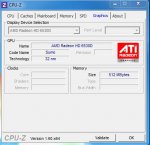
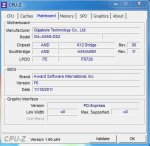
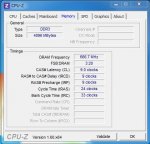
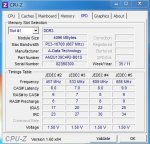
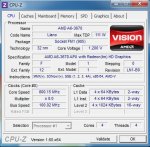
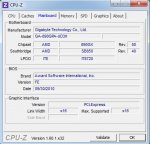
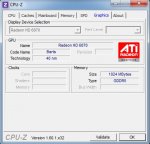
@Micha1975: Poste bitte noch ein paar Screenshots von CPU-Z (Reiter Mainboard, CPU, Memory, SPD und Graphics).
 
Ok hier sind die Screenshots:
 

Anhänge

  • grafik.JPG
    grafik.JPG
    38,9 KB · Aufrufe: 89
  • mainboard.JPG
    mainboard.JPG
    44,2 KB · Aufrufe: 64
  • memory.JPG
    memory.JPG
    44,8 KB · Aufrufe: 67
  • spd.JPG
    spd.JPG
    51,5 KB · Aufrufe: 73
  • Unbenannt.JPG
    Unbenannt.JPG
    55,5 KB · Aufrufe: 80
Der von dir gepostete Stop 0x101 Fehler (ist es immer der gleiche Stopfehler, der bei einem Bluescreen angezeigt wird?) tritt i.d.R. durch Biosprobleme (z.B. Spannungseinstellungen CPU), fehlerhafte Treiber, Temperaturprobleme oder defekte Hardware (insbes. Mainboard, CPU, Netzteil) auf.

Temperaturprobleme können insbes. durch Staub, etc. auftreten, was bei einem neu gekauften PC aber wohl eher ausgeschlossen werden kann. Ob ein Temperaturproblem vorliegt, kannst du einfach mit Prime95 und CoreTemp nachprüfen. Prime95 ca. eine halbe Stunde laufen lassen und mit CoreTemp die CPU Temperatur überwachen (hier sind die max. Temperaturwerte interessant).

Sollte hier alles im grünen Bereich liegen, wäre eine weitere Option das aktuellste Bios auf das Board zu flashen.
Für dein Board (bitte nachkontrollieren, welche Revision du hast -> steht auf dem Board) -es ist vermutlich Rev. 1.0- steht ein aktuelleres Bios zur Verfügung: GIGABYTE - Motherboard - Socket FM1 - GA-A55M-DS2 (rev. 1.0) (F7 Update APU AGESA 1.1.0.7). Diese Update für eine Llano CPU könnte hilfreich sein.

Gib aber erst mal bescheid, ob die Stopfehlercodes variieren, oder immer der Stop 0x101 Fehler auftritt und überprüfe die Temperatur.
 
Hallo, hab mir das Forum nun schon öfters durchgelesen, was mir leider nocht nicht so viel geholfen hat, darum habe ich mich nun angemeldet um das Problem mal zu posten.

Das hat mir das Windbg ausgespuckt.

*******************************************************************************
* *
* Bugcheck Analysis *
* *
*******************************************************************************

SYSTEM_SERVICE_EXCEPTION (3b)
An exception happened while executing a system service routine.
Arguments:
Arg1: 00000000c0000005, Exception code that caused the bugcheck
Arg2: fffff880010d264d, Address of the instruction which caused the bugcheck
Arg3: fffff88003c2ba20, Address of the context record for the exception that caused the bugcheck
Arg4: 0000000000000000, zero.

Debugging Details:
------------------

TRIAGER: Could not open triage file : C:\Program Files (x86)\Windows Kits\8.0\Debuggers\x64\triage\modclass.ini, error 2

EXCEPTION_CODE: (NTSTATUS) 0xc0000005 - Die Anweisung in 0x%08lx verweist auf Speicher 0x%08lx. Der Vorgang %s konnte nicht im Speicher durchgef hrt werden.

FAULTING_IP:
fltmgr!FltpProcessOperationStatusCallbacks+2d
fffff880`010d264d 488b03 mov rax,qword ptr [rbx]

CONTEXT: fffff88003c2ba20 -- (.cxr 0xfffff88003c2ba20)
rax=0000000000000000 rbx=74894808245c8948 rcx=fffff88000c2c530
rdx=0000000000000000 rsi=fffffa80067458d0 rdi=fffff88000c2c530
rip=fffff880010d264d rsp=fffff88003c2c400 rbp=0000000000000000
r8=0000000000000000 r9=0000000000000727 r10=fffff880012a4700
r11=fffff88003c2c218 r12=fffffa80066fa230 r13=0000000000000000
r14=0000000000000008 r15=fffff88000c2c530
iopl=0 nv up ei pl nz na po nc
cs=0010 ss=0018 ds=002b es=002b fs=0053 gs=002b efl=00010206
fltmgr!FltpProcessOperationStatusCallbacks+0x2d:
fffff880`010d264d 488b03 mov rax,qword ptr [rbx] ds:002b:74894808`245c8948=????????????????
Resetting default scope

CUSTOMER_CRASH_COUNT: 1

DEFAULT_BUCKET_ID: WIN7_DRIVER_FAULT

BUGCHECK_STR: 0x3B

PROCESS_NAME: svchost.exe

CURRENT_IRQL: 0

LAST_CONTROL_TRANSFER: from 0000000000000000 to fffff880010d264d

STACK_TEXT:
fffff880`03c2c400 00000000`00000000 : 00000000`00000000 00000000`00000000 00000000`00000000 00000000`00000000 : fltmgr!FltpProcessOperationStatusCallbacks+0x2d


FOLLOWUP_IP:
fltmgr!FltpProcessOperationStatusCallbacks+2d
fffff880`010d264d 488b03 mov rax,qword ptr [rbx]

SYMBOL_STACK_INDEX: 0

SYMBOL_NAME: fltmgr!FltpProcessOperationStatusCallbacks+2d

FOLLOWUP_NAME: MachineOwner

MODULE_NAME: fltmgr

IMAGE_NAME: fltmgr.sys

DEBUG_FLR_IMAGE_TIMESTAMP: 4ce7929c

STACK_COMMAND: .cxr 0xfffff88003c2ba20 ; kb

FAILURE_BUCKET_ID: X64_0x3B_fltmgr!FltpProcessOperationStatusCallbacks+2d

BUCKET_ID: X64_0x3B_fltmgr!FltpProcessOperationStatusCallbacks+2d


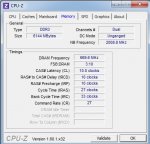
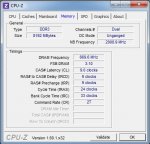
und nun noch ein paar screenshots von cpu-z, ich tippe darauf das der ram zu hoch von der nb-frequenzy ist, bin mir aber nicht sicher, kenne mich nicht so gut damit aus. Habe den Pc so wie die Einstellungen sind nun seit 1 Jahr laufen, so alt ist er auch erst, und leider keine Garantie mehr.

Freue mich auf jede Hilfreiche Antwort :)

PS: hatte bereits mehrer fehlercodes, Fehlercode a ist der aktuellste, davor war es 3b, diesen kann ich jedocht nicht mit dem windbg öffnen. Dies ist der Vorvorletzte, auch von Heute. Ebenfalls 3b.
 

Anhänge

  • cpu.jpg
    cpu.jpg
    144,6 KB · Aufrufe: 44
  • ram.jpg
    ram.jpg
    106,4 KB · Aufrufe: 47
  • mainboard.jpg
    mainboard.jpg
    99,4 KB · Aufrufe: 41
  • grafik.jpg
    grafik.jpg
    83,1 KB · Aufrufe: 39
Zuletzt bearbeitet:
Und hier noch der a Fehlercode.

IRQL_NOT_LESS_OR_EQUAL (a)
An attempt was made to access a pageable (or completely invalid) address at an
interrupt request level (IRQL) that is too high. This is usually
caused by drivers using improper addresses.
If a kernel debugger is available get the stack backtrace.
Arguments:
Arg1: 0000000000000038, memory referenced
Arg2: 0000000000000002, IRQL
Arg3: 0000000000000000, bitfield :
bit 0 : value 0 = read operation, 1 = write operation
bit 3 : value 0 = not an execute operation, 1 = execute operation (only on chips which support this level of status)
Arg4: fffff80003107327, address which referenced memory

Debugging Details:
------------------

TRIAGER: Could not open triage file : C:\Program Files (x86)\Windows Kits\8.0\Debuggers\x64\triage\modclass.ini, error 2

READ_ADDRESS: GetPointerFromAddress: unable to read from fffff80003309100
GetUlongFromAddress: unable to read from fffff800033091c0
0000000000000038 Nonpaged pool

CURRENT_IRQL: 2

FAULTING_IP:
nt!MiResolveMappedFileFault+97
fffff800`03107327 418b4138 mov eax,dword ptr [r9+38h]

CUSTOMER_CRASH_COUNT: 1

DEFAULT_BUCKET_ID: WIN7_DRIVER_FAULT

BUGCHECK_STR: 0xA

PROCESS_NAME: spoolsv.exe

TRAP_FRAME: fffff88008e19630 -- (.trap 0xfffff88008e19630)
NOTE: The trap frame does not contain all registers.
Some register values may be zeroed or incorrect.
rax=0000000000000001 rbx=0000000000000000 rcx=0000000000000000
rdx=0000000000000000 rsi=0000000000000000 rdi=0000000000000000
rip=fffff80003107327 rsp=fffff88008e197c0 rbp=fffff88008e19840
r8=fffff8a00225d9c0 r9=0000000000000000 r10=fffffa8008c48a28
r11=0000058000000000 r12=0000000000000000 r13=0000000000000000
r14=0000000000000000 r15=0000000000000000
iopl=0 nv up ei ng nz ac po nc
nt!MiResolveMappedFileFault+0x97:
fffff800`03107327 418b4138 mov eax,dword ptr [r9+38h] ds:00000000`00000038=????????
Resetting default scope

LAST_CONTROL_TRANSFER: from fffff800030d9769 to fffff800030da1c0

STACK_TEXT:
fffff880`08e194e8 fffff800`030d9769 : 00000000`0000000a 00000000`00000038 00000000`00000002 00000000`00000000 : nt!KeBugCheckEx
fffff880`08e194f0 fffff800`030d83e0 : fffff8a0`02276b20 00000000`00000000 fffff880`08e19690 fffff8a0`0225d9c0 : nt!KiBugCheckDispatch+0x69
fffff880`08e19630 fffff800`03107327 : 00000000`00401802 00000000`00000000 00000000`00000000 00000001`b5d4867e : nt!KiPageFault+0x260
fffff880`08e197c0 fffff800`030f825c : fa8008c4`8a280460 fffffa80`08e99ec8 fffff8a0`0225d9c0 f8a00225`d9c00400 : nt!MiResolveMappedFileFault+0x97
fffff880`08e19920 fffff800`030f6ac3 : 00000000`0012e7b4 000007fe`f984d478 fffff683`ff7cc268 fffffa80`08e99ec8 : nt!MiResolveProtoPteFault+0x47c
fffff880`08e199b0 fffff800`030e6769 : 00000000`00000000 000007fe`f984d478 ffffffff`ffffffff 00000000`00000000 : nt!MiDispatchFault+0x1c3
fffff880`08e19ac0 fffff800`030d82ee : 00000000`00000008 000007fe`f984d478 00000000`03fbfb01 00000000`00000001 : nt!MmAccessFault+0x359
fffff880`08e19c20 000007fe`f984d478 : 00000000`00000000 00000000`00000000 00000000`00000000 00000000`00000000 : nt!KiPageFault+0x16e
00000000`03fbfb68 00000000`00000000 : 00000000`00000000 00000000`00000000 00000000`00000000 00000000`00000000 : 0x7fe`f984d478


STACK_COMMAND: kb

FOLLOWUP_IP:
nt!MiResolveMappedFileFault+97
fffff800`03107327 418b4138 mov eax,dword ptr [r9+38h]

SYMBOL_STACK_INDEX: 3

SYMBOL_NAME: nt!MiResolveMappedFileFault+97

FOLLOWUP_NAME: MachineOwner

MODULE_NAME: nt

DEBUG_FLR_IMAGE_TIMESTAMP: 4f76721c

IMAGE_NAME: memory_corruption

FAILURE_BUCKET_ID: X64_0xA_nt!MiResolveMappedFileFault+97

BUCKET_ID: X64_0xA_nt!MiResolveMappedFileFault+97
 
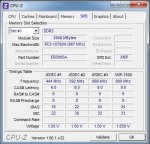
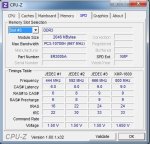
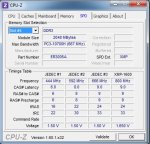
Poste bitte noch ein paar Screenshots von CPU-Z (Reiter SPD). Einen Screenshot von jedem Slot (in SPD Screen auswählbar). Bei 6GB RAM sind das dann 3 oder 4 RAM Riegel? 2x2GB + 2x1GB, oder 3x2GB?

Was bei den Timings zunächst auffällt ist, dass der Subtimings Wert tRC für die Latenzen 10-10-10-27 zu niedrig eingestellt ist. Dies wäre ein mögliche Fehlerquelle. Der tRC Wert müsste bei den anliegenden Latenzen mind. 37 clocks betragen.

Poste aber erst mal die Screens vom Reiter "SPD", um die Profile der RAM zu sehen.
 
hab jetzt mal nur zum komplettieren wieder alle 4 Riegel reingetan, 4x2gb, allerdings läuft er mit allen vieren am instabilsten. und habe nen neuen windbg im angebot^^

*******************************************************************************
* *
* Bugcheck Analysis *
* *
*******************************************************************************

SYSTEM_THREAD_EXCEPTION_NOT_HANDLED_M (1000007e)
This is a very common bugcheck. Usually the exception address pinpoints
the driver/function that caused the problem. Always note this address
as well as the link date of the driver/image that contains this address.
Some common problems are exception code 0x80000003. This means a hard
coded breakpoint or assertion was hit, but this system was booted
/NODEBUG. This is not supposed to happen as developers should never have
hardcoded breakpoints in retail code, but ...
If this happens, make sure a debugger gets connected, and the
system is booted /DEBUG. This will let us see why this breakpoint is
happening.
Arguments:
Arg1: ffffffffc0000005, The exception code that was not handled
Arg2: fffff800031af617, The address that the exception occurred at
Arg3: fffff880029b0218, Exception Record Address
Arg4: fffff880029afa70, Context Record Address

Debugging Details:
------------------

TRIAGER: Could not open triage file : C:\Program Files (x86)\Windows Kits\8.0\Debuggers\x64\triage\modclass.ini, error 2

EXCEPTION_CODE: (NTSTATUS) 0xc0000005 - Die Anweisung in 0x%08lx verweist auf Speicher 0x%08lx. Der Vorgang %s konnte nicht im Speicher durchgef hrt werden.

FAULTING_IP:
nt!ExAllocatePoolWithTag+537
fffff800`031af617 48895808 mov qword ptr [rax+8],rbx

EXCEPTION_RECORD: fffff880029b0218 -- (.exr 0xfffff880029b0218)
ExceptionAddress: fffff800031af617 (nt!ExAllocatePoolWithTag+0x0000000000000537)
ExceptionCode: c0000005 (Access violation)
ExceptionFlags: 00000000
NumberParameters: 2
Parameter[0]: 0000000000000001
Parameter[1]: 0000000000000008
Attempt to write to address 0000000000000008

CONTEXT: fffff880029afa70 -- (.cxr 0xfffff880029afa70)
rax=0000000000000000 rbx=fffffa800517e880 rcx=fffff8a000b4f010
rdx=0000000000000001 rsi=0000000000000061 rdi=0000000000000001
rip=fffff800031af617 rsp=fffff880029b0450 rbp=0000000000001000
r8=0000000000000001 r9=fffffa800517e880 r10=fffffa800517e148
r11=0000000000000001 r12=fffffa800517e140 r13=0000000000000000
r14=fffffa8007781b50 r15=000000004e506456
iopl=0 nv up ei pl zr na po nc
cs=0010 ss=0018 ds=002b es=002b fs=0053 gs=002b efl=00010246
nt!ExAllocatePoolWithTag+0x537:
fffff800`031af617 48895808 mov qword ptr [rax+8],rbx ds:002b:00000000`00000008=????????????????
Resetting default scope

CUSTOMER_CRASH_COUNT: 1

PROCESS_NAME: csrss.exe

CURRENT_IRQL: 0

ERROR_CODE: (NTSTATUS) 0xc0000005 - Die Anweisung in 0x%08lx verweist auf Speicher 0x%08lx. Der Vorgang %s konnte nicht im Speicher durchgef hrt werden.

EXCEPTION_PARAMETER1: 0000000000000001

EXCEPTION_PARAMETER2: 0000000000000008

WRITE_ADDRESS: GetPointerFromAddress: unable to read from fffff800032b3100
GetUlongFromAddress: unable to read from fffff800032b31c0
0000000000000008 Nonpaged pool

FOLLOWUP_IP:
dxgkrnl!DMMVIDPNPRESENTPATH::SetGammaRamp+a2
fffff880`04974fc6 488bf8 mov rdi,rax

BUGCHECK_STR: 0x7E

DEFAULT_BUCKET_ID: NULL_CLASS_PTR_DEREFERENCE

LAST_CONTROL_TRANSFER: from fffff88004974fc6 to fffff800031af617

STACK_TEXT:
fffff880`029b0450 fffff880`04974fc6 : 00000000`00000001 fffff880`029b0910 fffff8a0`0cd7ef30 00000000`00000000 : nt!ExAllocatePoolWithTag+0x537
fffff880`029b0540 fffff880`049534b0 : fffff8a0`100fdb00 fffff8a0`100fdb00 fffff8a0`0d2862b0 00000000`000007ff : dxgkrnl!DMMVIDPNPRESENTPATH::SetGammaRamp+0xa2
fffff880`029b0580 fffff880`048e39f0 : 00000000`00000000 fffffa80`07e2a000 00000000`00000004 00000000`00000bc1 : dxgkrnl!DmmUpdateGammaRampOnAllClientVidPnPathsFromSource+0x2a4
fffff880`029b08f0 fffff880`048e3ea2 : fffff8a0`0fc31010 ffffffff`fffd74f6 00000000`00000000 00000000`00000799 : dxgkrnl!DXGADAPTER::SetGammaRamp+0x14c
fffff880`029b0940 fffff960`00785e75 : ffffffff`00000004 00000000`00000002 00000000`00000005 fffffa80`00000000 : dxgkrnl!DxgkCddSetGammaRamp+0x1ba
fffff880`029b09b0 ffffffff`00000004 : 00000000`00000002 00000000`00000005 fffffa80`00000000 00000000`c0001700 : cdd+0x5e75
fffff880`029b09b8 00000000`00000002 : 00000000`00000005 fffffa80`00000000 00000000`c0001700 00000000`00000000 : 0xffffffff`00000004
fffff880`029b09c0 00000000`00000005 : fffffa80`00000000 00000000`c0001700 00000000`00000000 00000000`00000000 : 0x2
fffff880`029b09c8 fffffa80`00000000 : 00000000`c0001700 00000000`00000000 00000000`00000000 fffff880`029b0ad0 : 0x5
fffff880`029b09d0 00000000`c0001700 : 00000000`00000000 00000000`00000000 fffff880`029b0ad0 00000000`fffff08d : 0xfffffa80`00000000
fffff880`029b09d8 00000000`00000000 : 00000000`00000000 fffff880`029b0ad0 00000000`fffff08d fffffa80`052ba1e0 : 0xc0001700


SYMBOL_STACK_INDEX: 1

SYMBOL_NAME: dxgkrnl!DMMVIDPNPRESENTPATH::SetGammaRamp+a2

FOLLOWUP_NAME: MachineOwner

MODULE_NAME: dxgkrnl

IMAGE_NAME: dxgkrnl.sys

DEBUG_FLR_IMAGE_TIMESTAMP: 4ce799fa

STACK_COMMAND: .cxr 0xfffff880029afa70 ; kb

FAILURE_BUCKET_ID: X64_0x7E_dxgkrnl!DMMVIDPNPRESENTPATH::SetGammaRamp+a2

BUCKET_ID: X64_0x7E_dxgkrnl!DMMVIDPNPRESENTPATH::SetGammaRamp+a2
 

Anhänge

  • ram2.jpg
    ram2.jpg
    108,5 KB · Aufrufe: 46
  • slot1.jpg
    slot1.jpg
    124,9 KB · Aufrufe: 52
  • slot2.jpg
    slot2.jpg
    126 KB · Aufrufe: 53
  • slot3.jpg
    slot3.jpg
    122,8 KB · Aufrufe: 52
  • slot4.jpg
    slot4.jpg
    128,4 KB · Aufrufe: 38
Baue testweise nur zwei RAM Riegel ein und teste, ob das System dann stabil läuft (teste "beide RAM-Kits" einzeln).

Überprüfe den RAM auch noch unbedingt mit Memtest86+ auf Fehler.
 
Hab den Memtest jetzt ca 2 stunden laufen lassen, was mich wundert ich hab 8gb, 2gb davon rechne ich mal großzügig fürs Win7 zu, bekomme aber dennoch nur 4095mb in den test zum testen? Ist das Normal?

PS: Pc lief den test gut durch, habe nebenbei abundzu mal noch im internet etwas machen müssen.

Hatte die Riegel schon getrennt durchgetestet, allerdings noch nicht durchgehend. Riegel 1-4
1+2 = absturz
1+3 = absturz
1+2+4 = absturz
2+3+4 = absturz

werde mal noch 3+4 und 1+4 testen/ und 2+3.

Frage: Wie kann es sein das der Pc abspackt, also abstürzt, obwohl er im standby war? also nicht mal an?
 

Anhänge

  • ramtest.jpg
    ramtest.jpg
    97 KB · Aufrufe: 63
So, war grade einkaufen (ich weiß tut nichts zur sache^^) hab derweile memtest weiterlaufen lassen, is jetzt bei beiden auf 215% und immernoch 0 errors. Zwischenstand er läuft immernoch mit allen 4 Riegeln :/.

---------- Posting hinzugefügt am 23.05.2012 um 14:57 ----------

Habe gerade Prime95 geladen, und hab es mal standartmäßig laufen lassen, nach ca 5minuten bluescreen mit folgendem windbg.

TRIAGER: Could not open triage file : C:\Program Files (x86)\Windows Kits\8.0\Debuggers\x64\triage\modclass.ini, error 2

BUGCHECK_STR: 0x124_AuthenticAMD

CUSTOMER_CRASH_COUNT: 1

DEFAULT_BUCKET_ID: WIN7_DRIVER_FAULT

PROCESS_NAME: prime95.exe

CURRENT_IRQL: f

STACK_TEXT:
fffff880`02f6cb08 fffff800`03616a3b : 00000000`00000124 00000000`00000000 fffffa80`07cd0028 00000000`b67a4000 : nt!KeBugCheckEx
fffff880`02f6cb10 fffff800`031a8b43 : 00000000`00000001 fffffa80`07d1aa60 00000000`00000000 fffffa80`07d1aab0 : hal!HalBugCheckSystem+0x1e3
fffff880`02f6cb50 fffff800`03616700 : 00000000`00000728 fffffa80`07d1aa60 fffff880`02f6ceb0 00000000`02ae0700 : nt!WheaReportHwError+0x263
fffff880`02f6cbb0 fffff800`03616052 : fffffa80`07d1aa60 fffff880`02f6ceb0 fffffa80`07d1aa60 00000000`00000000 : hal!HalInitializeBios+0x13e8
fffff880`02f6cd00 fffff800`03609e8f : 00000000`040e2000 00000000`00000001 fffff880`02f6cf30 00000000`00000000 : hal!HalInitializeBios+0xd3a
fffff880`02f6cd40 fffff800`03099aac : 00000000`00000000 00000000`00000000 00000000`00000000 00000000`00000000 : hal!HalHandleMcheck+0x47
fffff880`02f6cd70 fffff800`03099913 : 00000000`00000000 00000000`00000000 00000000`00000000 00000000`00000000 : nt!KxMcheckAbort+0x6c
fffff880`02f6ceb0 00000001`40684a2b : 00000000`00000000 00000000`00000000 00000000`00000000 00000000`00000000 : nt!KiMcheckAbort+0x153
00000000`0455e640 00000000`00000000 : 00000000`00000000 00000000`00000000 00000000`00000000 00000000`00000000 : 0x1`40684a2b


STACK_COMMAND: kb

FOLLOWUP_NAME: MachineOwner

MODULE_NAME: AuthenticAMD

IMAGE_NAME: AuthenticAMD

DEBUG_FLR_IMAGE_TIMESTAMP: 0

FAILURE_BUCKET_ID: X64_0x124_AuthenticAMD__UNKNOWN

BUCKET_ID: X64_0x124_AuthenticAMD__UNKNOWN

Followup: MachineOwner
 
Lass die Memtest Prüfung außerhalb von Windows laufen. Lade dazu am Besten die USB-Key Version runter, starte sie und wähle den (bereits angeschlossenen) USB Stick aus. Memtest richtet sich dann auf dem USB Stick bootfähig ein.

Starte den PC neu und boote über den USB Stick. Lass dann die daraufhin startende Memtest-Prüfung mind. 4 Std. laufen (am Besten über Nacht).

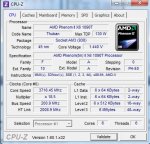
Außerdem...nimm die Übertaktung der CPU zurück!
 
Mh habs jetzt auf cd gebrannt das img vom memtest zum booten, hoffe das geht auch, zudem die Übertaktung is Voreingestellt, ich mach sie aber auf 3000 runter, sollte reichen denk ich, weiß ja nich auf was der Normal steht. Das Prime95 hat das iwas zu sagen?
 
Die Standardeinstellung des Multiplikators ist 16. Taktfrequenz wäre dann 3200mhz.

Das Prime könnte ein Anzeichen dafür sein, dass die Übertaktung nicht stabil läuft. Wäre das der Fall sollte es mit den Standardeinstellungen keine Probleme bei Prime (und auch sonst keine Abstürze) mehr geben.
 
Zurück