zusammengebauter PC startet nicht

NetzNinja

Komplett-PC-Aufrüster(in)
Moin Zusammen!

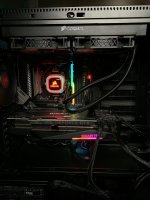
Ich baue mir meine Rechner seit win xp selber zusammen. Gestern habe ich meine Teile aufgebaut und das erste Mal in meinem Leben bekomme ich mein selbstgebautes System nicht hochgefahren - ich sehe rein gar nichts! Ich kann also nichtmal was im BIOS einstellen.
Ich habe bereits die PSU-Kabel mal getauscht (also die 8PIN-Kabel mal getauscht um eine Fehlerursache ausschließen zu können).

Die Komponenten sind:

RTX 3080 von Gigabyte
5800x Ryzen
MSI Tomahawk b550
Samsung Pro M.2 500gb (kein OS installiert)
H115i Corsair Pro
Be quiet 750Watt Titanium
Gskill DDR4 3600 2x8

Debug-LEDs zeigen nichts (manchmal die VGA LEDan, manchmal nicht) an. Die RAM Riegel habe ich schon verschieden platziert. Leider bekomme ich kein Bild auf meinen Schirm (weder via DP noch HDMI auf einen DELL25er Alienware mit 240hz)
Jemand noch eine Idee was ich versuchen könnte? Alles Komponenten sind nagelneu und ich kann leider keine anderen Teile einsetzen um Fehlerursachen zu finden.

Liebe Grüße!

PS: Frustlevel 9000!
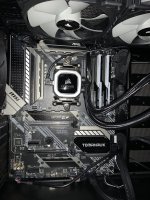
 

Anhänge

  • IMG_4396.JPG
    IMG_4396.JPG
    2,9 MB · Aufrufe: 60
  • IMG_4393.JPG
    IMG_4393.JPG
    1,4 MB · Aufrufe: 56
Du musst wahrscheinliche in Biosupdate machen, da das Board die neuen CPUs nur mit einer aktuelleren Biosversion unterstützt.

Updating BIOS with Flash BIOS Button
1. Please download the latest BIOS file that matches your motherboard model from the MSI® website.
2. Rename the BIOS file to MSI.ROM, and save it to the root of your USB flash drive.
3. Connect the power supply to CPU_PWR1 and ATX_PWR1. (No need to install CPU and memory.)
4. Plug the USB flash drive that contains the MSI.ROM file into the Flash BIOS Port on the rear I/O panel.
5. Press the Flash BIOS Button to flash BIOS, and the LED starts flashing.
6. The LED will be turned off when the process is completed.
 
Als erstes die GPU noch mal neu einsetzen.


Edit:

Ja stimmt, die 550er haben nicht unbedingt schon ein passendes Bios!
 
geht das bzw. wie kann ich das denn machen ohne bild?
Hab dir die Anleitung oben eingefügt, steht auch im Handbuch. (Seite 33 laut der mir vorliegenden PDF. Kapitelüberschrift lautet UEFI BIOS)

Edit Nr. 2:
Wenn es dann funktionieren sollte, es fehlen auch noch mind. 2 Schrauben. :stick:
 
Zuletzt bearbeitet:
Dann mach mal einen BIOS-Reset und teste die Riegel einzeln.

Wenn es nur ein Riegel ist, kommt der laut dem Handbuch in A2, also der zweite von links.
 
Hattest du den Ram und die CPU auf dem Mainboard beim flashen? Könntest mal versuchen beides rauszunehmen(Achtung nicht Ausersehen die CPU aus dem Sockel reißen dabei) und dann nochmal das Bios flashen.

oder das habe ich noch gefunden:

  1. Go to https://www.msi.com/Motherboard/support/ and download the latest bios
  2. Find all of your USB's in the house. You will likely need to change them out till one works. I found USB2 ones work better. Format the USB to FAT32 with all default settings in windows and leave the label/name blank.
  3. Copy the bios file to the usb and rename it to "msi.rom" ensuring it changes the filetype to rom (eg. not msi.rom.180).
  4. Remove RAM/GPU/USB headers etc from Motherboard so it is just CPU power and Motherboard power plugs installed. (Mine ended up working leaving the CPU and cooler installed)
  5. Turn the PSU switch off, remove the CMOS battery. Use a screwdriver to bridge the two pins of JBAT1 (page 14 of user guide will show you) for 15 seconds. Put the CMOS battery back in. (NOTE: Entres9 advised not to remove the CMOS in his instructions. I would try both methods if you have no luck)
  6. Turn the PSU switch back on. Insert your USB to the "flash bios" USB port on the back I/O. There is two ports there..so make sure you use the correct one which is labelled.
  7. Single press the Flash BIOS button with a pen / screwdriver and let the PC turn on. The EZ Debug CPU led will remain solid white and the motherboard fan will turn on.
  8. Look for a white blinking led where the USB is plugged in (on the inside of the motherboard). Your USB should not display any LED activity for a 5 seconds or so after the white LED is blinking...then your USB should light up with activity. If the white led turns solid after only 1 minute or so...it has likely not worked. Flashing the BIOS for me took about 5 minutes and both the USB and white led should be blinking the whole time.
If the white led goes solid and usb activity stops after only a short period (I would say one minute or so), my gut feeling would be the flash has not worked and you need to try another USB. It took 3 USB's for my white led to finally flash for 3-5 minutes.
 
ich habs jetzt aufgegeben... mit 9 verschiedenen usb sticks hat das flashen des bios nicht geklappt )-:

unfassbarer frust. Das Motherboard sende ich zurück. Ein Tip von euch, welches ich bestellen sollte :-) ??
 
Blöd gefragt, aber war das Monitorkabel am Mainboard oder an der Grafikkarte angeschlossen? Wäre nicht das erste mal, dass es versehentlich falsch angesteckt wurde.
 
Zurück