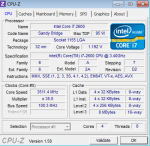
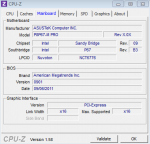
AW: Selbstgebautes PC stürtzt ab mit Bluescreen NICHT GELÖST!
Microsoft (R) Windows Debugger Version 6.12.0002.633 AMD64
Copyright (c) Microsoft Corporation. All rights reserved.
Loading Dump File [C:\Windows\Minidump\MEMORY.DMP]
Kernel Summary Dump File: Only kernel address space is available
WARNING: Whitespace at end of path element
Symbol search path is: SRV*c:\windows\symbols*
http://msdl.microsoft.com/download/symbols
Executable search path is: C:\Windows\System32
Windows 7 Kernel Version 7601 (Service Pack 1) MP (8 procs) Free x64
Product: WinNt, suite: TerminalServer SingleUserTS Personal
Built by: 7601.17514.amd64fre.win7sp1_rtm.101119-1850
Machine Name:
Kernel base = 0xfffff800`02e5a000 PsLoadedModuleList = 0xfffff800`0309fe90
Debug session time: Sun Oct 16 20:38:46.820 2011 (UTC + 2:00)
System Uptime: 0 days 0:38:54.695
Loading Kernel Symbols
...............................................................
................................................................
.......................
Loading User Symbols
Loading unloaded module list
......
The context is partially valid. Only x86 user-mode context is available.
The wow64exts extension must be loaded to access 32-bit state.
.load wow64exts will do this if you haven't loaded it already.
*******************************************************************************
* *
* Bugcheck Analysis *
* *
*******************************************************************************
Use !analyze -v to get detailed debugging information.
BugCheck 101, {19, 0, fffff88003117180, 6}
Probably caused by : Unknown_Image ( ANALYSIS_INCONCLUSIVE )
Followup: MachineOwner
---------
16.0: kd:x86> .reload
Loading Kernel Symbols
...............................................................
................................................................
.......................
Loading User Symbols
Loading unloaded module list
......
16.0: kd:x86> !analyze -v
*******************************************************************************
* *
* Bugcheck Analysis *
* *
*******************************************************************************
CLOCK_WATCHDOG_TIMEOUT (101)
An expected clock interrupt was not received on a secondary processor in an
MP system within the allocated interval. This indicates that the specified
processor is hung and not processing interrupts.
Arguments:
Arg1: 0000000000000019, Clock interrupt time out interval in nominal clock ticks.
Arg2: 0000000000000000, 0.
Arg3: fffff88003117180, The PRCB address of the hung processor.
Arg4: 0000000000000006, 0.
Debugging Details:
------------------
BUGCHECK_STR: CLOCK_WATCHDOG_TIMEOUT_8_PROC
DEFAULT_BUCKET_ID: VISTA_DRIVER_FAULT
CURRENT_IRQL: 0
STACK_TEXT:
00000000 00000000 00000000 00000000 00000000 0x0
STACK_COMMAND: kb
SYMBOL_NAME: ANALYSIS_INCONCLUSIVE
FOLLOWUP_NAME: MachineOwner
MODULE_NAME: Unknown_Module
IMAGE_NAME: Unknown_Image
DEBUG_FLR_IMAGE_TIMESTAMP: 0
BUCKET_ID: ZEROED_STACK
Followup: MachineOwner
Ich glaub jetzt ist das mit dem reload gegangen





 wenn der Treiber das nicht richtet, dann gibt es prinzipiell nur noch 2 Möglichkeiten: Mainboard und/oder CPU im Eimer.

 Hast uns sehr geholfen. Geh bitte wo anders trollen!