
Du verwendest einen veralteten Browser. Es ist möglich, dass diese oder andere Websites nicht korrekt angezeigt werden.
Du solltest ein Upgrade durchführen oder einen alternativen Browser verwenden.
Du solltest ein Upgrade durchführen oder einen alternativen Browser verwenden.
Pc startet nicht
- Ersteller mofo45
- Erstellt am

Dragon AMD
Volt-Modder(in)
Wie sieht deine hardware aus?
Dragon AMD
Volt-Modder(in)
Mach mal clear cmos.
Mfg
Mfg
Dragon AMD
Volt-Modder(in)
Nimm die batterie vom mainboard. Nur vorher den pc vom strom trennen.
Wenn die batterie raus ist und der pc vom strom dann mehrfach die powertaste drücken.
Dann batterie wieder rein und pc an strom und starten.
Mfg
Wenn die batterie raus ist und der pc vom strom dann mehrfach die powertaste drücken.
Dann batterie wieder rein und pc an strom und starten.
Mfg

Dragon AMD
Volt-Modder(in)
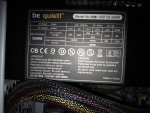
Ich tippe auf das netzteil.
Um welches handelt es sich?
Mfg
Um welches handelt es sich?
Mfg

MATRIX KILLER
Trockeneisprofi (m/w)
Ist das be quiet mit 500W noch aktuell & wenn ja welches Modell.
MATRIX KILLER
Trockeneisprofi (m/w)
Hast du ein anderes NT zum testen.
I
informatrixx
Guest
Einfache Sache, einmal kurz in Beep Codes Viewer geschaut, schon weiß man was los ist 
Da steht: RAM oder Speicherfehler.
Lösung: PC aufmachen, alle RAMs einmal aus- und wieder einstecken / oder Steckplätze tauschen
LG
Da steht: RAM oder Speicherfehler.
Lösung: PC aufmachen, alle RAMs einmal aus- und wieder einstecken / oder Steckplätze tauschen
LG
Zuletzt bearbeitet:
TE
TE

mofo45
PC-Selbstbauer(in)
Ich habe es probiert es geht leider immer noch nicht
Ich habe beide heraus genommen und gepustet das selbe bei der Graka und dann alles eingeschwenkt wieder.
Was könnte ich noch machen?
soll ich denn pc nochmal bis morgenfrüh vom Strom nehmen ?
Ich habe beide heraus genommen und gepustet das selbe bei der Graka und dann alles eingeschwenkt wieder.
Was könnte ich noch machen?
soll ich denn pc nochmal bis morgenfrüh vom Strom nehmen ?
Zuletzt bearbeitet:
I
informatrixx
Guest
nur mal einen RAM einstecken
G
Gast1705317003
Guest
Dieser warn Ton nennt man Beep Codes es singnalisiert das was nicht funktioniert und es kommt vom Mainboard.Allerdings weiss ich nicht was du für eine BIOS(Hersteller) verwendet wird(AMI,Award,Phoenix). 1mal lang und 3 mal kurz deutet darauf hin das entweder Grafikkarte oder Arbeitsspeicher nicht richtig funktionieren.Ich gib dir mal einen link mit den Codes.
Beep Codes - BIOS Fehler-Meldungen
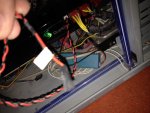
Und das Foto vom Stecker kann ich nichts erkennen,das sieht aus wie ein 2 Pinstecker vom Frontpanel zum Mainboard.Das steht aber auch drauf was es ist.
Beep Codes - BIOS Fehler-Meldungen
Und das Foto vom Stecker kann ich nichts erkennen,das sieht aus wie ein 2 Pinstecker vom Frontpanel zum Mainboard.Das steht aber auch drauf was es ist.
I
informatrixx
Guest
Also das Mainboard (ASUS P5QLE) hat ja ein AMI-BIOS.
Im "Beep Codes Viewer" steht dazu bei 1x lang, 3mal kurz:
vielleicht kann damit ja einer was anfangen?
Im "Beep Codes Viewer" steht dazu bei 1x lang, 3mal kurz:
Conventional/Extended memory failure - A fault has been detected in memory above 64KB. Try the steps below to resolve your issue:
(1) If you've recently added or tried to add additional memory to the computer and have started getting these beeps. Remove all new memory you've added to the computer. If the computer works fine after removing the new memory you're encountering either an incompatibility or defective new memory.
(2) Sometimes when the computer is moved and/or over time a memory stick can become loose causing the computer to be unable to read the memory or get errors as it's reading it. Try fixing this issue by opening the computer removing each of the memory sticks you have in the computer and then placing them back into the computer.
(3) If reseating the memory did not resolve the issue try swapping the location of the memory. If you have only one stick of memory in the computer try moving it to another slot and then boot the computer. If you have more than one stick of memory try removing all but one stick of memory and boot the computer. If this does not resolve the issue try removing that stick of memory and try one of the other sticks of memory.
(4) If you have access to another computer that uses the same type of memory try using its known good memory in your computer. If another computers memory works you know that you have faulty memory. If another computers memory does not work and it is compatible with your computer, unfortunately your motherboard and/or the slots on the motherboard are defective causing it to be unable to properly read the memory, which means the motherboard will have to be replaced.
vielleicht kann damit ja einer was anfangen?
Ähnliche Themen

- Antworten
- 7
- Aufrufe
- 640
- Antworten
- 5
- Aufrufe
- 549

- Antworten
- 9
- Aufrufe
- 704
- Antworten
- 24
- Aufrufe
- 1K

