Ist Windows verrückt geworden?

AW: Ist Windows verrückt geworden?

Ich würde den RAM im DualChannel-Modus lassen, allerdings die Command Rate im Bios auf 2T stellen.
Gib bescheid, ob die Probleme/Hänger damit besser werden.
 
AW: Ist Windows verrückt geworden?

Im BIOS finde ich keine Einstellmöglichkeit am RAM etwas einzustellen nicht mal an der CPU kann ich etwas machen.

Hatte beim starten Bluescreen, entpacken kann ich die Minidump nihct 7zip das Programm das ich benutze sagt mir es unterstütze das Format nicht.

Visual Studio 2010 will es öffnen, Windows hat dieses Programm als Standard gesetzt für diesen Dateitypen wie es aussieht.

Mit was kann ich die Datei öffnen? Hochladen als ANhang geht nicht Fprmat wird nicht unterstützt, was mich freut sonst kann man einfach Viren hochladen.

Wenn es so weiter geht installiere ich wieder Ubuntu bis ich eine nicht registrierte Windows XP Cd finde auch wenn es nicht einfach ist die zu finden.
Mir reicht es langsam mit Windows da bezahlt man soviel und bekommt nur ein OS das Fehler hat und dann Tonnenweise Updates installieren muss, der Windows Ordner wird nur immer grösser, wenn das so wieter geht, braucht Windows in 10 Jahren 100Gb Speicherplatz nur um Programme ausführen zu können.
Windows 98 war der Hammer da lief noch alles Super aber ab Windows Vista hat alles nur noch Fehler und es geht nur ums Geld, warum blieb Bill Gates denn nicht bei MS :daumen2:
 
AW: Ist Windows verrückt geworden?

Für das auslesen der Minidump benötigst du den Debugger (siehe Signatur).
Die Minidump kannst du hochladen, du musst sie nur vorher mit 7Zip einpacken (RAR oder ZIP Format).

Im Bios ins Menü "Advanced" -> "Jumper Free Configuration" -> "DRAM Timing Mode" -> einstellen auf [manuell]. Hier sollte dann die Command Rate eingestellt werden können. Als ich aber in das Handbuch deines Motherboards geschaut habe, musst ich feststellen, dass hier keine Möglichkeit gegeben ist, die Command Rate zu verändern (@Asus::motz:).

Schau aber bitte dennoch in den Bios Einstellungen nach, ob die option (CR, Command Rate, o.ä.) nicht doch aufgeführt ist (möglicherweise wurde sie bei einer aktuellen Bios Version nachgereicht - die aktuellste Version ist ja bereits auf deinem Board).

Wir können aber auch anderes versuchen die möglichen Kompatibilitätsprobleme zu umschiffen:
- "Advanced" -> "Jumper Free Configuration" -> "DRAM Frequency" auf [1067mhz] stellen.
- "Advanced" -> "Jumper Free Configuration" -> "Memory Overvoltage" auf [1,5V] stellen. Bleiben die Probleme erhöhe schrittweise die Einstellung bis max. 1,65V.
 
AW: Ist Windows verrückt geworden?

Ich an deiner Stelle würde das System Platt machen und neu Aufsetzen.
Das ist mit Sicherheit nicht so umständlich wie die Fehlersuche und außerdem
schließt du damit alle Fehler und krücken aus.

Ich persönlich traue Windows nicht, wenn es einmal zum huren beginnt...
Einfach neu machen und kein Ärger haben!

:daumen:

Ps. Hoffentlich hast du deine Daten auf einer anderen Partition / Festplatte :D:devil:
 
AW: Ist Windows verrückt geworden?

Ich an deiner Stelle würde das System Platt machen und neu Aufsetzen.
Das ist mit Sicherheit nicht so umständlich wie die Fehlersuche und außerdem
schließt du damit alle Fehler und krücken aus.

Ich persönlich traue Windows nicht, wenn es einmal zum huren beginnt...
Einfach neu machen und kein Ärger haben!

:daumen:

Ps. Hoffentlich hast du deine Daten auf einer anderen Partition / Festplatte :D:devil:

Er hat schon neuinstalliert! Ist blöd alles gerade.. :(
 
AW: Ist Windows verrückt geworden?

Also mit dem RAM habe ich mal auf 1067MHz eingestellt und ein paar mal konnte ich starten ohen Bluescreen aber jetzt kommt wieder der Bluescreen ich versuche mal im Abgesicherten Modus in Windows zu kommen bin gerade bei Ubuntu drin, wenn Wine mir meine Spiele unterstützt dann behalt ich Ubuntu auf der Platte oder hol mir ein XP, sogar The Witcher 2 unterstützt Xp obwohl es im Mai rauskam :D
 
AW: Ist Windows verrückt geworden?

Also das mit den Minidumps geht nicht so richtig wie es soll habe das gemacht was im Hpw to steht und das kopiert was da steht aber es passiert nix wenn ich dann Open Crash Dump klicke und die Minidump auswähle sagt er mir


Microsoft (R) Windows Debugger Version 6.12.0002.633 AMD64
Copyright (c) Microsoft Corporation. All rights reserved.


Loading Dump File [C:\Windows\Minidump\Mini070111-01.dmp]
Mini Kernel Dump File: Only registers and stack trace are available

Symbol search path is: SRV*C:\symbols*http://msdl.microsoft.com/download/symbols
Executable search path is:
Windows Server 2008/Windows Vista Kernel Version 6001 (Service Pack 1) MP (4 procs) Free x64
Product: WinNt, suite: TerminalServer SingleUserTS Personal
Built by: 6001.18538.amd64fre.vistasp1_gdr.101014-0432
Machine Name:
Kernel base = 0xfffff800`0221c000 PsLoadedModuleList = 0xfffff800`023e1db0
Debug session time: Thu Jun 30 15:35:13.403 2011 (UTC + 2:00)
System Uptime: 0 days 0:00:41.808
Loading Kernel Symbols
...............................................................
................................................................
....................
Loading User Symbols
Loading unloaded module list
.......
*******************************************************************************
* *
* Bugcheck Analysis *
* *
*******************************************************************************

Use !analyze -v to get detailed debugging information.

BugCheck 3B, {c0000005, fffffa6006fd60fe, fffffa600c565e40, 0}

Unable to load image \SystemRoot\system32\drivers\AtihdLH6.sys, Win32 error 0n2
*** WARNING: Unable to verify timestamp for AtihdLH6.sys
*** ERROR: Module load completed but symbols could not be loaded for AtihdLH6.sys
Probably caused by : ks.sys ( ks!KspPinPropertyHandler+17a )

Followup: MachineOwner
---------

Ist es das was du brauchst?
 
AW: Ist Windows verrückt geworden?

Also das mit den Minidumps geht nicht so richtig wie es soll habe das gemacht was im Hpw to steht und das kopiert was da steht aber es passiert nix wenn ich dann Open Crash Dump klicke und die Minidump auswähle sagt er mir

Bis dahin hast du alles richtig gemacht. Gebe nun noch unten in der Kommandoleiste "!analyze -v" ein (ohne "") - das dauert dann auch wieder ein Moment, bis das durch ist.
 
AW: Ist Windows verrückt geworden?

Wenn ich das eingebe was du sagst erscheint das hier ist es das was du brauchst?


Microsoft (R) Windows Debugger Version 6.12.0002.633 AMD64
Copyright (c) Microsoft Corporation. All rights reserved.


Loading Dump File [C:\Windows\Minidump\Mini070211-01.dmp]
Mini Kernel Dump File: Only registers and stack trace are available

Symbol search path is: *** Invalid ***
****************************************************************************
* Symbol loading may be unreliable without a symbol search path. *
* Use .symfix to have the debugger choose a symbol path. *
* After setting your symbol path, use .reload to refresh symbol locations. *
****************************************************************************
Executable search path is:
*********************************************************************
* Symbols can not be loaded because symbol path is not initialized. *
* *
* The Symbol Path can be set by: *
* using the _NT_SYMBOL_PATH environment variable. *
* using the -y <symbol_path> argument when starting the debugger. *
* using .sympath and .sympath+ *
*********************************************************************
Unable to load image \SystemRoot\system32\ntoskrnl.exe, Win32 error 0n2
*** WARNING: Unable to verify timestamp for ntoskrnl.exe
*** ERROR: Module load completed but symbols could not be loaded for ntoskrnl.exe
Windows Server 2008/Windows Vista Kernel Version 6001 (Service Pack 1) MP (4 procs) Free x64
Product: WinNt, suite: TerminalServer SingleUserTS Personal
Machine Name:
Kernel base = 0xfffff800`02246000 PsLoadedModuleList = 0xfffff800`0240bdb0
Debug session time: Sat Jul 2 12:18:57.913 2011 (UTC + 2:00)
System Uptime: 0 days 0:00:35.318
*********************************************************************
* Symbols can not be loaded because symbol path is not initialized. *
* *
* The Symbol Path can be set by: *
* using the _NT_SYMBOL_PATH environment variable. *
* using the -y <symbol_path> argument when starting the debugger. *
* using .sympath and .sympath+ *
*********************************************************************
Unable to load image \SystemRoot\system32\ntoskrnl.exe, Win32 error 0n2
*** WARNING: Unable to verify timestamp for ntoskrnl.exe
*** ERROR: Module load completed but symbols could not be loaded for ntoskrnl.exe
Loading Kernel Symbols
...............................................................
................................................................
..................
Loading User Symbols
Loading unloaded module list
.......
*******************************************************************************
* *
* Bugcheck Analysis *
* *
*******************************************************************************

Use !analyze -v to get detailed debugging information.

BugCheck 3B, {c0000005, fffffa6006f7c0fe, fffffa600c411e40, 0}

Unable to load image \SystemRoot\system32\drivers\ks.sys, Win32 error 0n2
*** WARNING: Unable to verify timestamp for ks.sys
*** ERROR: Module load completed but symbols could not be loaded for ks.sys
***** Kernel symbols are WRONG. Please fix symbols to do analysis.

*************************************************************************
*** ***
*** ***
*** Your debugger is not using the correct symbols ***
*** ***
*** In order for this command to work properly, your symbol path ***
*** must point to .pdb files that have full type information. ***
*** ***
*** Certain .pdb files (such as the public OS symbols) do not ***
*** contain the required information. Contact the group that ***
*** provided you with these symbols if you need this command to ***
*** work. ***
*** ***
*** Type referenced: nt!_KPRCB ***
*** ***
*************************************************************************
*************************************************************************
*** ***
*** ***
*** Your debugger is not using the correct symbols ***
*** ***
*** In order for this command to work properly, your symbol path ***
*** must point to .pdb files that have full type information. ***
*** ***
*** Certain .pdb files (such as the public OS symbols) do not ***
*** contain the required information. Contact the group that ***
*** provided you with these symbols if you need this command to ***
*** work. ***
*** ***
*** Type referenced: nt!_KPRCB ***
*** ***
*************************************************************************
*************************************************************************
*** ***
*** ***
*** Your debugger is not using the correct symbols ***
*** ***
*** In order for this command to work properly, your symbol path ***
*** must point to .pdb files that have full type information. ***
*** ***
*** Certain .pdb files (such as the public OS symbols) do not ***
*** contain the required information. Contact the group that ***
*** provided you with these symbols if you need this command to ***
*** work. ***
*** ***
*** Type referenced: nt!_KPRCB ***
*** ***
*************************************************************************
Probably caused by : ks.sys ( ks+170fe )

Followup: MachineOwner
---------

0: kd> !analyze -v
*******************************************************************************
* *
* Bugcheck Analysis *
* *
*******************************************************************************

SYSTEM_SERVICE_EXCEPTION (3b)
An exception happened while executing a system service routine.
Arguments:
Arg1: 00000000c0000005, Exception code that caused the bugcheck
Arg2: fffffa6006f7c0fe, Address of the instruction which caused the bugcheck
Arg3: fffffa600c411e40, Address of the context record for the exception that caused the bugcheck
Arg4: 0000000000000000, zero.

Debugging Details:
------------------

***** Kernel symbols are WRONG. Please fix symbols to do analysis.

*************************************************************************
*** ***
*** ***
*** Your debugger is not using the correct symbols ***
*** ***
*** In order for this command to work properly, your symbol path ***
*** must point to .pdb files that have full type information. ***
*** ***
*** Certain .pdb files (such as the public OS symbols) do not ***
*** contain the required information. Contact the group that ***
*** provided you with these symbols if you need this command to ***
*** work. ***
*** ***
*** Type referenced: nt!_KPRCB ***
*** ***
*************************************************************************
*************************************************************************
*** ***
*** ***
*** Your debugger is not using the correct symbols ***
*** ***
*** In order for this command to work properly, your symbol path ***
*** must point to .pdb files that have full type information. ***
*** ***
*** Certain .pdb files (such as the public OS symbols) do not ***
*** contain the required information. Contact the group that ***
*** provided you with these symbols if you need this command to ***
*** work. ***
*** ***
*** Type referenced: nt!_KPRCB ***
*** ***
*************************************************************************
*************************************************************************
*** ***
*** ***
*** Your debugger is not using the correct symbols ***
*** ***
*** In order for this command to work properly, your symbol path ***
*** must point to .pdb files that have full type information. ***
*** ***
*** Certain .pdb files (such as the public OS symbols) do not ***
*** contain the required information. Contact the group that ***
*** provided you with these symbols if you need this command to ***
*** work. ***
*** ***
*** Type referenced: nt!_KPRCB ***
*** ***
*************************************************************************

ADDITIONAL_DEBUG_TEXT:
Use '!findthebuild' command to search for the target build information.
If the build information is available, run '!findthebuild -s ; .reload' to set symbol path and load symbols.

MODULE_NAME: ks

FAULTING_MODULE: fffff80002246000 nt

DEBUG_FLR_IMAGE_TIMESTAMP: 47919888

EXCEPTION_CODE: (NTSTATUS) 0xc0000005 - Die Anweisung in 0x%08lx verweist auf Speicher 0x%08lx. Der Vorgang %s konnte nicht im Speicher durchgef hrt werden.

FAULTING_IP:
ks+170fe
fffffa60`06f7c0fe ?? ???

CONTEXT: fffffa600c411e40 -- (.cxr 0xfffffa600c411e40)
rax=fffffa8009228248 rbx=0000000000000000 rcx=0000000000000000
rdx=0000000000000000 rsi=fffffa8009228010 rdi=0000000000000008
rip=fffffa6006f7c0fe rsp=fffffa600c4126a0 rbp=0000000000000001
r8=0000000000000001 r9=0000000000000002 r10=fffff88000e0a3c0
r11=00000000fffffff8 r12=0000000000000008 r13=fffff88000e0a3c0
r14=00000000ffffffff r15=0000000000000001
iopl=0 nv up ei pl nz na pe nc
cs=0010 ss=0018 ds=002b es=002b fs=0053 gs=002b efl=00010202
ks+0x170fe:
fffffa60`06f7c0fe ?? ???
Resetting default scope

CUSTOMER_CRASH_COUNT: 1

DEFAULT_BUCKET_ID: VISTA_DRIVER_FAULT

BUGCHECK_STR: 0x3B

CURRENT_IRQL: 0

LAST_CONTROL_TRANSFER: from 0000000000000801 to fffffa6006f7c0fe

STACK_TEXT:
fffffa60`0c4126a0 00000000`00000801 : fffff800`023d91c8 00000000`00000000 00000000`00000000 00000000`00000028 : ks+0x170fe
fffffa60`0c4126a8 fffff800`023d91c8 : 00000000`00000000 00000000`00000000 00000000`00000028 fffff880`00ea59c0 : 0x801
fffffa60`0c4126b0 00000000`00000000 : 00000000`00000000 00000000`00000028 fffff880`00ea59c0 00000000`00000001 : nt+0x1931c8


FOLLOWUP_IP:
ks+170fe
fffffa60`06f7c0fe ?? ???

SYMBOL_STACK_INDEX: 0

SYMBOL_NAME: ks+170fe

FOLLOWUP_NAME: MachineOwner

IMAGE_NAME: ks.sys

STACK_COMMAND: .cxr 0xfffffa600c411e40 ; kb

BUCKET_ID: WRONG_SYMBOLS

Followup: MachineOwner
---------

Oder habe ich etwas vergessen? Habe einfach "Open Crash Dump" geklickt und die aktuellste Datei genommen und dann den Befehl unten eingegeben und das kam dabei raus
 
AW: Ist Windows verrückt geworden?

Jetzt muss es stimmen oder? :-)


Microsoft (R) Windows Debugger Version 6.12.0002.633 AMD64
Copyright (c) Microsoft Corporation. All rights reserved.


Loading Dump File [C:\Windows\Minidump\Mini070211-01.dmp]
Mini Kernel Dump File: Only registers and stack trace are available

Symbol search path is: SRV*C:\symbols*http://msdl.microsoft.com/download/symbols
Executable search path is:
Windows Server 2008/Windows Vista Kernel Version 6001 (Service Pack 1) MP (4 procs) Free x64
Product: WinNt, suite: TerminalServer SingleUserTS Personal
Built by: 6001.18538.amd64fre.vistasp1_gdr.101014-0432
Machine Name:
Kernel base = 0xfffff800`02246000 PsLoadedModuleList = 0xfffff800`0240bdb0
Debug session time: Sat Jul 2 12:18:57.913 2011 (UTC + 2:00)
System Uptime: 0 days 0:00:35.318
Loading Kernel Symbols
...............................................................
................................................................
..................
Loading User Symbols
Loading unloaded module list
.......
*******************************************************************************
* *
* Bugcheck Analysis *
* *
*******************************************************************************

Use !analyze -v to get detailed debugging information.

BugCheck 3B, {c0000005, fffffa6006f7c0fe, fffffa600c411e40, 0}

Unable to load image \SystemRoot\system32\drivers\AtihdLH6.sys, Win32 error 0n2
*** WARNING: Unable to verify timestamp for AtihdLH6.sys
*** ERROR: Module load completed but symbols could not be loaded for AtihdLH6.sys
Probably caused by : ks.sys ( ks!KspPinPropertyHandler+17a )

Followup: MachineOwner
---------

0: kd> !analyze –v
*******************************************************************************
* *
* Bugcheck Analysis *
* *
*******************************************************************************

Use !analyze -v to get detailed debugging information.

BugCheck 3B, {c0000005, fffffa6006f7c0fe, fffffa600c411e40, 0}

Probably caused by : ks.sys ( ks!KspPinPropertyHandler+17a )

Followup: MachineOwner
---------

0: kd> !analyze -v
*******************************************************************************
* *
* Bugcheck Analysis *
* *
*******************************************************************************

SYSTEM_SERVICE_EXCEPTION (3b)
An exception happened while executing a system service routine.
Arguments:
Arg1: 00000000c0000005, Exception code that caused the bugcheck
Arg2: fffffa6006f7c0fe, Address of the instruction which caused the bugcheck
Arg3: fffffa600c411e40, Address of the context record for the exception that caused the bugcheck
Arg4: 0000000000000000, zero.

Debugging Details:
------------------


EXCEPTION_CODE: (NTSTATUS) 0xc0000005 - Die Anweisung in 0x%08lx verweist auf Speicher 0x%08lx. Der Vorgang %s konnte nicht im Speicher durchgef hrt werden.

FAULTING_IP:
ks!KspPinPropertyHandler+17a
fffffa60`06f7c0fe 448b0a mov r9d,dword ptr [rdx]

CONTEXT: fffffa600c411e40 -- (.cxr 0xfffffa600c411e40)
rax=fffffa8009228248 rbx=0000000000000000 rcx=0000000000000000
rdx=0000000000000000 rsi=fffffa8009228010 rdi=0000000000000008
rip=fffffa6006f7c0fe rsp=fffffa600c4126a0 rbp=0000000000000001
r8=0000000000000001 r9=0000000000000002 r10=fffff88000e0a3c0
r11=00000000fffffff8 r12=0000000000000008 r13=fffff88000e0a3c0
r14=00000000ffffffff r15=0000000000000001
iopl=0 nv up ei pl nz na pe nc
cs=0010 ss=0018 ds=002b es=002b fs=0053 gs=002b efl=00010202
ks!KspPinPropertyHandler+0x17a:
fffffa60`06f7c0fe 448b0a mov r9d,dword ptr [rdx] ds:002b:00000000`00000000=????????
Resetting default scope

CUSTOMER_CRASH_COUNT: 1

DEFAULT_BUCKET_ID: VISTA_DRIVER_FAULT

BUGCHECK_STR: 0x3B

PROCESS_NAME: svchost.exe

CURRENT_IRQL: 0

LAST_CONTROL_TRANSFER: from fffffa6006f8201b to fffffa6006f7c0fe

STACK_TEXT:
fffffa60`0c4126a0 fffffa60`06f8201b : fffffa80`09228010 fffffa80`08fa4490 fffffa80`09228010 fffff880`00e9e9c0 : ks!KspPinPropertyHandler+0x17a
fffffa60`0c4126f0 fffffa60`023c7f32 : 00000000`7070534b fffffa80`08fa4490 fffff880`00ea59c0 00000000`00000020 : ks!KsPinPropertyHandler+0x1b
fffffa60`0c412730 fffffa60`06f792ab : fffffa80`09228010 fffffa80`085394e0 00000000`00000000 00000000`00000003 : portcls!PcPinPropertyHandler+0x152
fffffa60`0c412770 fffffa60`06f8259b : 00000000`00000000 fffff880`00000003 fffffa60`0c412880 fffff880`00e9ebf0 : ks!KspPropertyHandler+0x6cb
fffffa60`0c4127d0 fffffa60`023c8904 : fffffa60`0c412880 fffff880`00e9ebf0 fffffa80`09228010 fffffa80`09058d40 : ks!KsPropertyHandler+0x1b
fffffa60`0c412820 fffffa60`023db69c : 00000000`00000001 fffffa80`09228010 fffffa80`08539630 fffffa60`023ac0cb : portcls!PcHandlePropertyWithTable+0x64
fffffa60`0c412850 fffffa60`023c7b01 : fffffa80`09228010 fffffa80`085394e0 fffffa80`08539630 fffffa60`0c412a88 : portcls!CPortFilterWaveRT::DeviceIoControl+0x144
fffffa60`0c4128b0 fffffa60`06f796d8 : 00000000`c000000d fffffa80`09228248 fffffa80`085394e0 00000000`60000000 : portcls!DispatchDeviceIoControl+0x79
fffffa60`0c4128e0 fffffa60`023c706c : fffffa60`0c412a18 11cf51ad`8c134960 0000c101`f8948a87 00000001`00000003 : ks!KsDispatchIrp+0xd8
fffffa60`0c412910 fffffa60`09b80765 : 00000000`00000001 fffffa80`09228290 fffffa60`0c412a00 fffffa60`023eea87 : portcls!PcDispatchIrp+0x5c
fffffa60`0c412940 00000000`00000001 : fffffa80`09228290 fffffa60`0c412a00 fffffa60`023eea87 fffffa80`09228010 : AtihdLH6+0x1b765
fffffa60`0c412948 fffffa80`09228290 : fffffa60`0c412a00 fffffa60`023eea87 fffffa80`09228010 00000000`00000000 : 0x1
fffffa60`0c412950 fffffa60`0c412a00 : fffffa60`023eea87 fffffa80`09228010 00000000`00000000 fffffa80`09058d40 : 0xfffffa80`09228290
fffffa60`0c412958 fffffa60`023eea87 : fffffa80`09228010 00000000`00000000 fffffa80`09058d40 fffffa80`09228010 : 0xfffffa60`0c412a00
fffffa60`0c412960 fffffa60`023ee7dd : 00000000`00000001 fffffa80`09228248 fffffa80`09228290 fffffa80`09228010 : ksthunk!CKSThunkDevice::DispatchIoctl+0xcf
fffffa60`0c412990 fffff800`0251ea6a : fffffa80`09058d40 fffffa60`0c412ca0 00000000`00000000 00000000`00000001 : ksthunk!CKernelFilterDevice::DispatchIrp+0x11d
fffffa60`0c4129f0 fffff800`02537966 : fffffa80`08fc4170 00000000`00000000 00000000`00000000 00000000`00000000 : nt!IopXxxControlFile+0x5da
fffffa60`0c412b40 fffff800`0229aeb3 : fffff880`09536cc0 fffffa80`0900e060 00000000`000003a8 fffff800`02517634 : nt!NtDeviceIoControlFile+0x56
fffffa60`0c412bb0 00000000`778e507a : 00000000`00000000 00000000`00000000 00000000`00000000 00000000`00000000 : nt!KiSystemServiceCopyEnd+0x13
00000000`00c0ef48 00000000`00000000 : 00000000`00000000 00000000`00000000 00000000`00000000 00000000`00000000 : 0x778e507a


FOLLOWUP_IP:
ks!KspPinPropertyHandler+17a
fffffa60`06f7c0fe 448b0a mov r9d,dword ptr [rdx]

SYMBOL_STACK_INDEX: 0

SYMBOL_NAME: ks!KspPinPropertyHandler+17a

FOLLOWUP_NAME: MachineOwner

MODULE_NAME: ks

IMAGE_NAME: ks.sys

DEBUG_FLR_IMAGE_TIMESTAMP: 47919888

STACK_COMMAND: .cxr 0xfffffa600c411e40 ; kb

FAILURE_BUCKET_ID: X64_0x3B_ks!KspPinPropertyHandler+17a

BUCKET_ID: X64_0x3B_ks!KspPinPropertyHandler+17a

Followup: MachineOwner
---------

 
AW: Ist Windows verrückt geworden?

Hier fallen gleich ein paar Treiber negativ auf.

Hast du die aktuellsten Chipsatz- und Grafikkartentreiber installiert?
Wenn ja, welche Versionen und wo hast du sie runtergeladen?
 
AW: Ist Windows verrückt geworden?

Grafiktreiber ist der 11-6_vista64_win7_64_dd_ccc_ocl von Ati Homepage

Chipsatztreiber der AMD_Chipset_V13254_51010008_XPVISTAWIN7 von der Asus Homepage
 
AW: Ist Windows verrückt geworden?

Habe zuerst den Ati Treiber deinstalliert und dann den 11.5 installiert sowie den Southbridgetreiber.

Seit dem Neustart nach der installation kein Bluescreen, mal sehen wie es morgen wird wenn ich den PC einschalte.
 
AW: Ist Windows verrückt geworden?

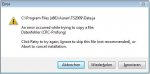
Cities in Motion kann ich nicht starten weil der Steam Server nicht erreichbar ist und TS2009 lässt sich nicht installieren.

Bringt immer folgende Meldung gleich beim starten der Installation, siehe Anhang
 

Anhänge

  • error ts09.jpg
    error ts09.jpg
    19,1 KB · Aufrufe: 91
AW: Ist Windows verrückt geworden?

TS2009 versuchst du von CD/DVD zu installieren? Der CRC Fehler würde auf eine defekte Datei bzw. einen defekten Datenträger hinweisen.

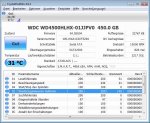
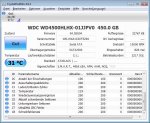
Mache bitte auch noch einen Screenshot CrystalDiskInfo. Mal sehen, was die SMART Werte über die Festplatte sagen.
 
AW: Ist Windows verrückt geworden?

Also habe mal die Cristaldiskinfo installiert weiss nicht was von den Daten du brauchst deshalbe habe ich mal 2 Screenshots gemacht.

Laufwerk C ist Windows drauf Laufwerk L Ubuntu kann dass das Problem sein?
 

Anhänge

  • hdd 1.jpg
    hdd 1.jpg
    82,1 KB · Aufrufe: 76
  • hdd 2.jpg
    hdd 2.jpg
    80,9 KB · Aufrufe: 79
Zuletzt bearbeitet:
Zurück