Hallo liebe Community,
ich bin am verzweifeln.
Seit geraumer Zeit habe ich vor allem beim Spielen, aber z.b. auch beim Windows Startsound keinen klaren Ton mehr.
Es klingt immer mal wieder kratzig, stotternd, rauschend.
Nachdem ich nun dieses Wochenende ein wenig Zeit hatte begab ich mich nun auf Fehlersuche.
LatencyMon zeigte unter anderem einige Treiber als Ursache des Problems an.
Also nutzte ich die Gelegenheit und habe etliche Treiber und mein Bios mal auf den neusten Stand gebracht.
Leider keine Verbesserung. Die selben Verursacher werden weiterhin angezeigt.
Habe mein System aufgeräumt, die Registry gesäubert, Driver Cleaner mal aufräumen lassen.
Keine Besserung. Ich weiß nicht mehr weiter.
Hat jemand von Euch eine Idee?
Vielen Dank schon einmal für die Hilfe.
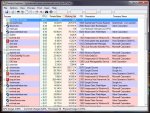
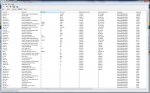
Hier mal die Ergebnisse die LatencyMon nach einer Runde Witcher 3, Browsen und Musikhören ausspuckt:

Edit:
Zur Übersicht hier noch mein System:
Betriebssystem : Windows 7
Prozessor : Intel i5 2500K
Mainboard : Asrock Z68 Extreme4 Gen3
Grafikkarte : Palit Super Jetstream 980Ti
Ram : Corsair Vengeance DDR3 16GB (4x4GB) 1600MHZ CL9
Netzteil : beQuiet E9-CM-580W
Soundkarte : keine-Onboard Sound
ich bin am verzweifeln.
Seit geraumer Zeit habe ich vor allem beim Spielen, aber z.b. auch beim Windows Startsound keinen klaren Ton mehr.
Es klingt immer mal wieder kratzig, stotternd, rauschend.
Nachdem ich nun dieses Wochenende ein wenig Zeit hatte begab ich mich nun auf Fehlersuche.
LatencyMon zeigte unter anderem einige Treiber als Ursache des Problems an.
Also nutzte ich die Gelegenheit und habe etliche Treiber und mein Bios mal auf den neusten Stand gebracht.
Leider keine Verbesserung. Die selben Verursacher werden weiterhin angezeigt.
Habe mein System aufgeräumt, die Registry gesäubert, Driver Cleaner mal aufräumen lassen.
Keine Besserung. Ich weiß nicht mehr weiter.
Hat jemand von Euch eine Idee?
Vielen Dank schon einmal für die Hilfe.
Hier mal die Ergebnisse die LatencyMon nach einer Runde Witcher 3, Browsen und Musikhören ausspuckt:
_________________________________________________________________________________________________________
CONCLUSION
_________________________________________________________________________________________________________
Your system appears to be having trouble handling real-time audio and other tasks. You are likely to experience buffer underruns appearing as drop outs, clicks or pops. One problem may be related to power management, disable CPU throttling settings in Control Panel and BIOS setup. Check for BIOS updates.
LatencyMon has been analyzing your system for 0:52:47 (h:mm:ss) on all processors.
_________________________________________________________________________________________________________
SYSTEM INFORMATION
_________________________________________________________________________________________________________
Computer name: -----
OS version: Windows 7 Service Pack 1, 6.1, build: 7601 (x64)
Hardware: ASRock, Z68 Extreme4 Gen3
CPU: GenuineIntel Intel(R) Core(TM) i5-2500K CPU @ 3.30GHz
Logical processors: 4
Processor groups: 1
RAM: 16273 MB total
_________________________________________________________________________________________________________
CPU SPEED
_________________________________________________________________________________________________________
Reported CPU speed: 3292 MHz
Measured CPU speed: 1 MHz (approx.)
Note: reported execution times may be calculated based on a fixed reported CPU speed. Disable variable speed settings like Intel Speed Step and AMD Cool N Quiet in the BIOS setup for more accurate results.
WARNING: the CPU speed that was measured is only a fraction of the CPU speed reported. Your CPUs may be throttled back due to variable speed settings and thermal issues. It is suggested that you run a utility which reports your actual CPU frequency and temperature.
_________________________________________________________________________________________________________
MEASURED INTERRUPT TO USER PROCESS LATENCIES
_________________________________________________________________________________________________________
The interrupt to process latency reflects the measured interval that a usermode process needed to respond to a hardware request from the moment the interrupt service routine started execution. This includes the scheduling and execution of a DPC routine, the signaling of an event and the waking up of a usermode thread from an idle wait state in response to that event.
Highest measured interrupt to process latency (µs): 18707,807214
Average measured interrupt to process latency (µs): 2,970222
Highest measured interrupt to DPC latency (µs): 264,348774
Average measured interrupt to DPC latency (µs): 0,722586
_________________________________________________________________________________________________________
REPORTED ISRs
_________________________________________________________________________________________________________
Interrupt service routines are routines installed by the OS and device drivers that execute in response to a hardware interrupt signal.
Highest ISR routine execution time (µs): 125,542527
Driver with highest ISR routine execution time: dxgkrnl.sys - DirectX Graphics Kernel, Microsoft Corporation
Highest reported total ISR routine time (%): 0,199052
Driver with highest ISR total time: dxgkrnl.sys - DirectX Graphics Kernel, Microsoft Corporation
Total time spent in ISRs (%) 0,342156
ISR count (execution time <250 µs): 7945021
ISR count (execution time 250-500 µs): 0
ISR count (execution time 500-999 µs): 0
ISR count (execution time 1000-1999 µs): 0
ISR count (execution time 2000-3999 µs): 0
ISR count (execution time >=4000 µs): 0
_________________________________________________________________________________________________________
REPORTED DPCs
_________________________________________________________________________________________________________
DPC routines are part of the interrupt servicing dispatch mechanism and disable the possibility for a process to utilize the CPU while it is interrupted until the DPC has finished execution.
Highest DPC routine execution time (µs): 275,503341
Driver with highest DPC routine execution time: nvlddmkm.sys - NVIDIA Windows Kernel Mode Driver, Version 368.69 , NVIDIA Corporation
Highest reported total DPC routine time (%): 0,082862
Driver with highest DPC total execution time: dxgkrnl.sys - DirectX Graphics Kernel, Microsoft Corporation
Total time spent in DPCs (%) 0,276868
DPC count (execution time <250 µs): 17755477
DPC count (execution time 250-500 µs): 0
DPC count (execution time 500-999 µs): 6
DPC count (execution time 1000-1999 µs): 0
DPC count (execution time 2000-3999 µs): 0
DPC count (execution time >=4000 µs): 0
_________________________________________________________________________________________________________
REPORTED HARD PAGEFAULTS
_________________________________________________________________________________________________________
Hard pagefaults are events that get triggered by making use of virtual memory that is not resident in RAM but backed by a memory mapped file on disk. The process of resolving the hard pagefault requires reading in the memory from disk while the process is interrupted and blocked from execution.
NOTE: some processes were hit by hard pagefaults. If these were programs producing audio, they are likely to interrupt the audio stream resulting in dropouts, clicks and pops. Check the Processes tab to see which programs were hit.
Process with highest pagefault count: svchost.exe
Total number of hard pagefaults 16648
Hard pagefault count of hardest hit process: 3973
Highest hard pagefault resolution time (µs): 349760,633657
Total time spent in hard pagefaults (%): 0,242847
Number of processes hit: 35
_________________________________________________________________________________________________________
PER CPU DATA
_________________________________________________________________________________________________________
CPU 0 Interrupt cycle time (s): 104,193678
CPU 0 ISR highest execution time (µs): 125,542527
CPU 0 ISR total execution time (s): 43,356437
CPU 0 ISR count: 7945021
CPU 0 DPC highest execution time (µs): 275,503341
CPU 0 DPC total execution time (s): 33,854202
CPU 0 DPC count: 17340529
_________________________________________________________________________________________________________
CPU 1 Interrupt cycle time (s): 10,824656
CPU 1 ISR highest execution time (µs): 0,0
CPU 1 ISR total execution time (s): 0,0
CPU 1 ISR count: 0
CPU 1 DPC highest execution time (µs): 153,093864
CPU 1 DPC total execution time (s): 0,306255
CPU 1 DPC count: 113611
_________________________________________________________________________________________________________
CPU 2 Interrupt cycle time (s): 19,312693
CPU 2 ISR highest execution time (µs): 0,0
CPU 2 ISR total execution time (s): 0,0
CPU 2 ISR count: 0
CPU 2 DPC highest execution time (µs): 166,983293
CPU 2 DPC total execution time (s): 0,344099
CPU 2 DPC count: 109094
_________________________________________________________________________________________________________
CPU 3 Interrupt cycle time (s): 21,031879
CPU 3 ISR highest execution time (µs): 0,0
CPU 3 ISR total execution time (s): 0,0
CPU 3 ISR count: 0
CPU 3 DPC highest execution time (µs): 231,892163
CPU 3 DPC total execution time (s): 0,578845
CPU 3 DPC count: 192249
_________________________________________________________________________________________________________
CONCLUSION
_________________________________________________________________________________________________________
Your system appears to be having trouble handling real-time audio and other tasks. You are likely to experience buffer underruns appearing as drop outs, clicks or pops. One problem may be related to power management, disable CPU throttling settings in Control Panel and BIOS setup. Check for BIOS updates.
LatencyMon has been analyzing your system for 0:52:47 (h:mm:ss) on all processors.
_________________________________________________________________________________________________________
SYSTEM INFORMATION
_________________________________________________________________________________________________________
Computer name: -----
OS version: Windows 7 Service Pack 1, 6.1, build: 7601 (x64)
Hardware: ASRock, Z68 Extreme4 Gen3
CPU: GenuineIntel Intel(R) Core(TM) i5-2500K CPU @ 3.30GHz
Logical processors: 4
Processor groups: 1
RAM: 16273 MB total
_________________________________________________________________________________________________________
CPU SPEED
_________________________________________________________________________________________________________
Reported CPU speed: 3292 MHz
Measured CPU speed: 1 MHz (approx.)
Note: reported execution times may be calculated based on a fixed reported CPU speed. Disable variable speed settings like Intel Speed Step and AMD Cool N Quiet in the BIOS setup for more accurate results.
WARNING: the CPU speed that was measured is only a fraction of the CPU speed reported. Your CPUs may be throttled back due to variable speed settings and thermal issues. It is suggested that you run a utility which reports your actual CPU frequency and temperature.
_________________________________________________________________________________________________________
MEASURED INTERRUPT TO USER PROCESS LATENCIES
_________________________________________________________________________________________________________
The interrupt to process latency reflects the measured interval that a usermode process needed to respond to a hardware request from the moment the interrupt service routine started execution. This includes the scheduling and execution of a DPC routine, the signaling of an event and the waking up of a usermode thread from an idle wait state in response to that event.
Highest measured interrupt to process latency (µs): 18707,807214
Average measured interrupt to process latency (µs): 2,970222
Highest measured interrupt to DPC latency (µs): 264,348774
Average measured interrupt to DPC latency (µs): 0,722586
_________________________________________________________________________________________________________
REPORTED ISRs
_________________________________________________________________________________________________________
Interrupt service routines are routines installed by the OS and device drivers that execute in response to a hardware interrupt signal.
Highest ISR routine execution time (µs): 125,542527
Driver with highest ISR routine execution time: dxgkrnl.sys - DirectX Graphics Kernel, Microsoft Corporation
Highest reported total ISR routine time (%): 0,199052
Driver with highest ISR total time: dxgkrnl.sys - DirectX Graphics Kernel, Microsoft Corporation
Total time spent in ISRs (%) 0,342156
ISR count (execution time <250 µs): 7945021
ISR count (execution time 250-500 µs): 0
ISR count (execution time 500-999 µs): 0
ISR count (execution time 1000-1999 µs): 0
ISR count (execution time 2000-3999 µs): 0
ISR count (execution time >=4000 µs): 0
_________________________________________________________________________________________________________
REPORTED DPCs
_________________________________________________________________________________________________________
DPC routines are part of the interrupt servicing dispatch mechanism and disable the possibility for a process to utilize the CPU while it is interrupted until the DPC has finished execution.
Highest DPC routine execution time (µs): 275,503341
Driver with highest DPC routine execution time: nvlddmkm.sys - NVIDIA Windows Kernel Mode Driver, Version 368.69 , NVIDIA Corporation
Highest reported total DPC routine time (%): 0,082862
Driver with highest DPC total execution time: dxgkrnl.sys - DirectX Graphics Kernel, Microsoft Corporation
Total time spent in DPCs (%) 0,276868
DPC count (execution time <250 µs): 17755477
DPC count (execution time 250-500 µs): 0
DPC count (execution time 500-999 µs): 6
DPC count (execution time 1000-1999 µs): 0
DPC count (execution time 2000-3999 µs): 0
DPC count (execution time >=4000 µs): 0
_________________________________________________________________________________________________________
REPORTED HARD PAGEFAULTS
_________________________________________________________________________________________________________
Hard pagefaults are events that get triggered by making use of virtual memory that is not resident in RAM but backed by a memory mapped file on disk. The process of resolving the hard pagefault requires reading in the memory from disk while the process is interrupted and blocked from execution.
NOTE: some processes were hit by hard pagefaults. If these were programs producing audio, they are likely to interrupt the audio stream resulting in dropouts, clicks and pops. Check the Processes tab to see which programs were hit.
Process with highest pagefault count: svchost.exe
Total number of hard pagefaults 16648
Hard pagefault count of hardest hit process: 3973
Highest hard pagefault resolution time (µs): 349760,633657
Total time spent in hard pagefaults (%): 0,242847
Number of processes hit: 35
_________________________________________________________________________________________________________
PER CPU DATA
_________________________________________________________________________________________________________
CPU 0 Interrupt cycle time (s): 104,193678
CPU 0 ISR highest execution time (µs): 125,542527
CPU 0 ISR total execution time (s): 43,356437
CPU 0 ISR count: 7945021
CPU 0 DPC highest execution time (µs): 275,503341
CPU 0 DPC total execution time (s): 33,854202
CPU 0 DPC count: 17340529
_________________________________________________________________________________________________________
CPU 1 Interrupt cycle time (s): 10,824656
CPU 1 ISR highest execution time (µs): 0,0
CPU 1 ISR total execution time (s): 0,0
CPU 1 ISR count: 0
CPU 1 DPC highest execution time (µs): 153,093864
CPU 1 DPC total execution time (s): 0,306255
CPU 1 DPC count: 113611
_________________________________________________________________________________________________________
CPU 2 Interrupt cycle time (s): 19,312693
CPU 2 ISR highest execution time (µs): 0,0
CPU 2 ISR total execution time (s): 0,0
CPU 2 ISR count: 0
CPU 2 DPC highest execution time (µs): 166,983293
CPU 2 DPC total execution time (s): 0,344099
CPU 2 DPC count: 109094
_________________________________________________________________________________________________________
CPU 3 Interrupt cycle time (s): 21,031879
CPU 3 ISR highest execution time (µs): 0,0
CPU 3 ISR total execution time (s): 0,0
CPU 3 ISR count: 0
CPU 3 DPC highest execution time (µs): 231,892163
CPU 3 DPC total execution time (s): 0,578845
CPU 3 DPC count: 192249
_________________________________________________________________________________________________________
Edit:
Zur Übersicht hier noch mein System:
Betriebssystem : Windows 7
Prozessor : Intel i5 2500K
Mainboard : Asrock Z68 Extreme4 Gen3
Grafikkarte : Palit Super Jetstream 980Ti
Ram : Corsair Vengeance DDR3 16GB (4x4GB) 1600MHZ CL9
Netzteil : beQuiet E9-CM-580W
Soundkarte : keine-Onboard Sound
Zuletzt bearbeitet: