Bluescreen brauche Hilfe

Myst007

PC-Selbstbauer(in)
Hallo erstmal an alle!!! :D

Wie oben schon steht hatte ich nen Bluescreen.
Nur habe ich keine Ahnung warum, vielleicht könnt ihr mir ja helfen?
Habe RAGE Durchgespielt. Als dann das Outro Kahm bin ich was holen gegangen,
als ich wieder am Pc war sehe ich das der Pc am Neustarten war.:wow: Jetzt würde ich aber gerne mal wissen warum.:huh:

Pc Lief bis jetzt immer Problemlos!
Ps: Er ist noch nicht Übertaktet wollte ich diese Woche machen. :D

Dump File : 080612-12074-01.dmp
Crash Time : 06.08.2012 02:11:03
Bug Check String : UNEXPECTED_KERNEL_MODE_TRAP
Bug Check Code : 0x0000007f
Parameter 1 : 00000000`00000008
Parameter 2 : 00000000`80050033
Parameter 3 : 00000000`000406f8
Parameter 4 : fffff880`0580838c
Caused By Driver : dxgmms1.sys
Caused By Address : dxgmms1.sys+838c
File Description :
Product Name :
Company :
File Version :
Processor : x64
Crash Address : ntoskrnl.exe+7f1c0
Stack Address 1 :
Stack Address 2 :
Stack Address 3 :
Computer Name :
Full Path : C:\Windows\MiniDump\080612-12074-01.dmp
Processors Count : 8
Major Version : 15
Minor Version : 7601
Dump File Size : 312.576

Danke schon mal für eure Hilfe :daumen:
 
Nun erste google suche und M$ directx fehler der bei bestimmten Szenarien eintritt
Fehlerhaften RAM, Mainboard I/O error und Spiel nutzt die beschädigten directx sys datei
lösung
Eingabeauffordeung (cmd) admid start und"sfc /scannow
wenn es zu häufigen fehlern kommt (steht in der cbs log drin) sollte man versuchen die fehlenden und beschädigten Daten zu ersetzen
es kann sein das das System zerschossen ist, heißt Neuinstallation
 
Lade die Dateien aus diesem Verzeichnis hier hoch: C:\Windows\MiniDump
Was für eine Firewall/Virenschutzsoftware ist installiert?
 
Habe es durchlaufen lassen,
hat aber nichts gefunden.

und Hier die Datei:


UNEXPECTED_KERNEL_MODE_TRAP (7f)
This means a trap occurred in kernel mode, and it's a trap of a kind
that the kernel isn't allowed to have/catch (bound trap) or that
is always instant death (double fault). The first number in the
bugcheck params is the number of the trap (8 = double fault, etc)
Consult an Intel x86 family manual to learn more about what these
traps are. Here is a *portion* of those codes:
If kv shows a taskGate
use .tss on the part before the colon, then kv.
Else if kv shows a trapframe
use .trap on that value
Else
.trap on the appropriate frame will show where the trap was taken
(on x86, this will be the ebp that goes with the procedure KiTrap)
Endif
kb will then show the corrected stack.
Arguments:
Arg1: 0000000000000008, EXCEPTION_DOUBLE_FAULT
Arg2: 0000000080050033
Arg3: 00000000000406f8
Arg4: fffff8800580838c

Debugging Details:
------------------


BUGCHECK_STR: 0x7f_8

CUSTOMER_CRASH_COUNT: 1

DEFAULT_BUCKET_ID: VISTA_DRIVER_FAULT

PROCESS_NAME: System

CURRENT_IRQL: 6

LAST_CONTROL_TRANSFER: from fffff800030d0769 to fffff800030d11c0

STACK_TEXT:
fffff800`00ba4d28 fffff800`030d0769 : 00000000`0000007f 00000000`00000008 00000000`80050033 00000000`000406f8 : nt!KeBugCheckEx
fffff800`00ba4d30 fffff800`030cec32 : 00000000`00000000 00000000`00000000 00000000`00000000 00000000`00000000 : nt!KiBugCheckDispatch+0x69
fffff800`00ba4e70 fffff880`0580838c : 00000000`00000000 00000000`00000000 00000000`00000000 00000000`00000000 : nt!KiDoubleFaultAbort+0xb2
fffff880`06ee1fc0 00000000`00000000 : 00000000`00000000 00000000`00000000 00000000`00000000 00000000`00000000 : dxgmms1!VidSchiProcessIsrVSync+0x64


STACK_COMMAND: kb

FOLLOWUP_IP:
dxgmms1!VidSchiProcessIsrVSync+64
fffff880`0580838c e86b620000 call dxgmms1!VidSchiUpdateCurrentIsrFrameTime (fffff880`0580e5fc)

SYMBOL_STACK_INDEX: 3

SYMBOL_NAME: dxgmms1!VidSchiProcessIsrVSync+64

FOLLOWUP_NAME: MachineOwner

MODULE_NAME: dxgmms1

IMAGE_NAME: dxgmms1.sys

DEBUG_FLR_IMAGE_TIMESTAMP: 4ce799c1

FAILURE_BUCKET_ID: X64_0x7f_8_dxgmms1!VidSchiProcessIsrVSync+64

BUCKET_ID: X64_0x7f_8_dxgmms1!VidSchiProcessIsrVSync+64

Followup: MachineOwner
 
Double Fault Fehler durch/im DirectX Kernel.

Wiederhole bitte noch mal die Auswertung mittels !analyze -v und gebe anschließend noch !thread und kb100 ein (nacheinander). Poste dann die neue Auswertung.

Unabhängig könnte das Problem durch eine der beiden Grafikkarten ausgelöst werden (-> beide Karten einzeln testen).
Da du Rage aber problemlos durchzocken konntest, glaube ich allerdings weniger an ein Problem mit den beiden Karten.
Mir würde da eher die Umschaltung auf die interne Grafik (verringerte Last beim Abspann!?) in den Sinn kommen. Hier mal im Bios die Onboard (CPU) Grafik deaktivieren.

Ist denn der Fehler seither noch mal aufgetreten, oder war das bislang eine einmalige Sache?
 
Werde ich nachher mal deaktivieren.
Das war bis jetzt das erste mal. :ugly:
Aber wer mag schon Bluescreen. :D

0: kd> !thread
GetPointerFromAddress: unable to read from fffff80003300000
THREAD fffffa800dde2b50 Cid 0004.1b04 Teb: 0000000000000000 Win32Thread: 0000000000000000 RUNNING on processor 0
Not impersonating
GetUlongFromAddress: unable to read from fffff8000323fba4
Owning Process 0 Image: <Unknown>
Attached Process fffffa80069ec040 Image: System
fffff78000000000: Unable to get shared data
Wait Start TickCount 923875
Context Switch Count 105901
ReadMemory error: Cannot get nt!KeMaximumIncrement value.
UserTime 00:00:00.000
KernelTime 00:00:00.000
Win32 Start Address ndis!ndisReceiveWorkerThread (0xfffff880020fcd80)
Stack Init fffff88006ee7c70 Current fffff88006ee78c0
Base fffff88006ee8000 Limit fffff88006ee2000 Call 0
Priority 8 BasePriority 8 PriorityDecrement 0 IoPriority 2 PagePriority 5
Child-SP RetAddr : Args to Child : Call Site
fffff800`00ba4d28 fffff800`030d0769 : 00000000`0000007f 00000000`00000008 00000000`80050033 00000000`000406f8 : nt!KeBugCheckEx
fffff800`00ba4d30 fffff800`030cec32 : 00000000`00000000 00000000`00000000 00000000`00000000 00000000`00000000 : nt!KiBugCheckDispatch+0x69
fffff800`00ba4e70 fffff880`0580838c : 00000000`00000000 00000000`00000000 00000000`00000000 00000000`00000000 : nt!KiDoubleFaultAbort+0xb2 (TrapFrame @ fffff800`00ba4e70)
fffff880`06ee1fc0 00000000`00000000 : 00000000`00000000 00000000`00000000 00000000`00000000 00000000`00000000 : dxgmms1!VidSchiProcessIsrVSync+0x64

0: kd> kb100
RetAddr : Args to Child : Call Site
fffff800`030d0769 : 00000000`0000007f 00000000`00000008 00000000`80050033 00000000`000406f8 : nt!KeBugCheckEx
fffff800`030cec32 : 00000000`00000000 00000000`00000000 00000000`00000000 00000000`00000000 : nt!KiBugCheckDispatch+0x69
fffff880`0580838c : 00000000`00000000 00000000`00000000 00000000`00000000 00000000`00000000 : nt!KiDoubleFaultAbort+0xb2
00000000`00000000 : 00000000`00000000 00000000`00000000 00000000`00000000 00000000`00000000 : dxgmms1!VidSchiProcessIsrVSync+0x64
 
Child-SP RetAddr : Args to Child : Call Site
fffff800`00ba4d28 fffff800`030d0769 : 00000000`0000007f 00000000`00000008 00000000`80050033 00000000`000406f8 : nt!KeBugCheckEx
fffff800`00ba4d30 fffff800`030cec32 : 00000000`00000000 00000000`00000000 00000000`00000000 00000000`00000000 : nt!KiBugCheckDispatch+0x69
fffff800`00ba4e70 fffff880`0580838c : 00000000`00000000 00000000`00000000 00000000`00000000 00000000`00000000 : nt!KiDoubleFaultAbort+0xb2 (TrapFrame @ fffff800`00ba4e70)
fffff880`06ee1fc0 00000000`00000000 : 00000000`00000000 00000000`00000000 00000000`00000000 00000000`00000000 : dxgmms1!VidSchiProcessIsrVSync+0x64

Gleiches bitte noch einmal. Anstelle kb100 aber folgenden Befehl eingeben: ".trap fffff800`00ba4e70", anschließend "kv" (jeweils ohne "").

Also:
!analyze -v
!thread
.trap (adresse des TrapFrames)
kv
 
So hier ist es:

UNEXPECTED_KERNEL_MODE_TRAP (7f)
This means a trap occurred in kernel mode, and it's a trap of a kind
that the kernel isn't allowed to have/catch (bound trap) or that
is always instant death (double fault). The first number in the
bugcheck params is the number of the trap (8 = double fault, etc)
Consult an Intel x86 family manual to learn more about what these
traps are. Here is a *portion* of those codes:
If kv shows a taskGate
use .tss on the part before the colon, then kv.
Else if kv shows a trapframe
use .trap on that value
Else
.trap on the appropriate frame will show where the trap was taken
(on x86, this will be the ebp that goes with the procedure KiTrap)
Endif
kb will then show the corrected stack.
Arguments:
Arg1: 0000000000000008, EXCEPTION_DOUBLE_FAULT
Arg2: 0000000080050033
Arg3: 00000000000406f8
Arg4: fffff8800580838c

Debugging Details:
------------------


BUGCHECK_STR: 0x7f_8

CUSTOMER_CRASH_COUNT: 1

DEFAULT_BUCKET_ID: VISTA_DRIVER_FAULT

PROCESS_NAME: System

CURRENT_IRQL: 6

LAST_CONTROL_TRANSFER: from fffff800030d0769 to fffff800030d11c0

STACK_TEXT:
fffff800`00ba4d28 fffff800`030d0769 : 00000000`0000007f 00000000`00000008 00000000`80050033 00000000`000406f8 : nt!KeBugCheckEx
fffff800`00ba4d30 fffff800`030cec32 : 00000000`00000000 00000000`00000000 00000000`00000000 00000000`00000000 : nt!KiBugCheckDispatch+0x69
fffff800`00ba4e70 fffff880`0580838c : 00000000`00000000 00000000`00000000 00000000`00000000 00000000`00000000 : nt!KiDoubleFaultAbort+0xb2
fffff880`06ee1fc0 00000000`00000000 : 00000000`00000000 00000000`00000000 00000000`00000000 00000000`00000000 : dxgmms1!VidSchiProcessIsrVSync+0x64


STACK_COMMAND: kb

FOLLOWUP_IP:
dxgmms1!VidSchiProcessIsrVSync+64
fffff880`0580838c e86b620000 call dxgmms1!VidSchiUpdateCurrentIsrFrameTime (fffff880`0580e5fc)

SYMBOL_STACK_INDEX: 3

SYMBOL_NAME: dxgmms1!VidSchiProcessIsrVSync+64

FOLLOWUP_NAME: MachineOwner

MODULE_NAME: dxgmms1

IMAGE_NAME: dxgmms1.sys

DEBUG_FLR_IMAGE_TIMESTAMP: 4ce799c1

FAILURE_BUCKET_ID: X64_0x7f_8_dxgmms1!VidSchiProcessIsrVSync+64

BUCKET_ID: X64_0x7f_8_dxgmms1!VidSchiProcessIsrVSync+64

Followup: MachineOwner
---------

0: kd> !thread
GetPointerFromAddress: unable to read from fffff80003300000
THREAD fffffa800dde2b50 Cid 0004.1b04 Teb: 0000000000000000 Win32Thread: 0000000000000000 RUNNING on processor 0
Not impersonating
GetUlongFromAddress: unable to read from fffff8000323fba4
Owning Process 0 Image: <Unknown>
Attached Process fffffa80069ec040 Image: System
fffff78000000000: Unable to get shared data
Wait Start TickCount 923875
Context Switch Count 105901
ReadMemory error: Cannot get nt!KeMaximumIncrement value.
UserTime 00:00:00.000
KernelTime 00:00:00.000
Win32 Start Address ndis!ndisReceiveWorkerThread (0xfffff880020fcd80)
Stack Init fffff88006ee7c70 Current fffff88006ee78c0
Base fffff88006ee8000 Limit fffff88006ee2000 Call 0
Priority 8 BasePriority 8 PriorityDecrement 0 IoPriority 2 PagePriority 5
Child-SP RetAddr : Args to Child : Call Site
fffff800`00ba4d28 fffff800`030d0769 : 00000000`0000007f 00000000`00000008 00000000`80050033 00000000`000406f8 : nt!KeBugCheckEx
fffff800`00ba4d30 fffff800`030cec32 : 00000000`00000000 00000000`00000000 00000000`00000000 00000000`00000000 : nt!KiBugCheckDispatch+0x69
fffff800`00ba4e70 fffff880`0580838c : 00000000`00000000 00000000`00000000 00000000`00000000 00000000`00000000 : nt!KiDoubleFaultAbort+0xb2 (TrapFrame @ fffff800`00ba4e70)
fffff880`06ee1fc0 00000000`00000000 : 00000000`00000000 00000000`00000000 00000000`00000000 00000000`00000000 : dxgmms1!VidSchiProcessIsrVSync+0x64

0: kd> .trap fffff800`00ba4e70
NOTE: The trap frame does not contain all registers.
Some register values may be zeroed or incorrect.
rax=0000000000000000 rbx=0000000000000000 rcx=fffffa800b679410
rdx=fffffa800b69d000 rsi=0000000000000000 rdi=0000000000000000
rip=fffff8800580838c rsp=fffff88006ee1fc0 rbp=0000000000100113
r8=0000000002880001 r9=0000000000000000 r10=0000000000000001
r11=0000000000000003 r12=0000000000000000 r13=0000000000000000
r14=0000000000000000 r15=0000000000000000
iopl=0 nv up ei ng nz ac po cy
dxgmms1!VidSchiProcessIsrVSync+0x64:
fffff880`0580838c e86b620000 call dxgmms1!VidSchiUpdateCurrentIsrFrameTime (fffff880`0580e5fc)
0: kd> kv
*** Stack trace for last set context - .thread/.cxr resets it
Child-SP RetAddr : Args to Child : Call Site
fffff880`06ee1fc0 00000000`00000000 : 00000000`00000000 00000000`00000000 00000000`00000000 00000000`00000000 : dxgmms1!VidSchiProcessIsrVSync+0x64
 
mach mal wenn möglich eine neue Test Partition mit neuen OS drauf. fertig einrichten treiber und win updates installiere das Spiel installieren (bei rage steam) und probiere es mal aus ob dann der Fehler immer noch kommt.
partitionieren kannst du mit windows onboard parttions manager (könnte sein das die Systempartition sich nicht verkleinern lässt) oder paragon disk manager free machen
Das programm hat die grundfunktionen dabei
Partitionen erstellen und vergrößern verkleinern
Win vista DVD hast du ja
 
Ja müsste eigentlich drauf sein.
Vielleicht mochte er das spiel einfach nicht, sonst läuft ja alles zu 100%.
Werde nachher nochmal spielen und gucken ob es nochmal passiert. Musste das Spiel gestern 2 mal über Strg-Alt-Entf Minimieren, weil es ja über Win nicht geht
vielleicht mochte er das ja nicht?
 
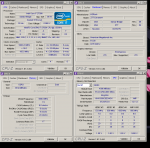
Unbenannt.PNG
 
Sieht soweit gut aus. Testen könntest du noch mit einer Command Rate von 2T (muss im Bios umgestellt werden). Glaube aber eher nicht, dass es damit Veränderungen gibt.
 
So habe Jetzt mal die Tech Demo A New Dawn, 4 Stunden laufen lassen ohne Probleme.
Dan habe ich Memtest86+, 4 mal durchlaufen lassen auch ohne Fehler.
Dan habe ich 3DMARK 11 4 mal laufen lassen, ohne Probleme.
Also kann es ja nur noch am Spiel liegen, oder er mochte das Minimieren nicht.
 
Das hat nichts zu sagen das die hardware OK ist .Ist klar.
das Problem betrifft directx9 und nichts anderes.
daher muss man die beschädigten sys Dateien reparieren mit
CMD aufrufen (suche) als admid starten und "sfc /scannow" eingeben
Dann werden die daten die beschädigt sind repariert (falls möglich)
 
Zurück