Sonnenspeer
Schraubenverwechsler(in)
Hallo  Ich bin neu hier, hab aber durch google einige Beiträge zu dem Thema Bluescreen 1031 schon entdeckt - jedoch für mich ohne Erfolg.
Deswegen hoffe ich, ihr könnt mir weiter helfen...
Mein Problem:
Ein Bluescreen mit automatischem Restart des PC's. Ich habe vor der Neuinstallation (1x durch ASUS Recovery und 1x durch Windows 7 Betriebs-CD = somit 2 Versuche) dauernd einen Bluescreen erhalten, gleich nach dem Neustart. Begonnen hat es, als ich ein Onlinespiel gespielt habe. Seit der Neuinstallation durch Win7 CD tritt es meistens nur beim Spielen auf.
Folgende Meldung aus dem Windows Debugger Tool:
Windows 7 x64
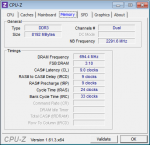
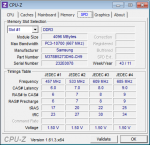
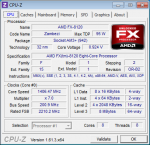
Ich weiss leider nicht, was ihr noch so für Daten benötigt und mir helfen zu können. Einfach bitte sagen...ich hoffe jemand kann das lösen
Ich bin neu hier, hab aber durch google einige Beiträge zu dem Thema Bluescreen 1031 schon entdeckt - jedoch für mich ohne Erfolg.Deswegen hoffe ich, ihr könnt mir weiter helfen...
Mein Problem:
Ein Bluescreen mit automatischem Restart des PC's. Ich habe vor der Neuinstallation (1x durch ASUS Recovery und 1x durch Windows 7 Betriebs-CD = somit 2 Versuche) dauernd einen Bluescreen erhalten, gleich nach dem Neustart. Begonnen hat es, als ich ein Onlinespiel gespielt habe. Seit der Neuinstallation durch Win7 CD tritt es meistens nur beim Spielen auf.
Folgende Meldung aus dem Windows Debugger Tool:
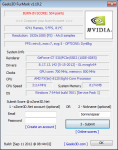
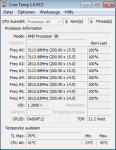
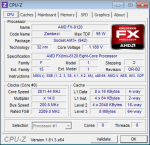
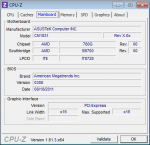
Meine Daten:Microsoft (R) Windows Debugger Version 6.2.9200.16384 AMD64
Copyright (c) Microsoft Corporation. All rights reserved.
Loading Dump File [C:\Windows\Minidump\082712-22822-01.dmp]
Mini Kernel Dump File: Only registers and stack trace are available
Symbol search path is: SRV*C:\symbols*http://msdl.microsoft.com/download/symbols
Executable search path is:
Windows 7 Kernel Version 7601 (Service Pack 1) MP (8 procs) Free x64
Product: WinNt, suite: TerminalServer SingleUserTS
Built by: 7601.17835.amd64fre.win7sp1_gdr.120503-2030
Machine Name:
Kernel base = 0xfffff800`02e66000 PsLoadedModuleList = 0xfffff800`030aa670
Debug session time: Mon Aug 27 15:12:34.363 2012 (UTC + 2:00)
System Uptime: 0 days 0:33:58.519
Loading Kernel Symbols
...............................................................
................................................................
...................
Loading User Symbols
Loading unloaded module list
.....
*******************************************************************************
* *
* Bugcheck Analysis *
* *
*******************************************************************************
Use !analyze -v to get detailed debugging information.
BugCheck 124, {0, fffffa8007ed0028, bc800800, 10137}
*** WARNING: Unable to verify timestamp for nvlddmkm.sys
*** ERROR: Module load completed but symbols could not be loaded for nvlddmkm.sys
*** WARNING: Unable to verify timestamp for win32k.sys
*** ERROR: Module load completed but symbols could not be loaded for win32k.sys
Probably caused by : AuthenticAMD
Followup: MachineOwner
---------
2: kd> !analyze -v
*******************************************************************************
* *
* Bugcheck Analysis *
* *
*******************************************************************************
WHEA_UNCORRECTABLE_ERROR (124)
A fatal hardware error has occurred. Parameter 1 identifies the type of error
source that reported the error. Parameter 2 holds the address of the
WHEA_ERROR_RECORD structure that describes the error conditon.
Arguments:
Arg1: 0000000000000000, Machine Check Exception
Arg2: fffffa8007ed0028, Address of the WHEA_ERROR_RECORD structure.
Arg3: 00000000bc800800, High order 32-bits of the MCi_STATUS value.
Arg4: 0000000000010137, Low order 32-bits of the MCi_STATUS value.
Debugging Details:
------------------
BUGCHECK_STR: 0x124_AuthenticAMD
CUSTOMER_CRASH_COUNT: 1
DEFAULT_BUCKET_ID: WIN7_DRIVER_FAULT
PROCESS_NAME: System
CURRENT_IRQL: f
STACK_TEXT:
fffff880`02f6db88 fffff800`02e2fa3b : 00000000`00000124 00000000`00000000 fffffa80`07ed0028 00000000`bc800800 : nt!KeBugCheckEx
fffff880`02f6db90 fffff800`02ff2b03 : 00000000`00000001 fffffa80`076b3a10 00000000`00000000 fffffa80`076b3a60 : hal!HalBugCheckSystem+0x1e3
fffff880`02f6dbd0 fffff800`02e2f700 : 00000000`00000728 fffffa80`076b3a10 fffff880`02f6df30 fffffa80`08548000 : nt!WheaReportHwError+0x263
fffff880`02f6dc30 fffff800`02e2f052 : fffffa80`076b3a10 fffff880`02f6df30 fffffa80`076b3a10 00000000`00000000 : hal!HalpMcaReportError+0x4c
fffff880`02f6dd80 fffff800`02e22e8f : fffffa80`08548000 00000000`00000001 fffff880`02f6dfb0 00000000`00000000 : hal!HalpMceHandler+0x9e
fffff880`02f6ddc0 fffff800`02ee3aac : 00000000`00000000 00000000`00000000 00000000`00000000 00000000`00000000 : hal!HalHandleMcheck+0x47
fffff880`02f6ddf0 fffff800`02ee3913 : 00000000`00000000 00000000`00000000 00000000`00000000 00000000`00000000 : nt!KxMcheckAbort+0x6c
fffff880`02f6df30 fffff880`111a73a0 : 00000000`00000000 00000000`00000000 00000000`00000000 00000000`00000000 : nt!KiMcheckAbort+0x153
fffff880`02f8dad0 00000000`00000000 : 00000000`00000000 00000000`00000000 00000000`00000000 00000000`00000000 : nvlddmkm+0x17c3a0
STACK_COMMAND: kb
FOLLOWUP_NAME: MachineOwner
MODULE_NAME: AuthenticAMD
IMAGE_NAME: AuthenticAMD
DEBUG_FLR_IMAGE_TIMESTAMP: 0
FAILURE_BUCKET_ID: X64_0x124_AuthenticAMD_PROCESSOR_CACHE
BUCKET_ID: X64_0x124_AuthenticAMD_PROCESSOR_CACHE
Followup: MachineOwner
---------
Windows 7 x64
Ich weiss leider nicht, was ihr noch so für Daten benötigt und mir helfen zu können. Einfach bitte sagen...ich hoffe jemand kann das lösen

.gif "sm_=) =)")