
Hallo,
ich habe einige Threads gelesen die mein Problem (mit ausnahme von anderen Bluescreen Fehlern) zwar beschreiben, aber nicht lösen.
Ich habe mir gestern eine Palit GeForce GTX 650 gekauft, diese in meinen Rechner verbaut und alle aktuellen Treiber installiert. (OnBoard Grafikkarte wurde im BIOS deaktiviert, alle Treiber der alten Karte restlos gelöscht).
Anfangs lief alles ganz gut, doch nach 10 Minuten bekam ich meinen ersten Bluescreen mit dem Fehler IRQL_NOT_LESS_OR_EQUAL. Ich habe mir gedacht, naja, kann passieren. Den Rechner neu gestartet und keine Probleme gehabt. Als ich dann den AION Clienten gestartet hatte, ging es nach ca. 5 minuten wieder los, und es wurde immer Schlimmer. Ich habe anschliessend meine Festplatte formatiert und Windows 7 erneut installiert, das gleiche Spiel von vorne.
Ich weiss nicht wieviele Internetseiten ich die letzte Nacht durchforstet und zig Lösungvorschläge angewand habe, nichts hat eine verbesserung hervorgerufen. Das erste was ich tat war das Programm memtest86+ laufen zu lassen, für ca.
10 Stunden. In dieser Zeit hatte ich 9x PASS und 0x Error (ich glaube ich hab es falsch gemacht da ich alle 3 Riegel drin hatte und nicht einen nach dem anderen).
Jedenfalls habe ich heute morgen die Grafikkarte umgetauscht in eine ASUS EAH6850, da ich mir dachte "wenn eine unkompabilität da sein sollte, dann nicht mit ASUS". Karte verbaut, Platte formatiert, Windows neu installiert, und wieder das gleiche. Da im Programm "WhoCrashed" unter den minidump files immer was von Fehlerhaften Treibern stand und ich mir sicher war das die Formatierung während eines Windows 7 Setups nicht alles löscht (ich habe nach einer neuinstallation noch nvidia treiber gefunden) ging ich nochmals los um mir eine neue Festplatte zu kaufen in der Hoffnung das damit das Problem gelöst sei.
Neue Festplatte rein, ohne die ASUS Grafikkarte, Windows Installiert, alle Treiber sowie Windows Updates installiert und erst einige Systemprogramme gestartet (Defrag etc.) Es lief alles gut, zumal die alte Karte wieder aktiv war. Zwischen drin hatte ich wieder einen Blue Screen, dort war aber kein Fehler wie der oben genannte vermerkt. Als der Rechner dann 2 Stunden Problemlos lief traute ich mich nochmals daran die Karte einzubauen. Es lief alles gut, keine Probleme. Ich startete AION um zu sehen ob das Problem weg ist, aber nach 5 minuten stürzte der Client ab. Dies passierte anschliessend auch mehrmals mit dem Internetexplorer, bevor ich wieder diverse Bluescreens durch AION oder den IE bekam (einer davon lautete CLOCK_WATCHDOG_TIMEOUT)
Ich bin mit meinem Latein am Ende woran es liegen kann. Vielleicht doch der Arbeitsspeicher oder gar das Mainboard. Der Rechner ist sauber da ich ihn jede Woche reinige. Vor dem Einbau der NVidia Karte hatte ich keinerlei solcher Probleme. Alles lief einwandfrei.
Ich heb direkt Bilder von CPU-Z und HWINFO64 mit hochgeladen und poste auch die dump Auswertung von WhoCrashed.


Crash dump directory: C:\Windows\Minidump
Crash dumps are enabled on your computer.
*Mit der neuen Festplatte:
On Tue 16.10.2012 19:53:52 GMT your computer crashed
crash dump file: C:\Windows\Minidump\101612-16177-01.dmp
This was probably caused by the following module: ntoskrnl.exe (nt+0x7EFC0)
Bugcheck code: 0xA (0xFFFFF7FFC556A280, 0x2, 0x0, 0xFFFFF80002CAB9FB)
Error: IRQL_NOT_LESS_OR_EQUAL
file path: C:\Windows\system32\ntoskrnl.exe
product: Microsoft® Windows® Operating System
company: Microsoft Corporation
description: NT Kernel & System
Bug check description: This indicates that Microsoft Windows or a kernel-mode driver accessed paged memory at DISPATCH_LEVEL or above.
This appears to be a typical software driver bug and is not likely to be caused by a hardware problem.
The crash took place in the Windows kernel. Possibly this problem is caused by another driver which cannot be identified at this time.
On Tue 16.10.2012 19:53:52 GMT your computer crashed
crash dump file: C:\Windows\memory.dmp
This was probably caused by the following module: ntfs.sys (Ntfs+0x99F88)
Bugcheck code: 0xA (0xFFFFF7FFC556A280, 0x2, 0x0, 0xFFFFF80002CAB9FB)
Error: IRQL_NOT_LESS_OR_EQUAL
file path: C:\Windows\system32\drivers\ntfs.sys
product: Betriebssystem Microsoft® Windows®
company: Microsoft Corporation
description: NT-Dateisystemtreiber
Bug check description: This indicates that Microsoft Windows or a kernel-mode driver accessed paged memory at DISPATCH_LEVEL or above.
This appears to be a typical software driver bug and is not likely to be caused by a hardware problem.
The crash took place in a standard Microsoft module. Your system configuration may be incorrect. Possibly this problem is caused by another driver on your system which cannot be identified at this time.
On Tue 16.10.2012 17:38:03 GMT your computer crashed
crash dump file: C:\Windows\Minidump\101612-24975-01.dmp
This was probably caused by the following module: ntfs.sys (Ntfs+0x48D8)
Bugcheck code: 0x24 (0x1904FB, 0xFFFFF880064A0A88, 0xFFFFF880064A02E0, 0xFFFFF880013002BF)
Error: NTFS_FILE_SYSTEM
file path: C:\Windows\system32\drivers\ntfs.sys
product: Betriebssystem Microsoft® Windows®
company: Microsoft Corporation
description: NT-Dateisystemtreiber
Bug check description: This indicates a problem occurred in the NTFS file system.
The crash took place in a standard Microsoft module. Your system configuration may be incorrect. Possibly this problem is caused by another driver on your system which cannot be identified at this time.
*Vor der neuen Festplatte:
On Tue 16.10.2012 14:37:59 GMT your computer crashed
crash dump file: C:\Windows\Minidump\101612-23275-01.dmp
This was probably caused by the following module: ntoskrnl.exe (nt+0x7EFC0)
Bugcheck code: 0xA (0x18E95C, 0x2, 0x1, 0xFFFFF80002AB63E0)
Error: IRQL_NOT_LESS_OR_EQUAL
file path: C:\Windows\system32\ntoskrnl.exe
product: Microsoft® Windows® Operating System
company: Microsoft Corporation
description: NT Kernel & System
Bug check description: This indicates that Microsoft Windows or a kernel-mode driver accessed paged memory at DISPATCH_LEVEL or above.
This appears to be a typical software driver bug and is not likely to be caused by a hardware problem.
The crash took place in the Windows kernel. Possibly this problem is caused by another driver which cannot be identified at this time.
On Tue 16.10.2012 14:32:31 GMT your computer crashed
crash dump file: C:\Windows\Minidump\101612-27159-01.dmp
This was probably caused by the following module: ntoskrnl.exe (nt+0x7F1C0)
Bugcheck code: 0x1E (0xFFFFFFFFC0000005, 0xFFFFF80002DC0150, 0x1, 0x0)
Error: KMODE_EXCEPTION_NOT_HANDLED
file path: C:\Windows\system32\ntoskrnl.exe
product: Microsoft® Windows® Operating System
company: Microsoft Corporation
description: NT Kernel & System
Bug check description: This indicates that a kernel-mode program generated an exception which the error handler did not catch.
This appears to be a typical software driver bug and is not likely to be caused by a hardware problem.
The crash took place in the Windows kernel. Possibly this problem is caused by another driver which cannot be identified at this time.
Mein System:
ASUS M4A88T-V EVO/USB3
AMD Phenom II x6 1075T
ASUS EAH6850 Grafikkarte
6GB No Name RAM (3x 2GB)
700 Watt Betzteil
Windows 7 Ultimate
Ich hoffe wirklich das jemand erkennt woran es liegt, ich will nicht nochmal los und Geld ausgeben um Blind eine neue Hardware zu kaufen und es trotzdem noch dabei bleibt.
Danke im voraus.
*edit: Hatte soeben wieder einen Absturz während dem anschauen eines Youtube Videos. Leider konnte ich den Bluescreen nicht erkennen da das Bild verzerrt war und der BS nur eine millisekunde zu sehen war. Nach dem Reboot musste ich aufgrund von BOOTMGR fehlt 3x neustarten.
ich habe einige Threads gelesen die mein Problem (mit ausnahme von anderen Bluescreen Fehlern) zwar beschreiben, aber nicht lösen.
Ich habe mir gestern eine Palit GeForce GTX 650 gekauft, diese in meinen Rechner verbaut und alle aktuellen Treiber installiert. (OnBoard Grafikkarte wurde im BIOS deaktiviert, alle Treiber der alten Karte restlos gelöscht).
Anfangs lief alles ganz gut, doch nach 10 Minuten bekam ich meinen ersten Bluescreen mit dem Fehler IRQL_NOT_LESS_OR_EQUAL. Ich habe mir gedacht, naja, kann passieren. Den Rechner neu gestartet und keine Probleme gehabt. Als ich dann den AION Clienten gestartet hatte, ging es nach ca. 5 minuten wieder los, und es wurde immer Schlimmer. Ich habe anschliessend meine Festplatte formatiert und Windows 7 erneut installiert, das gleiche Spiel von vorne.
Ich weiss nicht wieviele Internetseiten ich die letzte Nacht durchforstet und zig Lösungvorschläge angewand habe, nichts hat eine verbesserung hervorgerufen. Das erste was ich tat war das Programm memtest86+ laufen zu lassen, für ca.
10 Stunden. In dieser Zeit hatte ich 9x PASS und 0x Error (ich glaube ich hab es falsch gemacht da ich alle 3 Riegel drin hatte und nicht einen nach dem anderen).
Jedenfalls habe ich heute morgen die Grafikkarte umgetauscht in eine ASUS EAH6850, da ich mir dachte "wenn eine unkompabilität da sein sollte, dann nicht mit ASUS". Karte verbaut, Platte formatiert, Windows neu installiert, und wieder das gleiche. Da im Programm "WhoCrashed" unter den minidump files immer was von Fehlerhaften Treibern stand und ich mir sicher war das die Formatierung während eines Windows 7 Setups nicht alles löscht (ich habe nach einer neuinstallation noch nvidia treiber gefunden) ging ich nochmals los um mir eine neue Festplatte zu kaufen in der Hoffnung das damit das Problem gelöst sei.
Neue Festplatte rein, ohne die ASUS Grafikkarte, Windows Installiert, alle Treiber sowie Windows Updates installiert und erst einige Systemprogramme gestartet (Defrag etc.) Es lief alles gut, zumal die alte Karte wieder aktiv war. Zwischen drin hatte ich wieder einen Blue Screen, dort war aber kein Fehler wie der oben genannte vermerkt. Als der Rechner dann 2 Stunden Problemlos lief traute ich mich nochmals daran die Karte einzubauen. Es lief alles gut, keine Probleme. Ich startete AION um zu sehen ob das Problem weg ist, aber nach 5 minuten stürzte der Client ab. Dies passierte anschliessend auch mehrmals mit dem Internetexplorer, bevor ich wieder diverse Bluescreens durch AION oder den IE bekam (einer davon lautete CLOCK_WATCHDOG_TIMEOUT)
Ich bin mit meinem Latein am Ende woran es liegen kann. Vielleicht doch der Arbeitsspeicher oder gar das Mainboard. Der Rechner ist sauber da ich ihn jede Woche reinige. Vor dem Einbau der NVidia Karte hatte ich keinerlei solcher Probleme. Alles lief einwandfrei.
Ich heb direkt Bilder von CPU-Z und HWINFO64 mit hochgeladen und poste auch die dump Auswertung von WhoCrashed.
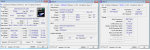
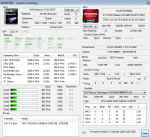
Crash dump directory: C:\Windows\Minidump
Crash dumps are enabled on your computer.
*Mit der neuen Festplatte:
On Tue 16.10.2012 19:53:52 GMT your computer crashed
crash dump file: C:\Windows\Minidump\101612-16177-01.dmp
This was probably caused by the following module: ntoskrnl.exe (nt+0x7EFC0)
Bugcheck code: 0xA (0xFFFFF7FFC556A280, 0x2, 0x0, 0xFFFFF80002CAB9FB)
Error: IRQL_NOT_LESS_OR_EQUAL
file path: C:\Windows\system32\ntoskrnl.exe
product: Microsoft® Windows® Operating System
company: Microsoft Corporation
description: NT Kernel & System
Bug check description: This indicates that Microsoft Windows or a kernel-mode driver accessed paged memory at DISPATCH_LEVEL or above.
This appears to be a typical software driver bug and is not likely to be caused by a hardware problem.
The crash took place in the Windows kernel. Possibly this problem is caused by another driver which cannot be identified at this time.
On Tue 16.10.2012 19:53:52 GMT your computer crashed
crash dump file: C:\Windows\memory.dmp
This was probably caused by the following module: ntfs.sys (Ntfs+0x99F88)
Bugcheck code: 0xA (0xFFFFF7FFC556A280, 0x2, 0x0, 0xFFFFF80002CAB9FB)
Error: IRQL_NOT_LESS_OR_EQUAL
file path: C:\Windows\system32\drivers\ntfs.sys
product: Betriebssystem Microsoft® Windows®
company: Microsoft Corporation
description: NT-Dateisystemtreiber
Bug check description: This indicates that Microsoft Windows or a kernel-mode driver accessed paged memory at DISPATCH_LEVEL or above.
This appears to be a typical software driver bug and is not likely to be caused by a hardware problem.
The crash took place in a standard Microsoft module. Your system configuration may be incorrect. Possibly this problem is caused by another driver on your system which cannot be identified at this time.
On Tue 16.10.2012 17:38:03 GMT your computer crashed
crash dump file: C:\Windows\Minidump\101612-24975-01.dmp
This was probably caused by the following module: ntfs.sys (Ntfs+0x48D8)
Bugcheck code: 0x24 (0x1904FB, 0xFFFFF880064A0A88, 0xFFFFF880064A02E0, 0xFFFFF880013002BF)
Error: NTFS_FILE_SYSTEM
file path: C:\Windows\system32\drivers\ntfs.sys
product: Betriebssystem Microsoft® Windows®
company: Microsoft Corporation
description: NT-Dateisystemtreiber
Bug check description: This indicates a problem occurred in the NTFS file system.
The crash took place in a standard Microsoft module. Your system configuration may be incorrect. Possibly this problem is caused by another driver on your system which cannot be identified at this time.
*Vor der neuen Festplatte:
On Tue 16.10.2012 14:37:59 GMT your computer crashed
crash dump file: C:\Windows\Minidump\101612-23275-01.dmp
This was probably caused by the following module: ntoskrnl.exe (nt+0x7EFC0)
Bugcheck code: 0xA (0x18E95C, 0x2, 0x1, 0xFFFFF80002AB63E0)
Error: IRQL_NOT_LESS_OR_EQUAL
file path: C:\Windows\system32\ntoskrnl.exe
product: Microsoft® Windows® Operating System
company: Microsoft Corporation
description: NT Kernel & System
Bug check description: This indicates that Microsoft Windows or a kernel-mode driver accessed paged memory at DISPATCH_LEVEL or above.
This appears to be a typical software driver bug and is not likely to be caused by a hardware problem.
The crash took place in the Windows kernel. Possibly this problem is caused by another driver which cannot be identified at this time.
On Tue 16.10.2012 14:32:31 GMT your computer crashed
crash dump file: C:\Windows\Minidump\101612-27159-01.dmp
This was probably caused by the following module: ntoskrnl.exe (nt+0x7F1C0)
Bugcheck code: 0x1E (0xFFFFFFFFC0000005, 0xFFFFF80002DC0150, 0x1, 0x0)
Error: KMODE_EXCEPTION_NOT_HANDLED
file path: C:\Windows\system32\ntoskrnl.exe
product: Microsoft® Windows® Operating System
company: Microsoft Corporation
description: NT Kernel & System
Bug check description: This indicates that a kernel-mode program generated an exception which the error handler did not catch.
This appears to be a typical software driver bug and is not likely to be caused by a hardware problem.
The crash took place in the Windows kernel. Possibly this problem is caused by another driver which cannot be identified at this time.
Mein System:
ASUS M4A88T-V EVO/USB3
AMD Phenom II x6 1075T
ASUS EAH6850 Grafikkarte
6GB No Name RAM (3x 2GB)
700 Watt Betzteil
Windows 7 Ultimate
Ich hoffe wirklich das jemand erkennt woran es liegt, ich will nicht nochmal los und Geld ausgeben um Blind eine neue Hardware zu kaufen und es trotzdem noch dabei bleibt.
Danke im voraus.
*edit: Hatte soeben wieder einen Absturz während dem anschauen eines Youtube Videos. Leider konnte ich den Bluescreen nicht erkennen da das Bild verzerrt war und der BS nur eine millisekunde zu sehen war. Nach dem Reboot musste ich aufgrund von BOOTMGR fehlt 3x neustarten.
Zuletzt bearbeitet:

.gif "sm_B-) :-)") Solche Random-BSODs passieren auch gern, wenn der Rechner außerhalb seiner Spezifikation läuft oder über einen gewissen Zeitraum lief und die Hardware nach einiger Zeit mehr Strom bei gleich bleibender Leistung verlangt, um stabil zu bleiben. Im Zweifelsfall machst du einfach den Spezial-Trick: alles auseinander bauen und wieder zusammen bauen - klappt in 50% aller Fälle.
Solche Random-BSODs passieren auch gern, wenn der Rechner außerhalb seiner Spezifikation läuft oder über einen gewissen Zeitraum lief und die Hardware nach einiger Zeit mehr Strom bei gleich bleibender Leistung verlangt, um stabil zu bleiben. Im Zweifelsfall machst du einfach den Spezial-Trick: alles auseinander bauen und wieder zusammen bauen - klappt in 50% aller Fälle.


