
Sammelthread [Support] FAQ + First Steps (international)

Sammelthread
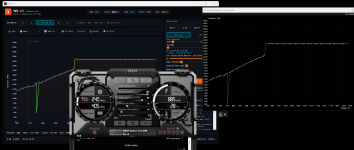
Hi, Logs look fine on my end , your UV seems to be saved in Slot 3 (2670 MHz @ 925 mV). Could you select Profile 3 in AB, open the AB Curve Editor and send me a screenshot? That'll tell us if the curve is actually applied?
Hi! I found an interesting behaviour:
- When I select profile 3 in AB (afterburner shows "Profile 3 loaded" text) and check the curve editor, it looks that the profile is correctly loaded (as seen in the first image).
- When I click apply on AB (afterburner shows "Profile 3 applied" text) and check the curve editor, then the profile is not applied and returns to the default curve (as seen in the second image).
Thank you again!
 

Anhänge

  • 1776309852178.png
    1776309852178.png
    1 MB · Aufrufe: 37
  • 1776309984332.png
    1776309984332.png
    1 MB · Aufrufe: 40
Hi! I found an interesting behaviour:
- When I select profile 3 in AB (afterburner shows "Profile 3 loaded" text) and check the curve editor, it looks that the profile is correctly loaded (as seen in the first image).
- When I click apply on AB (afterburner shows "Profile 3 applied" text) and check the curve editor, then the profile is not applied and returns to the default curve (as seen in the second image).
Thank you again!
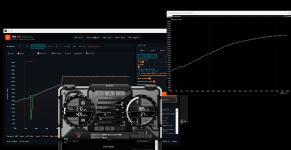
Have the same issue but it's actually applied just the AB UI is defaulting back to 0 not the curve, as my overclock is working.
 
Hi bamavrakis, hi ExcessiveGBH,

thanks for the report and the confirmation. This is very helpful.
I'm aware of the issue now.

There are several reports from Ada users where the UV profile is saved correctly
but the voltage is not actually capped under load.

The curve editor shows the right shape after loading, but after applying it resets visually,
and the GPU still boosts to full voltage.

I have a strong suspicion what causes this:
On Blackwell I use aspecific trick in the VF curve (fantasy frequencies) to prevent the GPU from boosting above the lock voltage. On Ada this mechanism is currently missing, and that is very likely the root cause.

To fix this properly I need to do some reverse engineering work directly on Ada hardware.

I need to create and analyze about a dozen AB profileswith different voltage lock points to understand exactly how Afterburner handles this internally on Ada.

I'm organizing an Ada card for this weekend so I can do the calibration myself.
Once I have solid data, I'll build and test the fix.

Thanks again for taking the time to report this.
Community feedback like this is exactly what makes the tool better. :)
 
GPU: RTX 5090
GPU manufacturer + model: ASUS ROG Astral RTX 5090 OC
NV-UV Version: Build 22 · Cantor (v0.93)
Afterburner Version: MSI Afterburner v4.6.7.16935 Beta 2
Windows: Windows 11 Pro 25H2
Driver version: 596.02


What happened:
The Max preset crashes in Microsoft Flight Simulator 2024 on my card.


Settings used:
Preset: Max
Mode: V-Lock
Target: 3097 MHz @ 975 mV
Power Limit: 100%
VRAM: 0 MHz
V-Step Fix: ON (+10 mV, effective lock 985 mV)
Override Safe Limit: OFF
Boost Override: OFF
Idle Optimisation: OFF


Reproducible:
Always
 
GPU: RTX 4080 super
GPU manufacturer + model: MSI gaming slim
NV-UV Version: Build 22 · Cantor (v0.93)
Afterburner Version: MSI Afterburner v4.6.6.16757
Windows: Windows 11 Pro 25H2
Driver version: 596.21


What happened:
Settings not apply in AB. When i click on profile, AB closes itself and reopens. No settings are preserved in AB. Stock curve is shown while memory clock is kept.


Settings used:
Preset: Custom - Voltage Step Scanner
Mode: V-Lock
Target: 2830 MHz @ 965 mV
Power Limit: 116%
VRAM: 1000 MHz
V-Step Fix: OFF
Override Safe Limit: ON
Boost Override: OFF
Idle Optimisation: OFF


Reproducible:
Always

Note: With a Ryzen 9850x3d cpu (iGPU enable) - might interfere.

AB GPU index:
iGPU -> 1GPU
dGPU -> 2GPU
 
Hi bamavrakis, hi ExcessiveGBH,

thanks for the report and the confirmation. This is very helpful.
I'm aware of the issue now.

There are several reports from Ada users where the UV profile is saved correctly
but the voltage is not actually capped under load.

The curve editor shows the right shape after loading, but after applying it resets visually,
and the GPU still boosts to full voltage.

I have a strong suspicion what causes this:
On Blackwell I use aspecific trick in the VF curve (fantasy frequencies) to prevent the GPU from boosting above the lock voltage. On Ada this mechanism is currently missing, and that is very likely the root cause.

To fix this properly I need to do some reverse engineering work directly on Ada hardware.

I need to create and analyze about a dozen AB profileswith different voltage lock points to understand exactly how Afterburner handles this internally on Ada.

I'm organizing an Ada card for this weekend so I can do the calibration myself.
Once I have solid data, I'll build and test the fix.

Thanks again for taking the time to report this.
Community feedback like this is exactly what makes the tool better. :)
Great to see a fix for this coming. I have the same issue on my 4090.

What I don't understand is why can't I now just use AB to set the saved curve? It keeps resetting, even with NV-UV closed. How is it still interacting with AB in a way that 'breaks' it with this bug? I was able to use AB to set my own UVs before.
 

Light at the end of the Ada tunnel

On my borrowed KFA2 4070 Ti, NV-UV now sets Ada UV profiles that Afterburner accepts and applies. The GPU caps cleanly, all presets work, manual V-Lock works.

I'm currently testing the remaining NV-UV functions. The mechanism should be the same across all Ada cards, but individual constants may vary per card, we'll need to verify that together.

Give me a bit more time to test the build. If everything goes well, the fix will land by Friday at the latest.

Screenshot 2026-04-22 013525.png


Screenshot 2026-04-22 012236.png
 
GPU: RTX 5090
GPU manufacturer + model: ASUS ROG Astral RTX 5090 OC
NV-UV Version: Build 22 · Cantor (v0.93)
Afterburner Version: MSI Afterburner v4.6.7.16935 Beta 2
Windows: Windows 11 Pro 25H2
Driver version: 596.02


What happened:
The Max preset crashes in Microsoft Flight Simulator 2024 on my card.


Settings used:
Preset: Max
Mode: V-Lock
Target: 3097 MHz @ 975 mV
Power Limit: 100%
VRAM: 0 MHz
V-Step Fix: ON (+10 mV, effective lock 985 mV)
Override Safe Limit: OFF
Boost Override: OFF
Idle Optimisation: OFF


Reproducible:
Always

Hey bigslice011,

Max is a pretty aggressive preset and Flight Simulator 2024 is one of the toughest workloads out there, so the combination is really pushing it. A couple of options:

1) Enable Game Replay. When a driver crash happens, it automatically steps the UV clock down by 50 MHz, rewrites the profile and your game keeps running. in combination with UV-Pilot, Per-game adjustments persist, so over a few launches it finds a stable point by itself.

2) Use the Performance preset instead. A bit more headroom, much easier on demanding titles like MSFS 2024.
 
I have an issue where the program does not start with windows. It has this shield icon which i think might something to do with that
explorer_0BtUetaw0m.jpg
 
I have an issue where the program does not start with windows. It has this shield icon which i think might something to do with thatAnhang anzeigen 1522813
Yes, the shield icon is the reason. NV-UV needs admin rights (for the RTCore64 driver that writes to the Afterburner backend), and Windows' normal autostart folder doesn't work for elevated apps. UAC blocks it silently on boot.

The correct way is the built-in option: open NV-UV klick Start.
That creates a scheduled task with the right privileges, which starts the app elevated on login without a UAC prompt.

Make sure you're on v0.93 build 22 ("Cantor") with the minfix-plus baseline. Earlier versions didn't have the scheduled-task mechanism and tried the normal autostart folder, which is what you're seeing.

If it still doesn't start after enabling that option: which NV-UV version and which Windows (Admin Account?) build are you on?
 
Hi! I'm planning to try and share the results with my 4090. Is it possible to have the discord channel link? Thank you!
 
Would like to help out by mentioning the 0.93v build might be causing issues for me upon alt-tabbing in and out of both discord video call + youtube in chrome running + while in game using 3D usage on the RTX 5070 with Performance profile set.

The issue is that the chrome freezes, locks up but remains responsive, audio functions then comes back alive responsive fully interactive.

When in game with this issue occuring, it will fully freeze the game to singular frame but also keep audio but this time it wont unfreeze the game rather lock it in state of 0% GPU/CPU usage with MEM usage at 2gigs in task manager

It happened today 22nd april, can also sent older logs if needed!

I noticed something has changed in 0.94v
 
Would like to help out by mentioning the 0.93v build might be causing issues for me upon alt-tabbing in and out of both discord video call + youtube in chrome running + while in game using 3D usage on the RTX 5070 with Performance profile set.

The issue is that the chrome freezes, locks up but remains responsive, audio functions then comes back alive responsive fully interactive.

When in game with this issue occuring, it will fully freeze the game to singular frame but also keep audio but this time it wont unfreeze the game rather lock it in state of 0% GPU/CPU usage with MEM usage at 2gigs in task manager

It happened today 22nd april, can also sent older logs if needed!

I noticed something has changed in 0.94v

Hi

You can try the new version; it should work better.

@jiggs1337 @AdinVM
ADA should also work much better now :)
 
Hey bigslice011,

Max is a pretty aggressive preset and Flight Simulator 2024 is one of the toughest workloads out there, so the combination is really pushing it. A couple of options:

1) Enable Game Replay. When a driver crash happens, it automatically steps the UV clock down by 50 MHz, rewrites the profile and your game keeps running. in combination with UV-Pilot, Per-game adjustments persist, so over a few launches it finds a stable point by itself.

2) Use the Performance preset instead. A bit more headroom, much easier on demanding titles like MSFS 2024.
Good afternoon cubi2k82, thank you for the explanation and suggestion.

The Performance preset offers my card 2902MHz @ 960mV, and it is stable.

Usually I run an undervolt on this card as I feel it performs pretty well with 2850MHz @ 920mV.

I ended up going the opposite direction to the Max preset. After updating the application to v0.94, ran Voltage Step Scanner, input a value of 900mV, once the scan was finished in both directions it recommended a setting of 2467MHz @ 875mV, with 0 on VRAM. I tested this recommendation (with Game Replay enabled) in MSFS2024 and Cyberpunk and can confirm no crashes yet (and no auto steps downwards yet). It runs very nicely at lower temps and power which is fantastic.

Is it possible to auto scan for the lowest stable mV at a specific user-defined frequency, for example 2900MHz?
 
Good evening :)

Its possible, you can choose the 2902Mhz as entry point..
you can use V-Lock to calculate, look at the target.
You dont need to Apply UV

1777050410267.png


now go to the scanner and set this up

Voltage and Offset

1777050485774.png


The first Point will be 2900@920 mV
you can also try this with 960 mV
 
Hi, I'm not sure if this is the right place to ask this - I've seen mention of a discord server for this a few times and was wondering where a link is? Cheers - great tool so far!
 
I was expecting that when a game is finished/closed, a default profile is restored, such as the one set as anchor? But after I finish a game that uses Max for example, I noticed it stays with this, which means when the GPU is used by something else after that game, it hits high power ratings and creates heat and in one recent case instability. Is there some way for it to default to a profile when not in games?
 
I was expecting that when a game is finished/closed, a default profile is restored, such as the one set as anchor? But after I finish a game that uses Max for example, I noticed it stays with this, which means when the GPU is used by something else after that game, it hits high power ratings and creates heat and in one recent case instability. Is there some way for it to default to a profile when not in games?
Hi jiggs1337,

quick question first, are you actually using UV-Pilot?
Sounds like it from your post but want to be sure before pointing you in the wrong direction.

If yes: your post hit a real bug, hotfix is coming. Game end will return you to where you were before.

Priority:
  1. Anchor if set (always wins)
  2. Pre-game slot otherwise, restored automatically
  3. Pilot fallback
Just set an Anchor (needs UV-Pilot) on whatever slot is your daily baseline.

If no: that's the missing piece. UV-Pilot is what catches game start/end and swaps profiles. Without it nothing switches automatically, so the GPU just stays on whatever you last clicked. Turn it on in settings and assign profiles per game in the Game Browser.

Either way, fix is in the next build.
 
Zurück